35
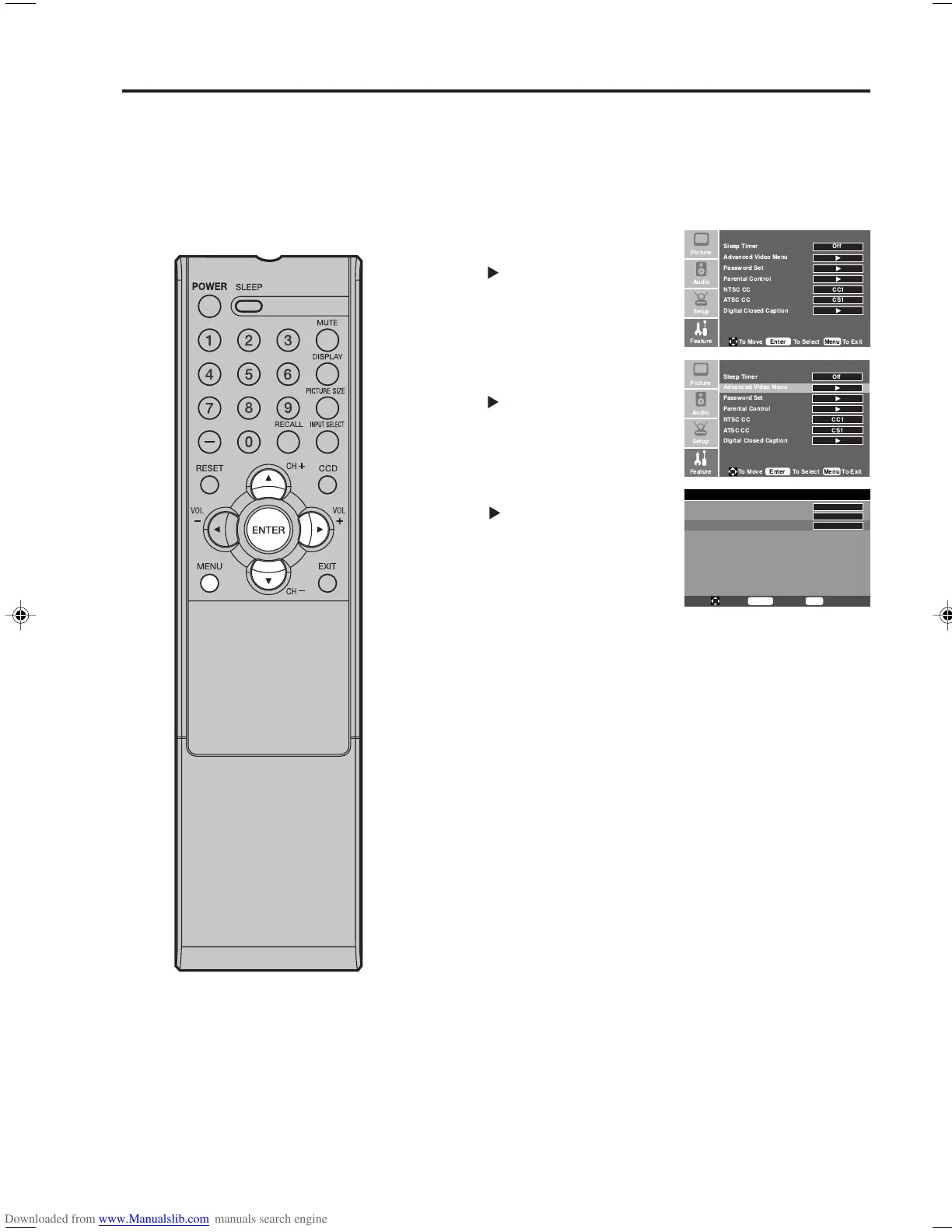
Setting the 3D Y/C
3D Y/C reduces visible interference in your TV picture. This
is useful when receiving a broadcast with a weak signal
(especially a Cable channel) or playing a video cassette or disc
damaged by repeated use.
1
Press MENU. Then press ▲ or
▼ to select “Feature” menu, then
press .
2
Press ▲ or ▼ to select
“Advanced Video Menu”, then
press
or ENTER.
3
Press ▲ or ▼ to select “3D Y/C”.
Press
or ENTER to select
“On” or “Off”.
4
Press MENU to return to the normal screen.
Advanced Video Menu
DNR
Color Temperature
3D Y/C
On
Cool
On
To Move
To Select
To Exit
Enter
Menu
Setting the 3D Y/C
!"
!
!"
33F0201A_En_p30-35 7/5/07, 3:29 PM35



 To Next Page