EasyManua.ls Logo

Sansui HDLCD1900 - To change the password

Sansui HDLCD1900
44 pages
Print Icon
To Next Page IconTo Next Page
To Previous Page IconTo Previous Page
Loading...
27
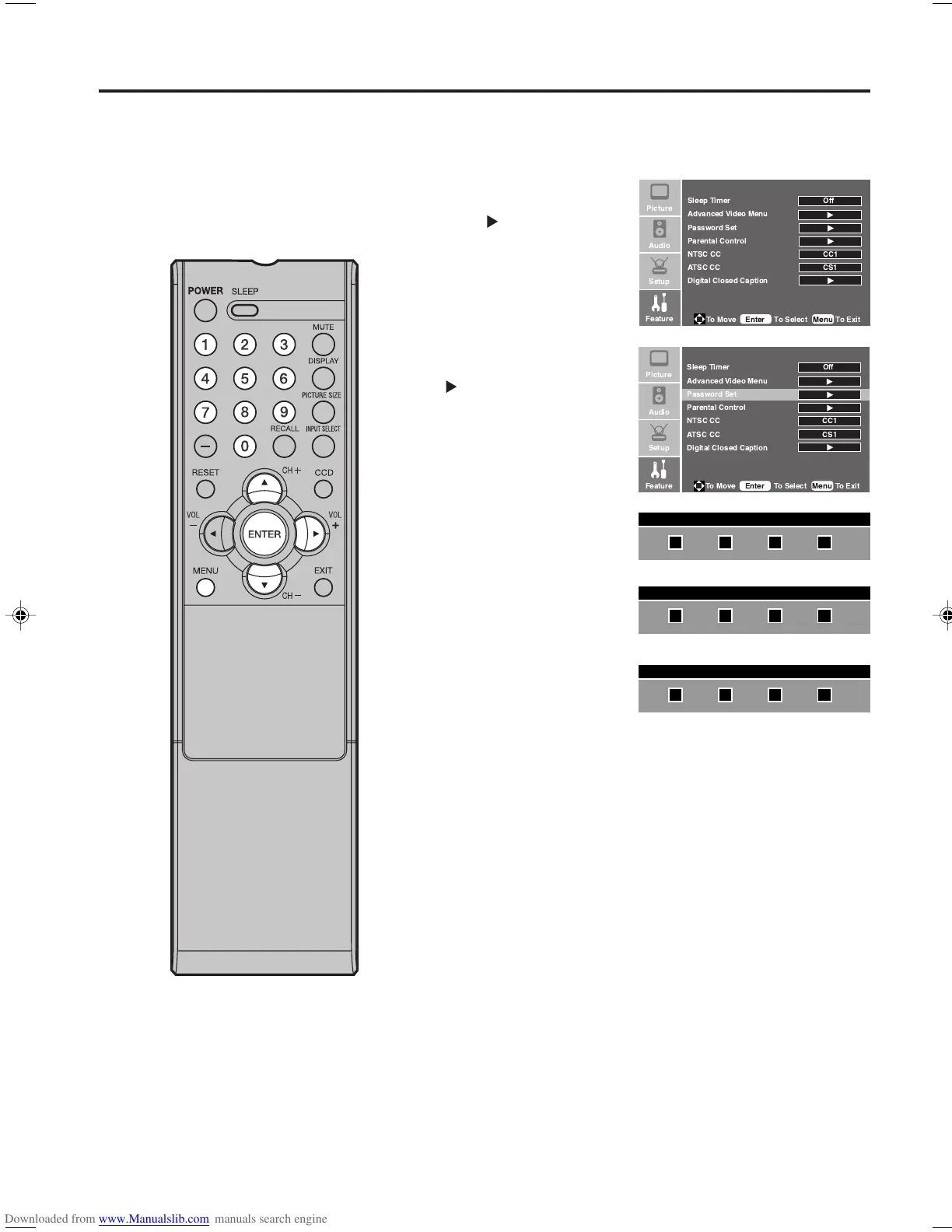
To change the password
1
Press MENU. The TV menu screen will appear.
2
Press or to select
“Feature” menu, then
press .
3
Press or to select
“Password Set”, then press
or ENTER.
4
Use Number buttons (0-9)
to enter your password.
5
Enter a new password
using Number buttons
(0-9).
6
Enter the same password
again to confirm.
The password is now
registered.
Setting the V-Chip
Enter Old Password
Enter New Password
Confirm New Password




  
  
 
 
  
  
   
 
 
 !"
!





  
  
 
 
  
  
   
 
 
 !"
!

33F0201A_En_p25-29 7/5/07, 3:29 PM27

Other manuals for Sansui HDLCD1900

Related product manuals