22
1
NOTE:
The V-Chip function is activated only
on programs and input sources that
have the rating signal.
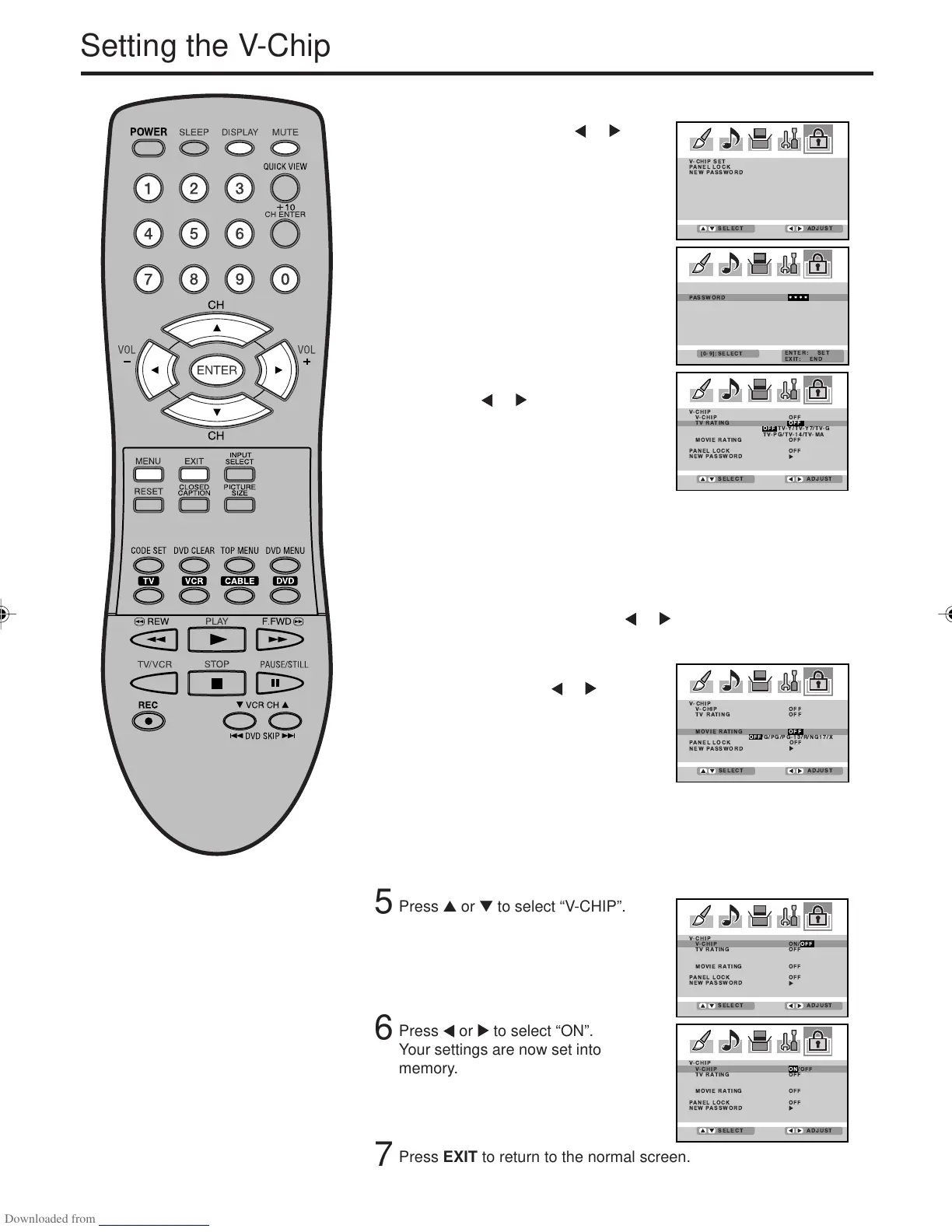
Press ▲ or ▼ to display the
password entering mode. Use
number buttons (0-9) to enter your
password, then press ENTER. The
LOCKS menu appears.
To set the V-CHIP
Press MENU, then press or to
select LOCKS menu.
Press ▲ or ▼ to select “TV RATING”.
Then press or to display the
desired rating.
OFF : TV RATING is not set
TV-Y : All children
TV-Y7 : 7 years old and above
TV-G : General audience
TV-PG : Parental guidance
TV-14 : 14 years old and above
TV-MA : 17 years old and above
• When you select TV-Y7, TV-PG, TV-14 or TV-MA, press
DISPLAY to explain the rating. Press ▲ or ▼ to select the
desired rating you want. Press
or to select the setting “ON”
or “OFF”.
Press ▲ or ▼ to select “MOVIE
RATING”. Then press
or to
display the desired rating.
OFF : MOVIE RATING is not set
G:All ages
PG : Parental guidance
PG-13 : Parental guidance less than
13 years old
R:Under 17 years old Parental guidance suggested
NC17 : 17 years old and above
X:Adult only
To use the Plasma Display after
the V-Chip protection has been set.
When a program exceeding the
selected V-Chip level is received a
screen will appear blocking the
channel display. To temporarily
override the V-Chip press the MUTE
button, enter your password and
press ENTER. Changing the channel
or turning the unit off will re-enable
the V-Chip setting.
3
4
2
5
Press ▲ or ▼ to select “V-CHIP”.
Press or to select “ON”.
Your settings are now set into
memory.
6
Press EXIT to return to the normal screen.
7
Setting the V-Chip
3V03001A_En_p17-23 8/23/05, 16:3322



 To Next Page