EasyManua.ls Logo

Sansui HDPDP4200A - Changing V-Chip Password

Sansui HDPDP4200A
40 pages
Print Icon
To Next Page IconTo Next Page
To Previous Page IconTo Previous Page
Loading...
23
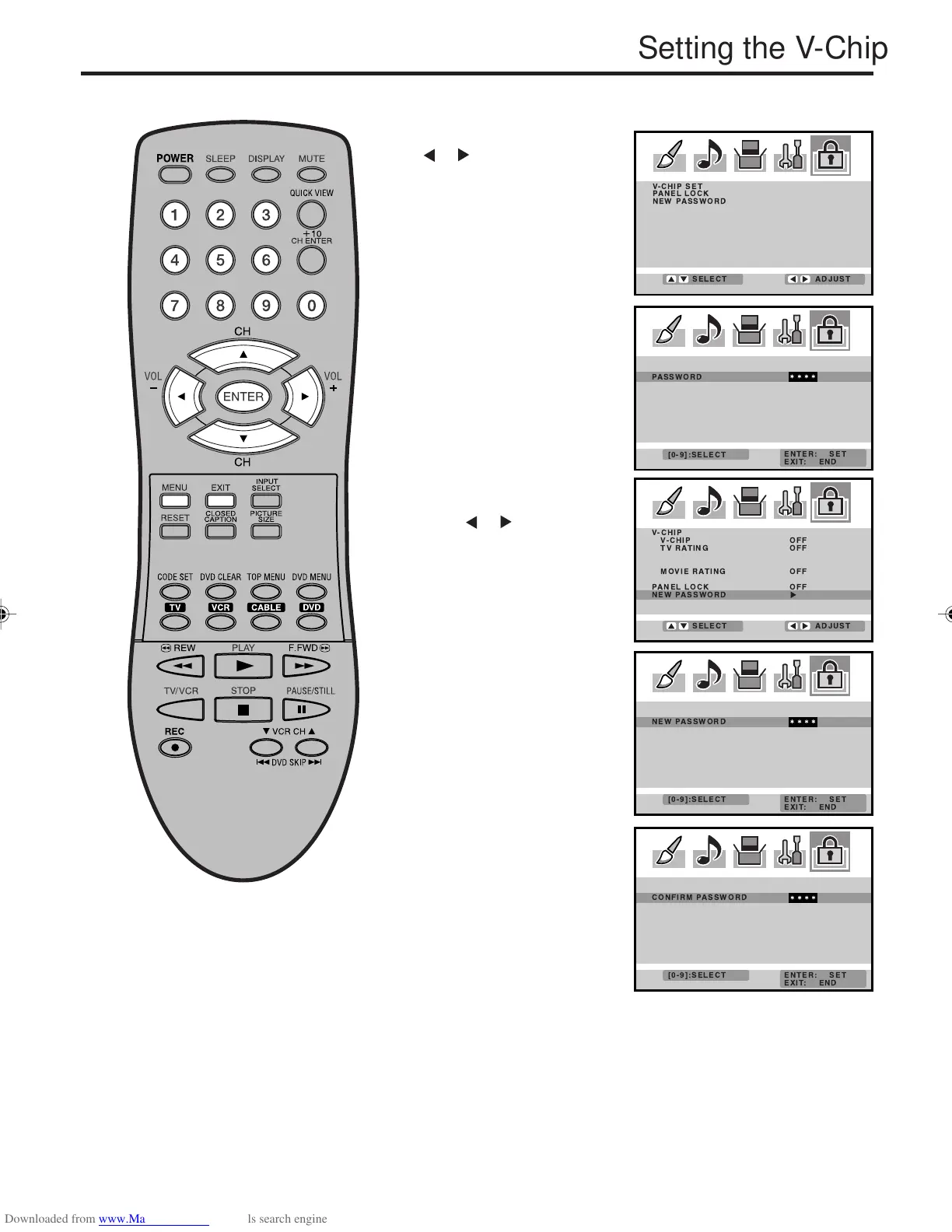
To change the password
Enter the same password
again to confirm, then press
ENTER.
Press EXIT to return to the normal screen.
4
6
Enter a new password
using the number buttons
(0-9), then press ENTER.
5
1
Press or to display the
password entering mode.
Use the number buttons
(0-9) to enter your
password, then press
ENTER. The LOCKS menu
appears.
Press MENU, then press
or to select LOCKS
menu.
3
Press or to select
“NEW PASSWORD”, then
press
or .
2

 
  
  
  
 


Setting the V-Chip
 
 
 



 
 

 
 
 

 
 
 

3V03001A_En_p17-23 8/23/05, 16:3323