MACHINE CONTROLS
3-5
SY60C Excavator OMM
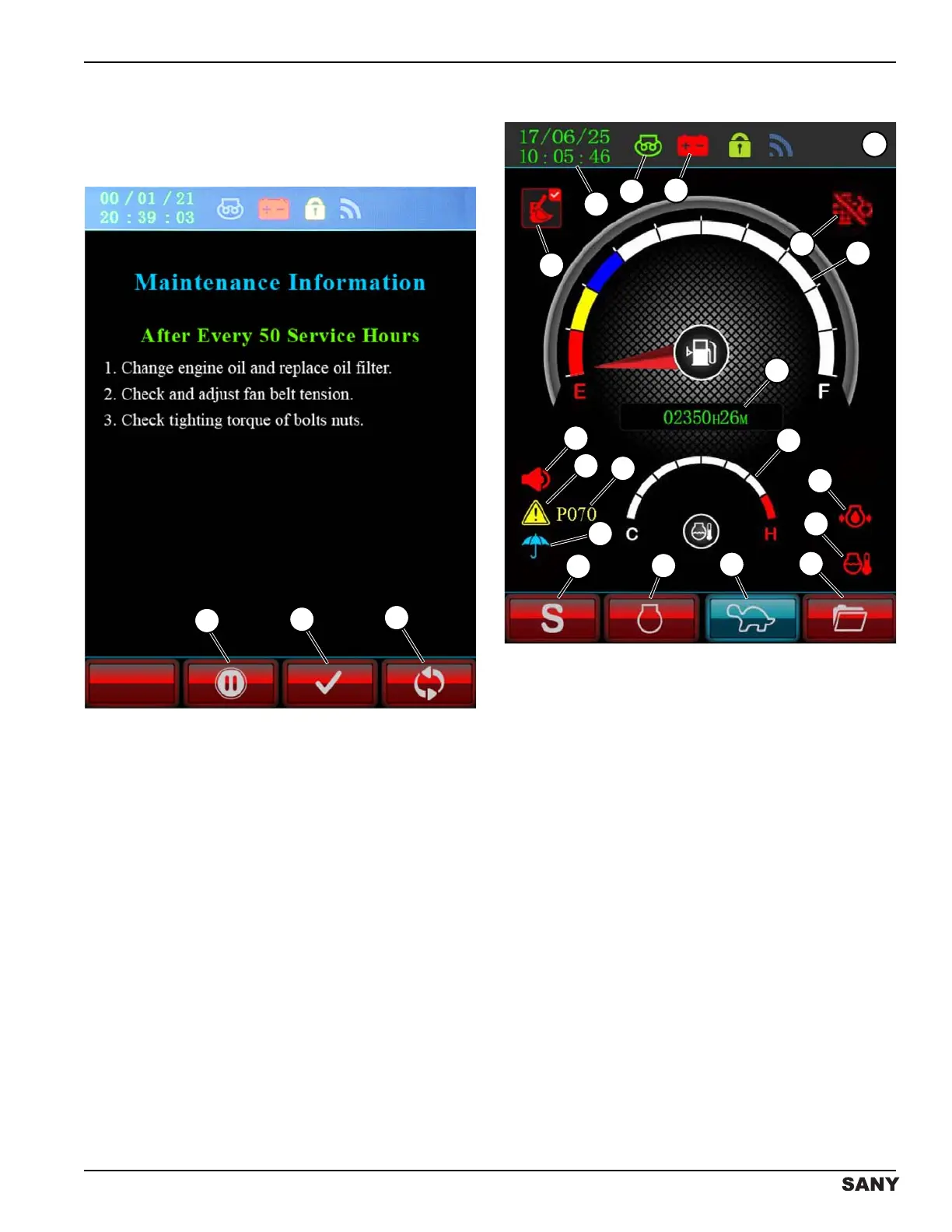
Maintenance Information Screen
NOTE: If maintenance is required, the Maintenance
Information screen will display instead of the Daily
Maintenance Information screen.
0003819
Figure 3-4
The Maintenance Information screen will display instead
of the Daily Maintenance Information screen at each
maintenance interval:
• Press the button below the pause icon (1) to pause
or continue the display of maintenance information
screens.
• Press the button below the check mark icon (2) to
confirm completion of maintenance displayed on the
screen. When prompted to reset the maintenance
icon on the home screen, enter the password
“53188” to clear the maintenance prompt.
Press the button below the return icon (3) to return to the
previous screen.
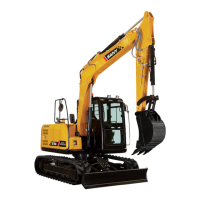
Home Screen
0003070
Figure 3-5
The home screen displays real-time machine operating
information and provides access to change system
parameters.
4
6
1
3
2
14
13
12
11
9
10
7
17
18
19
8
15
16
5


 To Next Page