MACHINE CONTROLS
3-7
SY60C Excavator OMM
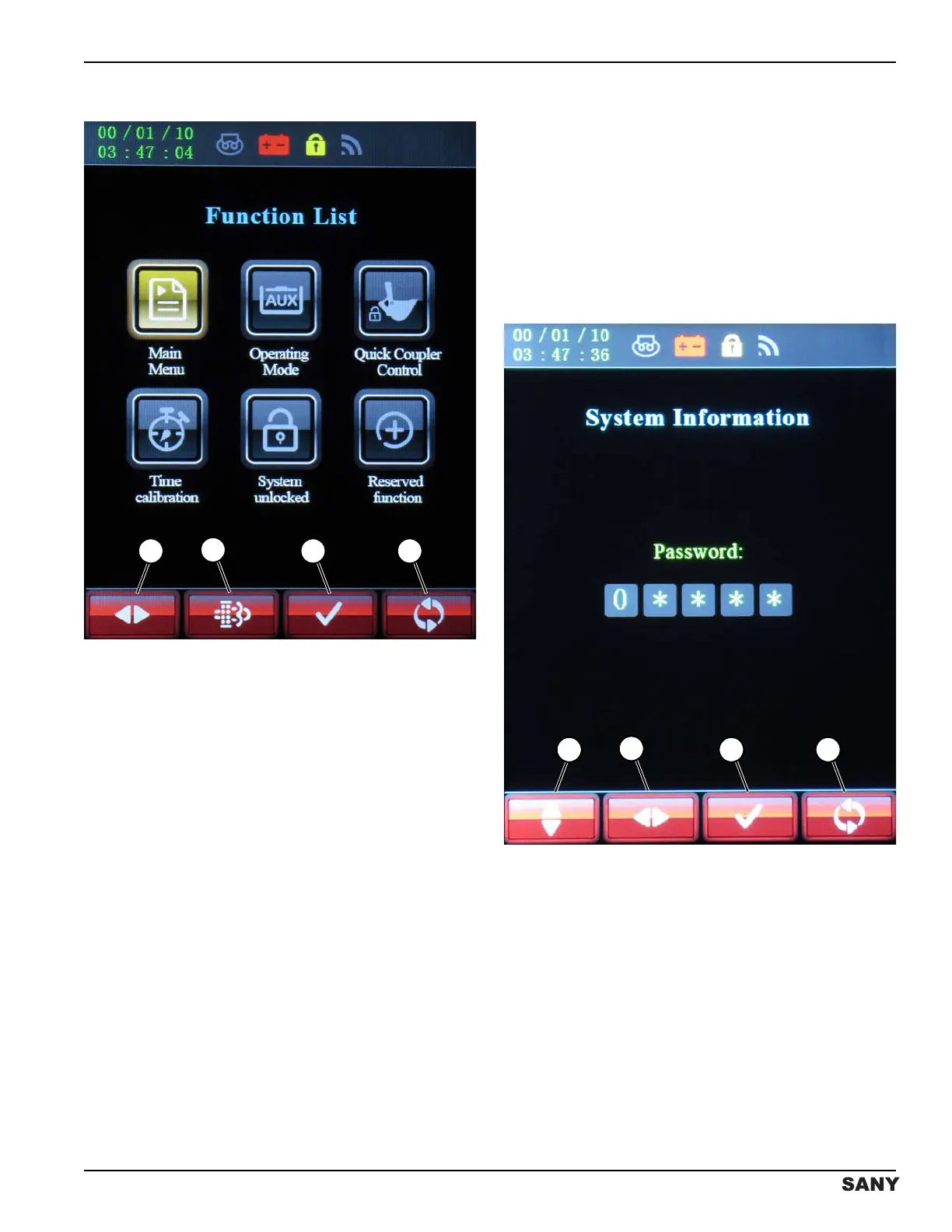
Function List Screen
0003073
Figure 3-6
The Function List screen is accessed by pressing the
button below the folder icon on the home screen. See
“Home Screen” on page 3-5.
The Function List screen displays informational
operational screens:
NOTE: The Main Menu screen is accessed with a
password. See “System Information Screen” on
this page.
• Main Menu – Machine operational information and
controls.
• Operating Mode – Designation of work equipment
and corresponding hydraulic flow control.
• Quick Coupler Control – Controls quick coupler to
activate the lock and unlock functions.
• Time Calibration – Correct the year, month, day,
time and time zone.
• System Unlocked – SANY factory and service only.
Contact a SANY dealer for further information.
• Reserved Function – Not used at this time; reserved
for future function.
• Press the button below the left/right arrow icon (1) to
scroll to and illuminate the selected icon.
• Press the button below the regeneration icon (2) to
begin the regeneration cycle. See “Diesel
Particulate Filter (DPF) Screens” on page 3-14.
• Press the button below the check mark icon (3) to
confirm the selected icon.
• Press the button below the return icon (4) to return
to the home screen.
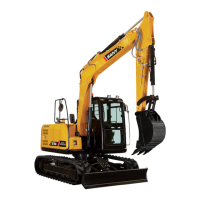
System Information Screen
0003812
Figure 3-7
Access to the Main Menu screen requires entering the
password “31868” on the system information screen:
• Press the button below the up/down arrow icon (1)
to scroll to the desired number.
• Press the button below the left/right arrow icon (2) to
move to the next number position.
• Press the button below the check mark icon (3) to
confirm the selected icon.
• Press the button below the return icon (4) to return
to the previous screen.


 To Next Page