The Sapling Company, Inc.
1633 Republic Road
Huntingdon Valley, PA 19006
USA
+1 215.322.6063 P.
+1 215.322.8498 F.
www.sapling-inc.com
2222
1.
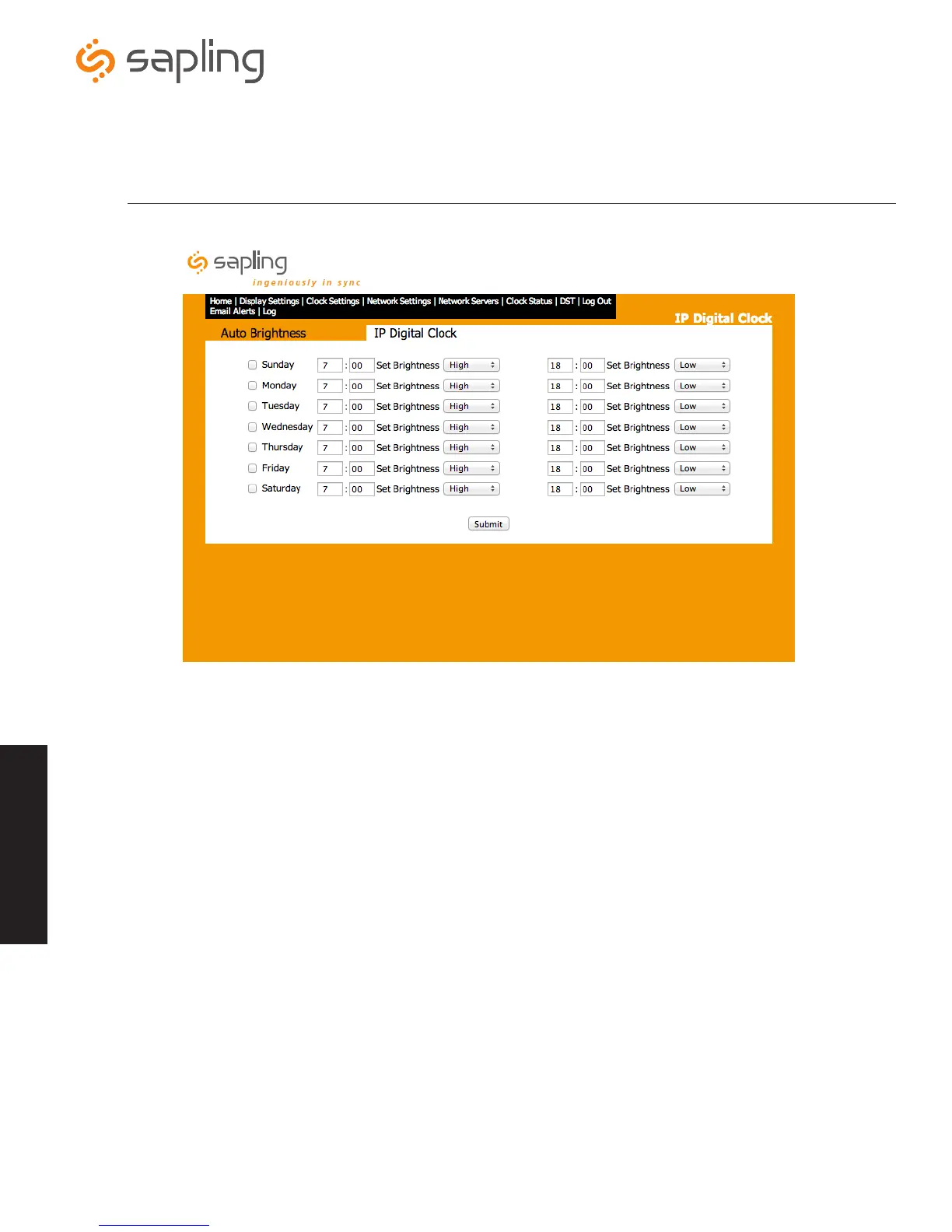
Select Day - This option allows the user to select which day(s) of the week to set alternate brightness levels.
2.
Select Time of Change - This option allows the user to select the time of the selected day that the brightness level of the
clocks will change.
3.
Select Brightness Level - This option allows the user to select the brightness level for the selected day and time.
4.
Select Time of Change (2) - This option allows the user to select an optional second time of the selected day that the
brightness level of the clocks will change.
5.
Select Brightness Level (2) - This option allows the user to select a brightness level for the optional second time of the
selected day that the brightness level of clocks will change.
*Hour selection for brightness scheduling is made in 24 hour time (0:00 to 23:59 hour selections)
Web Interface - Brightness Schedule (if option 4 is selected in Display Settings)
Web Interface
q
w
e
r
t



 To Next Page