The Sapling Company, Inc.
1633 Republic Road
Huntingdon Valley, PA 19006
USA
+1 215.322.6063 P.
+1 215.322.8498 F.
www.sapling-inc.com
2121
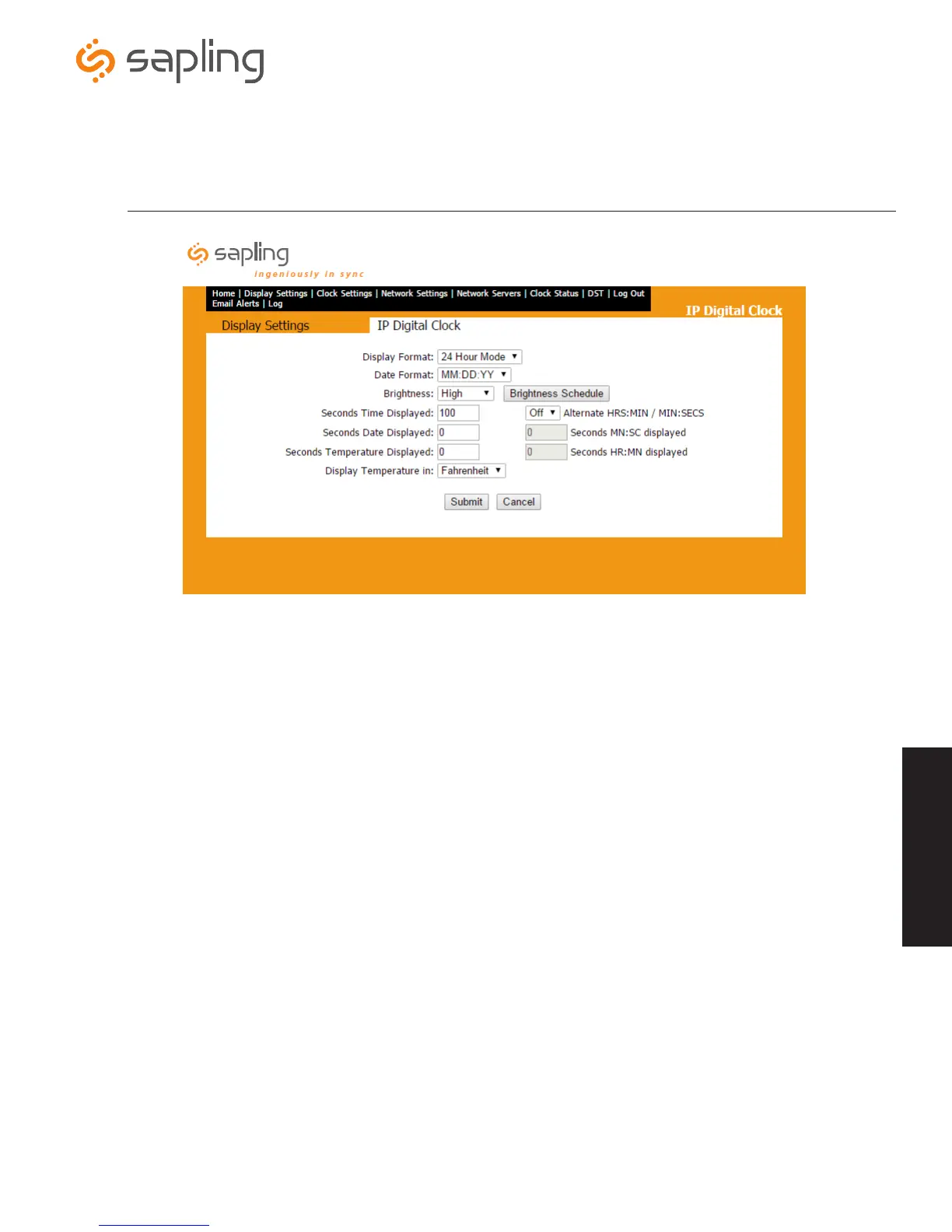
1. Display Format - This option sets the clock’s time display to either 12 hour mode or 24 hour mode.
2. Date Format - This option sets the clock’s date display format in either MM:DD:YY mode or DD:MM:YY mode.
3. Brightness - This option sets the clock’s brightness display. There are four settings: Low, Medium, High, or OFF.
4. Brightness Schedule - This option allows the user to schedule the day and time that the IP clock’s display should be at high, medium or
low brightness, or be completely powered off. (See page 22 for further instructions).
5. Seconds Time Displayed - This option sets the duration for how long the time is displayed. If the duration is set to 0, the time will not
be shown.
6. Seconds Date Displayed - This option sets the duration for how long the date is displayed. If the duration is set to 0, the date will not be
shown.
7. Seconds Temperature Displayed - This option sets the duration for how long the temperature is displayed. If the duration is set to 0,
the temperature will not be shown. This option only appears if a temperature sensor is installed on the clock. (3200/3300 Models Only)
8. Display Temperature In - This option sets the clock’s temperature display to either Fahrenheit or Celsius. This option only appears if a
temperature sensor is installed on the clock. (3200/3300 Models Only)
9. Submit - This button, when pressed, saves all of the settings that were entered.
10. Cancel - This button, when pressed, clears all of the settings that were changed.
11. Alternate HRS:MIN / MIN:SECS - This option allows the user to set the clock to alternate from an hours and minutes display (HR:MM) to
a minute and seconds display (MM:SECS). Must be set to ON to modify the values for the next two settings.
12.
Seconds Minutes and Seconds (MN:SC) displayed - This option allows the user to set the duration for how long the minutes and
seconds are displayed on the clock. Alternate HRS:MIN/MIN:SECS must be set to ON to modify.
13.
Seconds Hours and Minutes (HR:MN) displayed - This option allows the user to set the duration for how long the hours and minutes
are displayed on the clock. Alternate HRS:MIN/MIN:SECS must be set to ON to modify.
*Numbers 11 through 13 only apply to 4 digit IP Clocks
Web Interface - Display Settings
Web Interface
e
i
o
q
y
r
w
t
a
d
s
u
f



 To Next Page