The Sapling Company, Inc.
1633 Republic Road
Huntingdon Valley, PA 19006
USA
+1 215.322.6063 P.
+1 215.322.8498 F.
www.sapling-inc.com
44
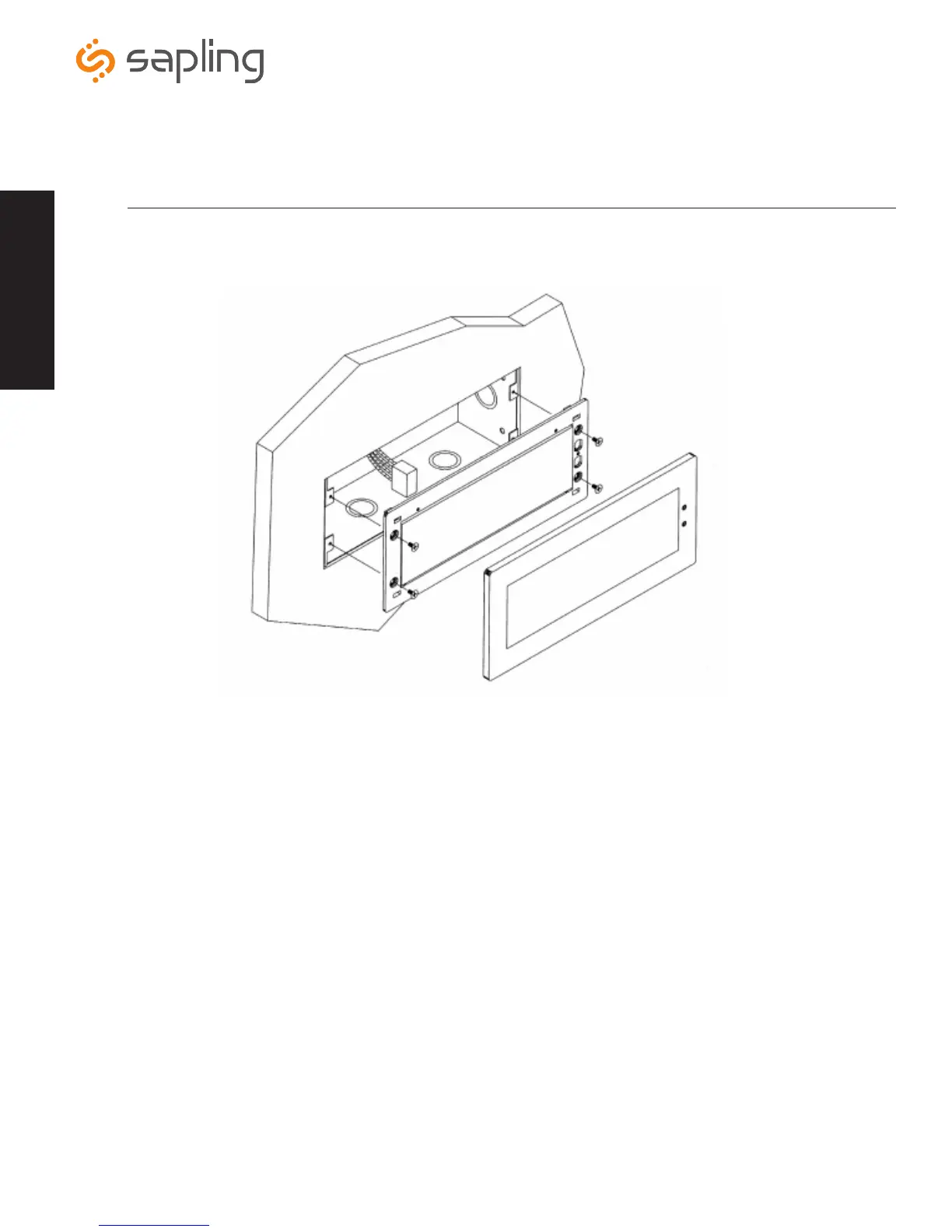
1. Mount the flush mount box into the wall.
2. Connect the ground wire into the flush mount box using the tooth lockwasher and the machine screw nut (included in the
kit).
3. Disconnect the red filter from the display panel.
4. Connect the wiring as shown on the wiring diagram on page 10.
5. Mount the display panel into the flush mount box using the four (4) black machine screws (#6, included in the kit). Make
sure the switches are on the right side.
6. Snap the red filter into the display panel.
Metal Flush Mount Installation
Dimensions
2.5” x 4 digit: 9.65”[ 245.1mm] L x 3.80”[ 96.5mm] W x 3.00”[ 76.2mm] H
2.5” x 6 digit: 12.90”[ 327.7mm] L x 3.80”[ 96.5mm] W x 3.00”[ 76.2mm] H
4.0” x 4 digit: 12.63”[ 320.7mm] L x 6.31”[ 160.3mm] W x 3.00”[ 76.2mm] H
4.0” x 6 digit: 17.76”[ 451.2mm] L x 6.19”[ 157.3mm] W x 3.00”[ 76.2mm] H
Installation



 To Next Page