Unit 3: Installation
S8400 Series Operator Manual
3-7 PN: 9001160 (C)
RIBBON LOADING
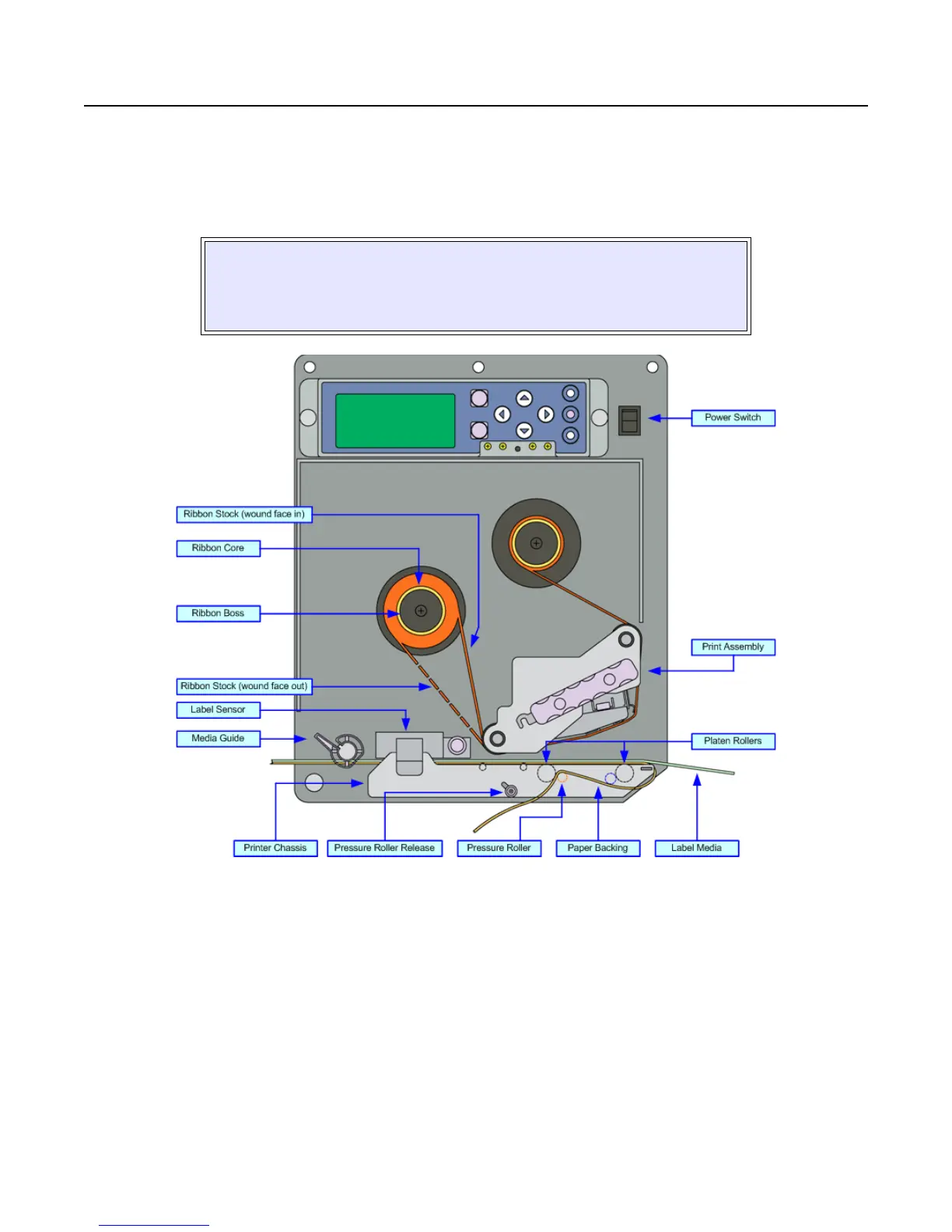
To load ribbon stock, unlatch the print head and remove exhausted ribbon stock if applicable. Insert an unused
ribbon roll, with ribbon core, fully onto the ribbon supply boss (left) and an empty core onto the ribbon rewind boss
(right). Route the ribbon’s free end around the print assembly and tape it to the blank core on the rewind boss.
Rotate the core a couple of times while holding the boss stationary to take up take up slack. Refer to Figure 3-5 for
visual assistance.
Figure 3-5, Ribbon & Media Loading
NOTE: Properly installed ribbon stock will be oriented so that its dull,
ink side is facing the printer chassis while the ribbon is dispensed and
taken up on the right side of each roll. The non-ink side of the ribbon
stock is the shinier of the two surfaces.


 To Next Page