Unit 4: Printer Configuration
S8400 Series Operator Manual
4-24 PN: 9001160 (C)
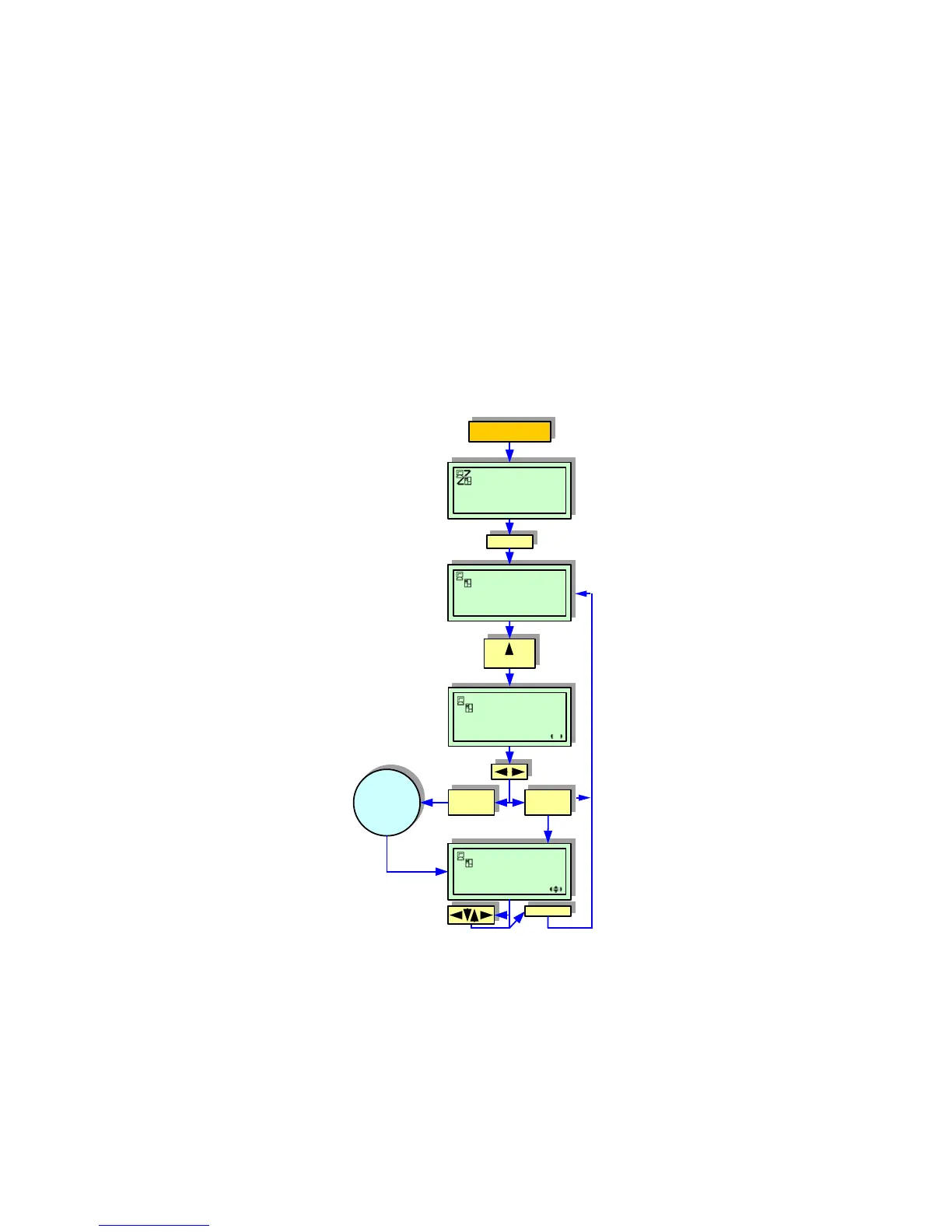
STAND ALONE MODE
The Stand Alone Mode allows the printer to function independently from a host computer once a fixed format has
been sent, and saved, to the flash-memory card.
The data may be saved to the flash-memory card while in the print buffer, and then recalled later with a new print
quantity indicated. The flash-memory card will only hold a single format at a time; new formats will overwrite the
existing saved format. The host computer must be reconnected to the printer to overwrite an existing format.
Figure 4-22, Stand Alone Mode
LINE
ONLINE
QTY: 000000
OFFLINE
QTY: 000000
YES
ENTER
NO
ENTER
IMAGE SAVE START
YES NO
OUTPUT LABEL
QTY: XXXXXX
POWER
ENTER
5 Seconds
A
copying screen
w/status bar
appears.


 To Next Page