Standalone usage 11
© 2021 Scan Electronics Ltd.
3.4.1 Display
The device is equipped with a display with the following characteristics:
·
Monochrome graphic LCD;
·
128x48 dots;
·
34x13 mm;
·
FSTN, transflective, positive;
·
built-in backlight.
The display is used to show:
·
device status;
·
control menu;
·
dose rate or count rate in the Monitor mode;
·
accumulated dose;
·
energy spectrum of absorbed radiation;
·
count rate in the Search mode.
How to configure the backlight and image orientation parameters through the menu, see Screen section
of Device settings.
Note: The display is made on a glass base and may break if the device is handled carelessly.
3.4.2 Buttons
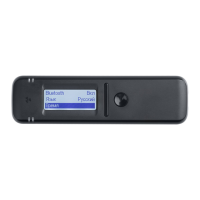
Dosimeter RadiaCode-101 has an intuitive menu system and is controlled by three buttons (see image
below):
1. round button for turning on and confirming;
2. swing button "down";
3. swing button "up".
There are two types of pressing the buttons: short and long (at least two seconds).
A long press on the round button [1] is used to:
·
turn on the device,
·
call up the menu.
A short press on the round button is used to:
·
unlocking and locking the swing buttons;
·
return from the main menu to the display mode;
·
confirming the selection of the highlighted menu item;
·
switch between options.
A short press on the swing "up" and "down" buttons [2, 3] is used to:
·
moving between menu items;


 To Next Page