© Scania CV 2009 33
1. Daily:
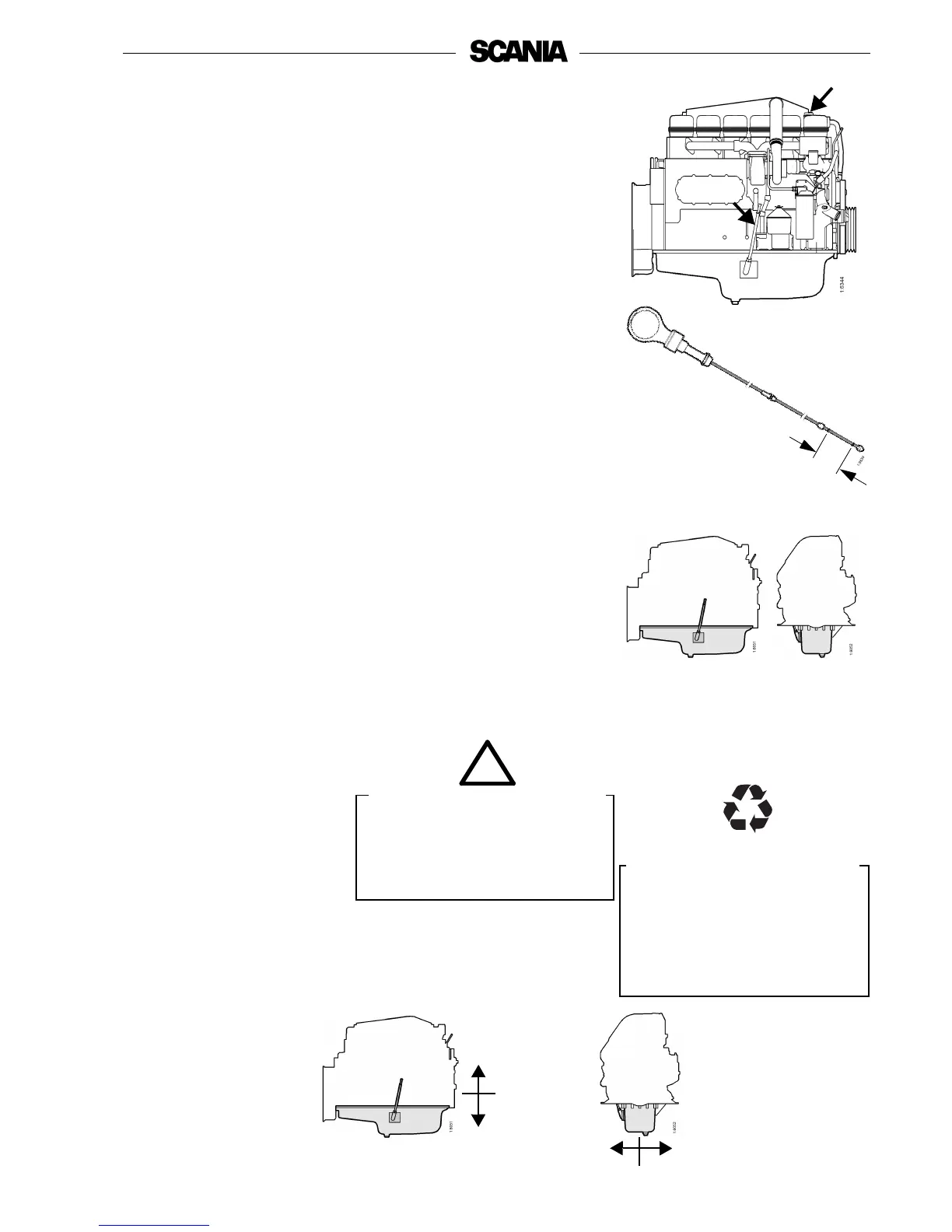
Checking the oil level
Note: Before checking oil level: Leave the engine switched off for at
least 1 minute.
- The correct level is between the marks on the dipstick. Top up when the
level is at the lower mark.
- For the correct oil grade, see page 32.
Checking oil level during operation
On some engines the oil level can be checked during operation.
- Remove the oil filler cap to release the pressure in the crankcase.
- Check the level on the dipstick. Correct oil level: 10 mm below the Min.
or Max. mark.
2. Every 400 hours:
Oil change
Note: If the engine is used for especially demanding operations,
particularly in a dusty environment or if the deposits in the
centrifugal cleaner are thicker than 20 mm: change the oil more
frequently.
- Unscrew the oil plug and drain the oil when the engine is hot.
- In certain engines the oil is pumped out by means of a bilge pump.
- Clean the magnet on the oil plug.
- Refit the oil plug and top up with oil.
- Check the level on the oil dipstick.
Max. 33 dm
3
Min. 28 dm
3
1 dm
3
= 1 litre
Maximum angles of inclination during operation
Maximum permissible angles during operation vary, depending on the type of
oil sump, see illustration.
Note: The specified angles may only occur intermittently.
35°
25°
25°
35°
The oil may be hot.
Wear protective gloves and
goggles.
Max.
Min.
Use a container to avoid spillage
when changing the oil. Dispose
of used oil through an
authorised waste disposal
contractor.
WARNING
!
Help protect our
environment!



 To Next Page