34 © Scania CV 2009
3. Every 400 hours:
Cleaning the oil cleaner
(in connection with oil change)
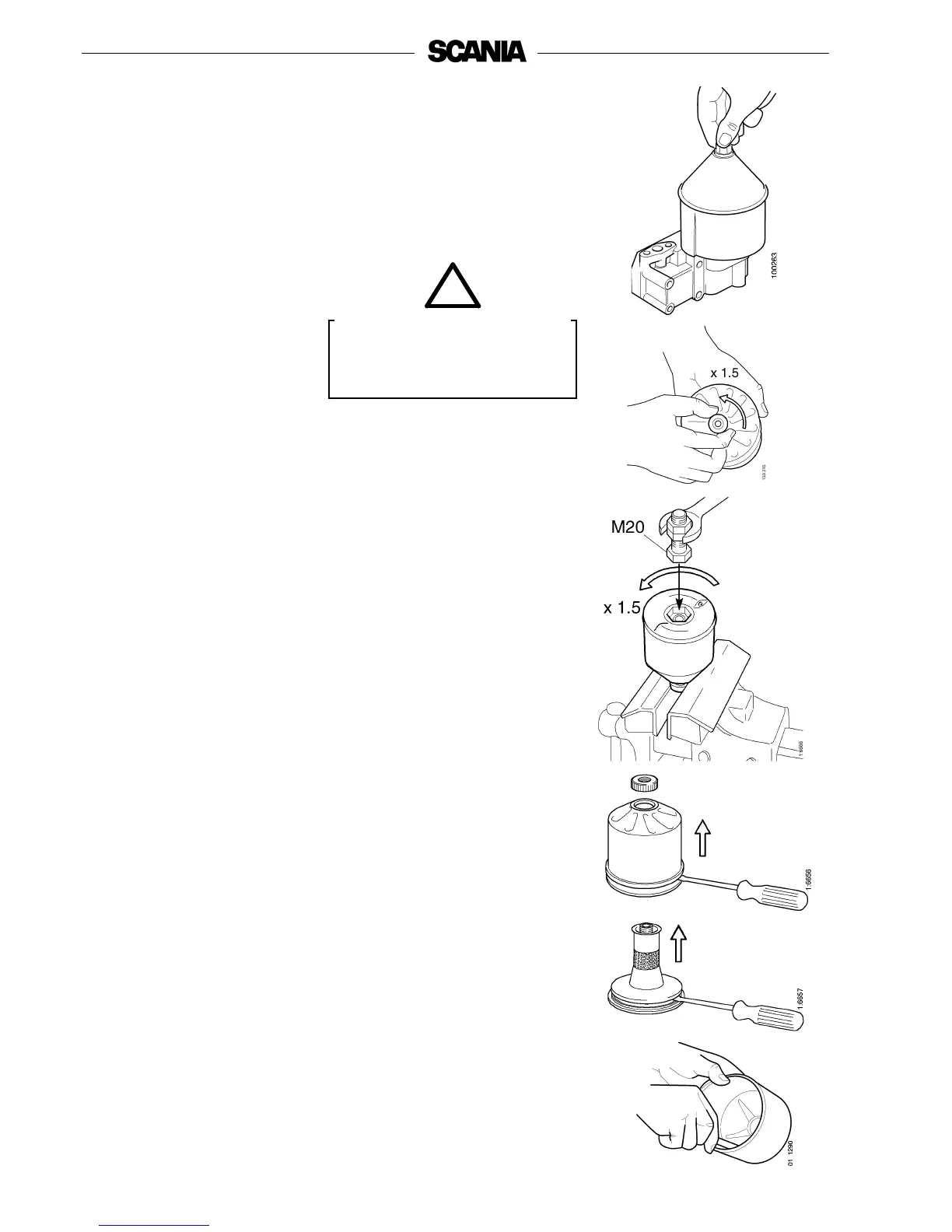
- Clean the cover. Unscrew the nut and remove the cover.
- Lift out the rotor and wipe the outside. Unscrew the rotor cover nut
about one and a half turns.
- If the rotor nut is jammed:
Turn the rotor upside down and fasten the nut in a vice, and turn the
rotor one and a half turns counterclockwise by hand, or use an M20 nut
as illustrated.
Note: The rotor must never be put in a vice.
- Hold the rotor and tap lightly on the rotor nut with a plastic mallet or
against the workbench, so that the rotor bowl comes loose from the
bottom plate. Never strike on the rotor directly as this may damage the
bearings.
- Unscrew the nut and remove the rotor cover.
- Remove the strainer. If the strainer has seized in the rotor bowl, pry
carefully using a screwdriver between the rotor bowl and the strainer.
- If the strainer has seized in the rotor, pry carefully between the rotor and
the strainer.
- Scrape off the deposits from the inside of the rotor cover. If there are no
deposits, this indicates that the cleaner is not working properly.
- If the deposits are thicker than 28 mm: clean more often.
Open the cover carefully. The
oil may be hot.
WARNING
!



 To Next Page