Home
Scantech
Barcode Reader
V-1020BT
Page 29 (VEGA Configuration)
Scantech V-1020BT - VEGA Configuration
92 pages
Manual
Save Page as PDF
To Next Page
To Next Page
To Previous Page
To Previous Page
Loading...
Scantech-ID VEGA
Area Imager
27
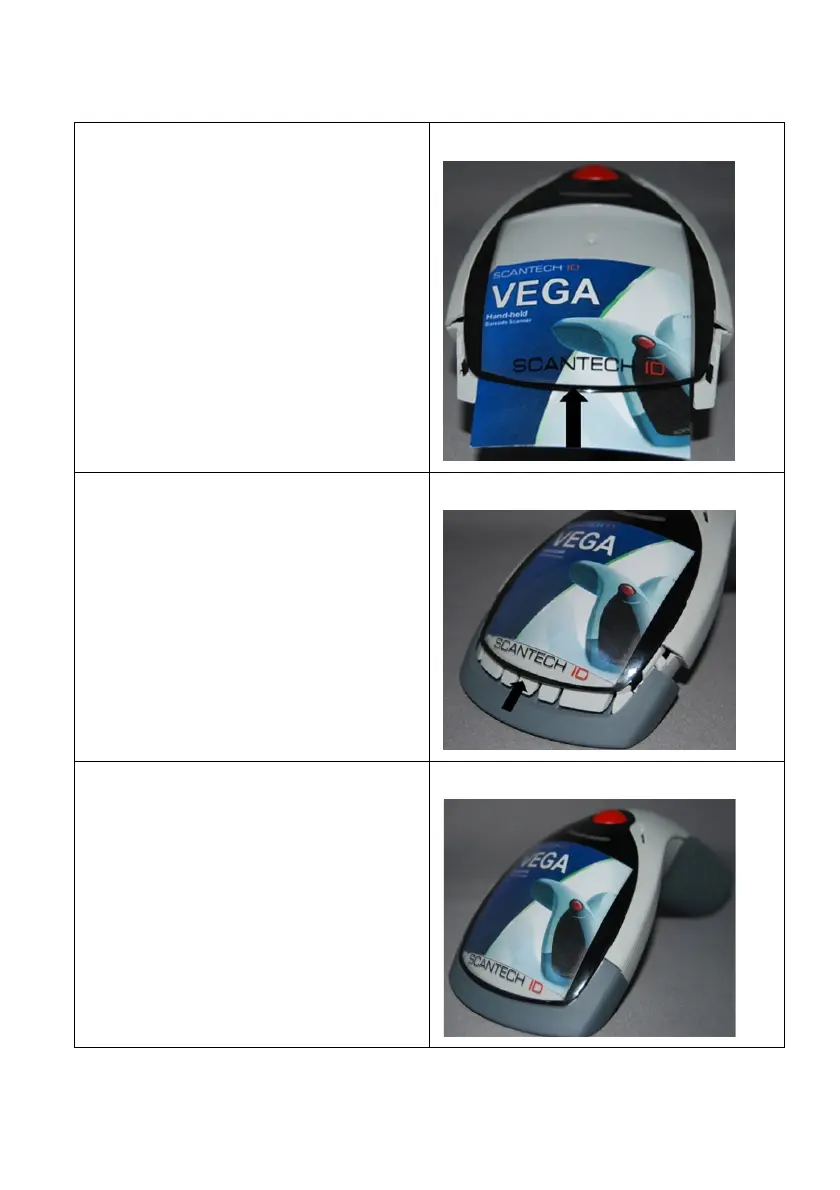
Step 7
Insert your commercia
l mess
age card
into the top cov
er toward the
arrow.
Step 8
Assemble the fron
t rubber lid into the
main unit toward the a
rrow.
Step 9
Complete change
top cover.
28
30
Table of Contents
Main Page
Default Chapter
4
Limited Warranty
4
Table of Contents
5
Introduction
8
Chapter 1 Product Safety
9
Safety & Caution
10
FCC Warning
11
Scanner Labelling
12
Chapter 2 General Description
13
Use of the VEGA
14
Chapter 3 Installation of the VEGA V-1020
15
Unpacking
16
Mounting
17
USB Driver
18
Chapter 4 Installation of the VEGA V-1020BT
19
Unpacking
20
Cradle Installation
21
Set up Bluetooth Communication
22
Chapter 5 Cover Display
25
Setup Cover Display
26
Change Cover Display
27
Chapter 6 Configuring the VEGA
31
Preface
32
Changing Scanner Settings with Utility Tool
33
Factory Default Setting
34
Chapter 7 Programming Codes
35
Return to Default
36
RS-232 Parameters
37
USB Mode
40
Bluetooth Scanner Setup
41
Bluetooth Cradle Setup
45
Set Pin Code
46
Decoding Selection
47
Disable All Symbologies
52
EAN /UPC Parameters
53
Check Digit Transmission
55
Code 11 Parameters
57
Code 39 Parameters
59
Code 93 Parameters
62
Code 128 / EAN 128 Parameters
63
Interleaved 2 of 5 Parameters
65
Msi Code Parameters
67
Plessey Code Parameters
69
Miscellaneous Parameters
71
Preambles and Postambles
72
Operating Settings
74
Scanning Triggering
75
Time out
76
Good Read Mode
77
Buzzer Beep Tone
77
Beep Duration
78
Good Read Led Duration
79
Firmware Version
79
Appendices
80
AASCII Table
81
B Readable Symbologies
83
C Technical Specifications
84
D Scan Map
86
Etest Symbologies
88
Foverview Part Numbers
91
Related product manuals
Scantech Shuttle SG-15 COLOUR
91 pages
Scantech ORION O-3050
41 pages



 To Next Page