- 14 -
www.SCEPTRE.com
SCEPTRE E22 FHD Display User Manual
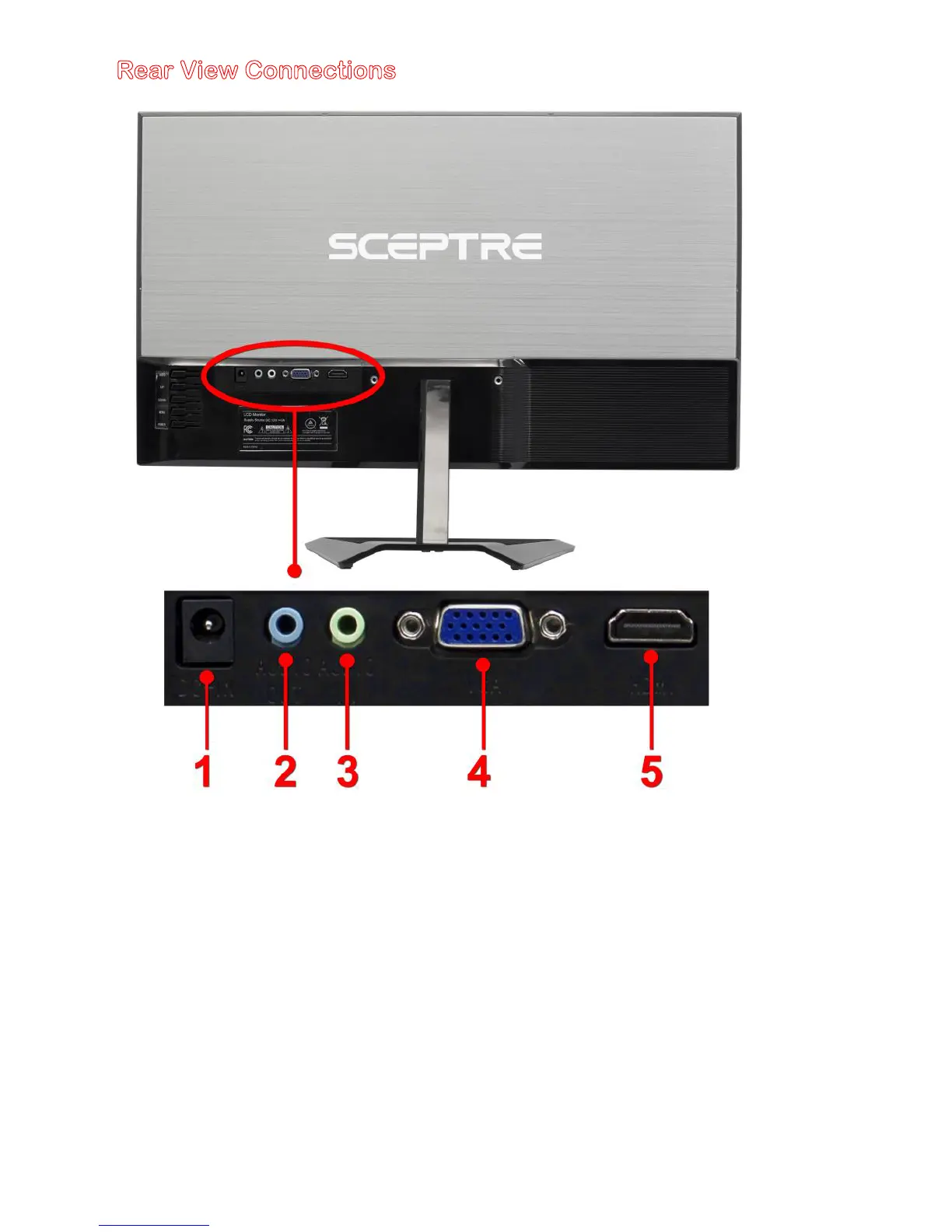
Rear View Connections
1. POWER – This plug is responsible for providing power to the monitor. Use it
with the included AC adapter.
2. AUDIO OUT (3.5mm Mini-jack) – This connection is for audio out from the
monitor to multimedia speakers or headphones.
3. AUDIO IN (3.5mm Mini-jack) – This connection is for audio in from the
computer going into the monitor.
4. VGA – VGA stands for Video Graphics Array. This connection is for
computers to send video signals to the monitor
by an analog signal. This
method of connection is the most commonly used connection.
5. HDMI – HDMI stands for High Definition Multimedia Interface. This
connection is for computers with HDMI video output.
WARNING:
This monitor is not equipped with built in speakers. The [audio in]
connection is used to transfer audio signal to the [audio out] port.


 To Next Page