- 19 -
www.SCEPTRE.com
E22 Series FHD Display User Manual
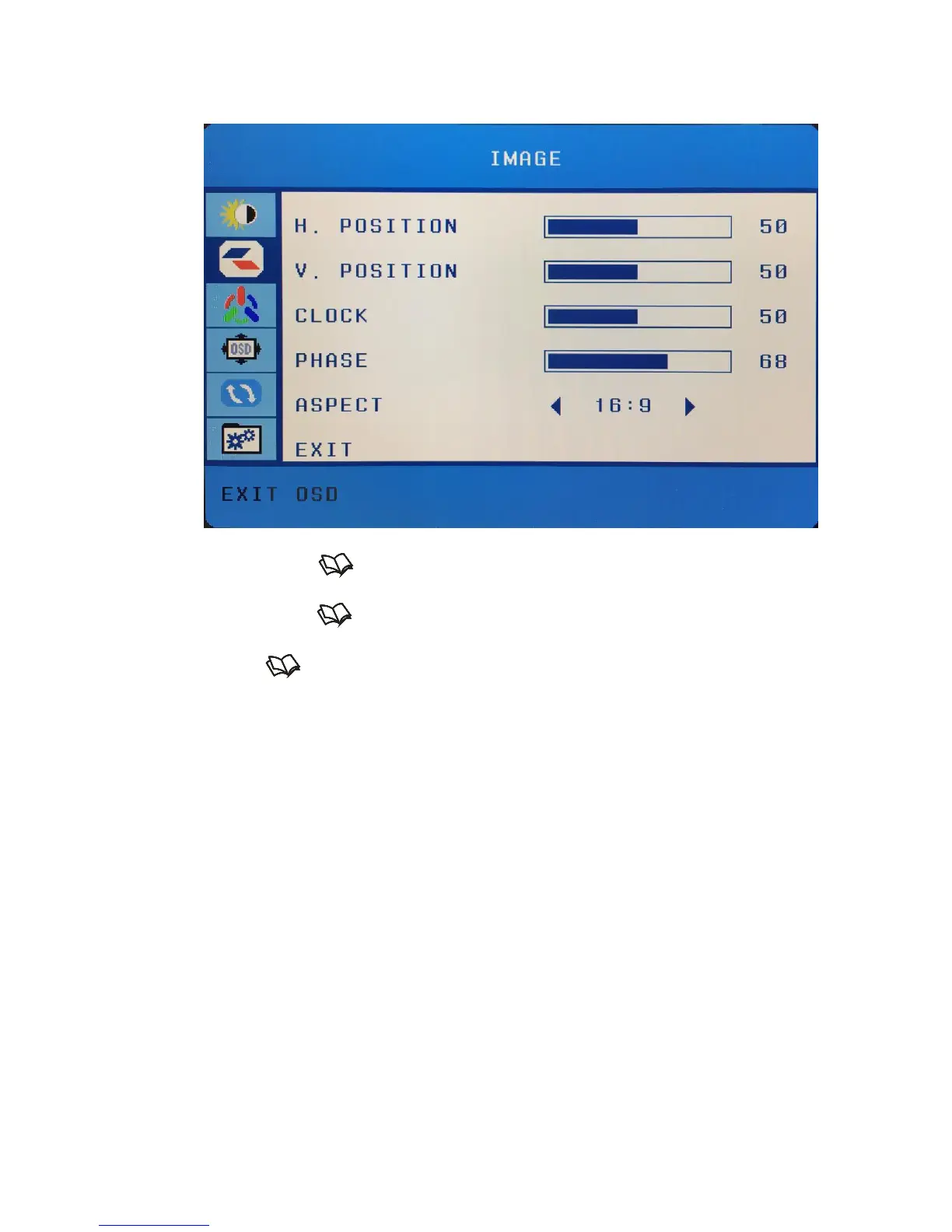
IMAGE
This function adjusts the image quality of the monitor.
1. Press to open the OSD then highlight IMAGE by pressing the ▲ or ▼
buttons.
2. Press to enter the function.
3. Press the ▲ or ▼ buttons to select the option you want to adjust and press
to enter the option.
4. Use the ▲ or ▼ buttons to adjust the values.
a. H. POSITION – This option adjusts the horizontal position of the
image.
b. V. POISTION – This option adjusts the vertical position of the
image.
c. CLOCK – This option adjusts the picture clarity by large increments.
d. PHASE – This option adjusts the picture clarity by small increments.
e. ASPECT – This option adjusts the format of the picture.
Please Note:
Always use auto adjust first to adjust the image.
This option is only available with a VGA connection. The image option
will be disabled if you are using HDMI.


 To Next Page