- 21 -
www.SCEPTRE.com
E22 Series FHD Display User Manual
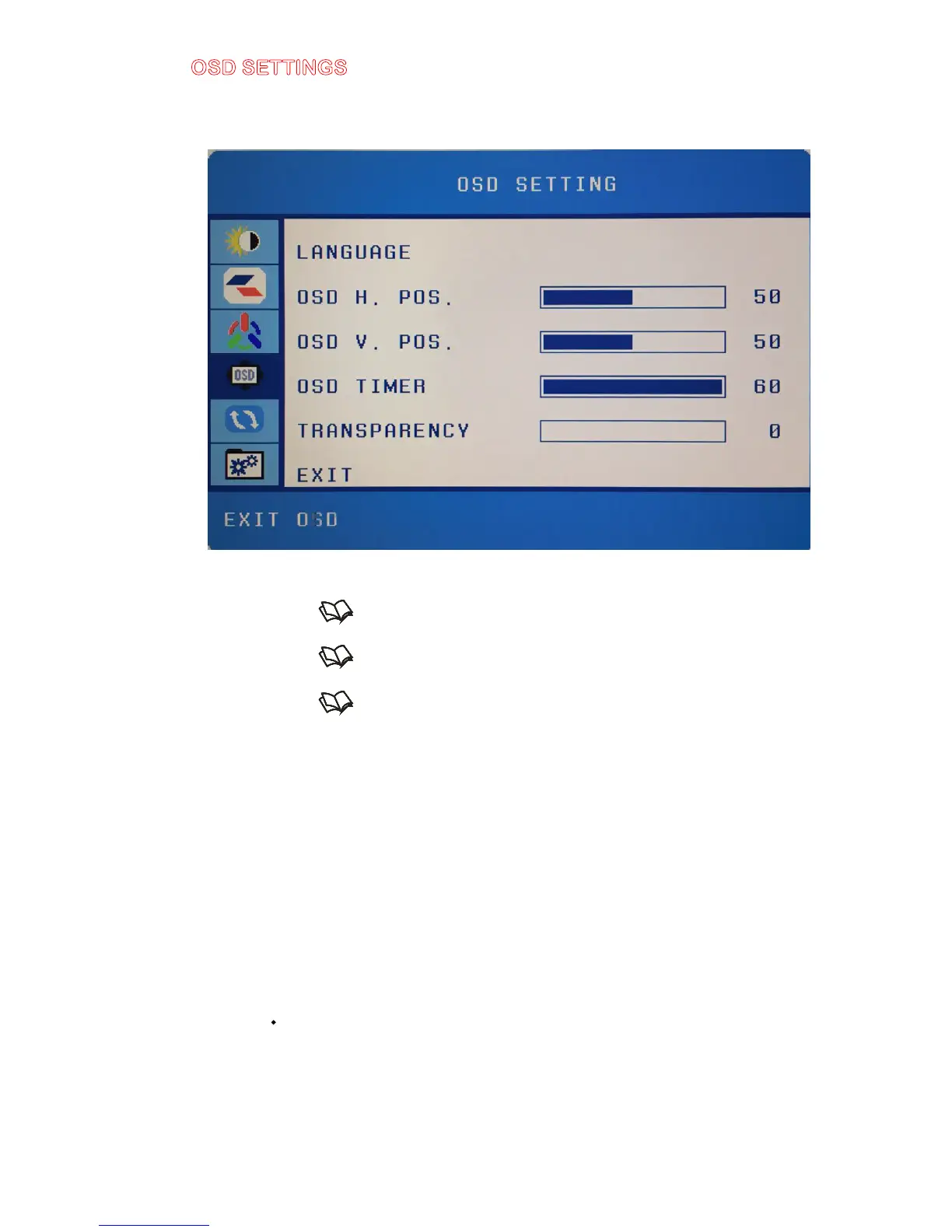
OSD SETTINGS
This function allows you to change the language of the OSD and adjust the
OSD options.
1. Press to open the OSD then highlight OSD SETTINGS by pressing the
▲ or ▼ buttons.
2. Press to enter the function.
3. Press the
▲ or ▼ buttons to select the option you want to change to and
press to begin adjusting the option
a. LANGUAGE – This option selects various languages for the OSD.
b. OSD H. POSITION – This option changes the horizontal pos
ition of
the OSD.
c. OSD V. POSITION – This option changes the vertical position of
the OSD.
d. OSD TIMER – This option changes how long the OSD menu will
stay up.
e. TRANSPARENCY – This option adjusts the transparency of the
OSD menu.
Please Note:
·
Changing the language of the OSD will alter all the messages and OSD
language of the monitor.


 To Next Page