Settings P746/EN ST/G31
MiCOM P746 (ST) 4-
23
ST
1.3.7 Commissioning tests
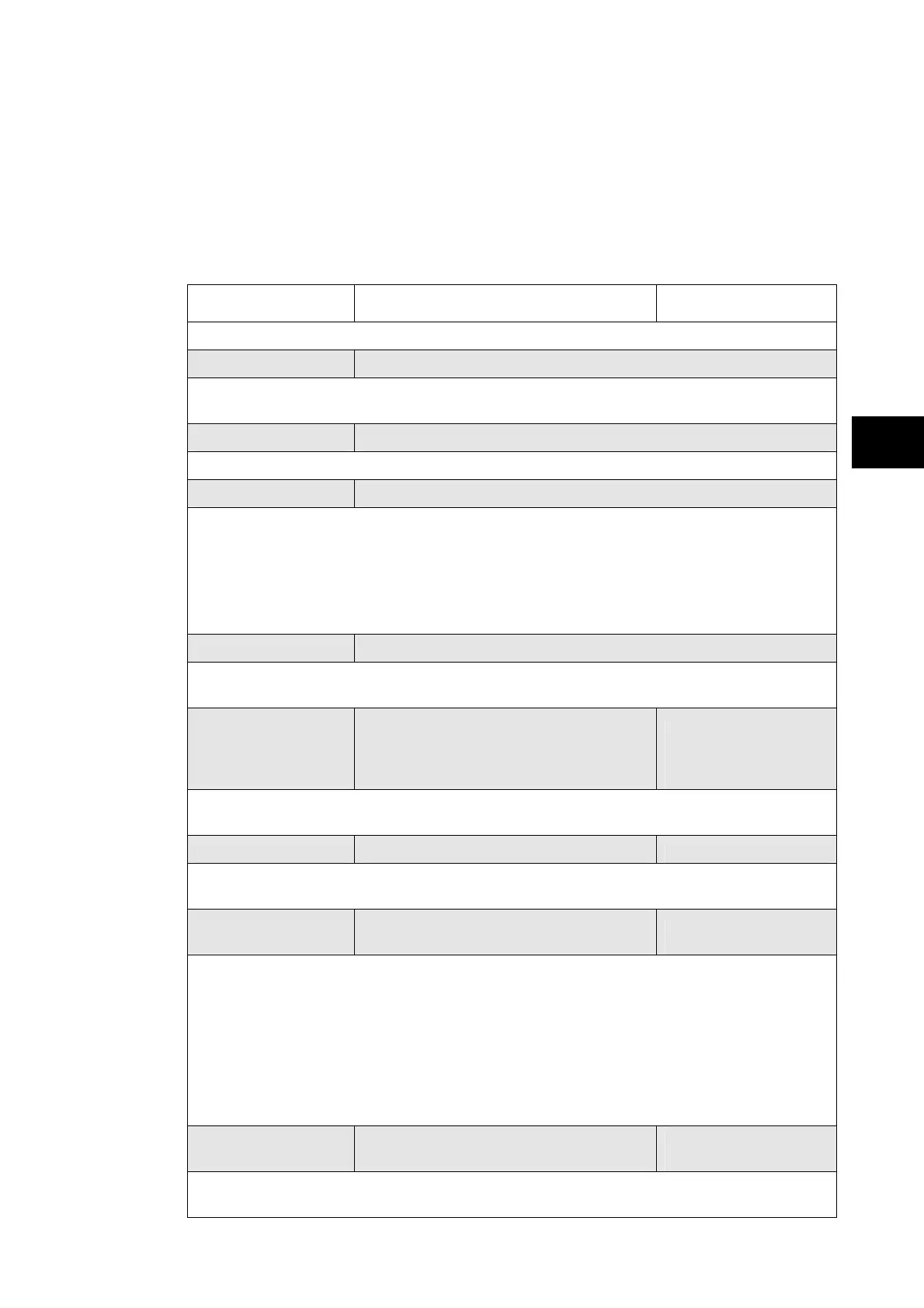
To help minimising the time required to test MiCOM relays the relay provides several test
facilities under the ‘COMMISSION TESTS’ menu heading.
There are menu cells which allow the status of the opto-isolated inputs, output relay
contacts, internal digital data bus (DDB) signals and user-programmable LEDs to be
monitored. Additionally there are cells to test the operation of the output contacts,
user-programmable LEDs.
Menu Text Default Setting Available Settings
COMMISSION TESTS
Opto I/P Status 00000000000000000000000000000000
This menu cell displays the status of the relay’s opto-isolated inputs (L01 to L32) as a binary
string, a ‘1’ indicating an energized opto-isolated input and a ‘0’ a de-energized one
Opto I/P Status2 00000000
Status of the next relay’s opto-isolated inputs (L33 to L40)
Rly O/P Status 00000000000000000000000000000000
This menu cell displays the status of the digital data bus (DDB) signals that result in
energisation of the output relays (R01 to R32) as a binary string, a ‘1’ indicating an operated
state and ‘0’ a non-operated state.
When the ‘Test Mode’ cell is set to ‘Enabled’ the ‘Relay O/P Status’ cell does not show the
current status of the output relays and hence can not be used to confirm operation of the
output relays. Therefore it will be necessary to monitor the state of each contact in turn.
Test Port Status 00000000
This menu cell displays the status of the eight digital data bus (DDB) signals that have been
allocated in the ‘Monitor Bit’ cells.
Monitor Bit 1 Relay Label 01
0 to 1022
See PSL section for
details of digital data
bus signals
The eight ‘Monitor Bit’ cells allow the user to select the status of which digital data bus
signals can be observed in the ‘Test Port Status’ cell or via the monitor/download port.
Monitor Bit 8 Relay Label 08 0 to 1022
The eight ‘Monitor Bit’ cells allow the user to select the status of which digital data bus
signals can be observed in the ‘Test Port Status’ cell or via the monitor/download port.
Test Mode Disabled
Disabled / Contacts
blocked / Test Mode
The Test Mode menu cell is used to allow secondary injection testing to be performed on a
Peripheral Unit relay without operation of the connected zone. It also enables a facility to
directly test the output contacts by applying menu controlled test signals. To select test
mode the Test Mode menu cell should be set to ‘Contact blocked’, which takes the relay out
of service. It also causes an alarm condition to be recorded and the yellow ‘Out of Service’
LED to illuminate and an alarm message ‘Out of Service’ is given. The 87BB and 50BF
protections are in service as long as the cells ‘87BB Monitoring’ and ‘87BB & 50BF disabl’
are equal to 0. Once testing is complete the cell must be set back to ‘Disabled’ to restore
the relay back to service.
Test Pattern 0000000000000000
0 = Not Operated
1 = Operated
This cell is used to select the output relay contacts that will be tested when the ‘Contact
Test’ cell is set to ‘Apply Test’.



 To Next Page