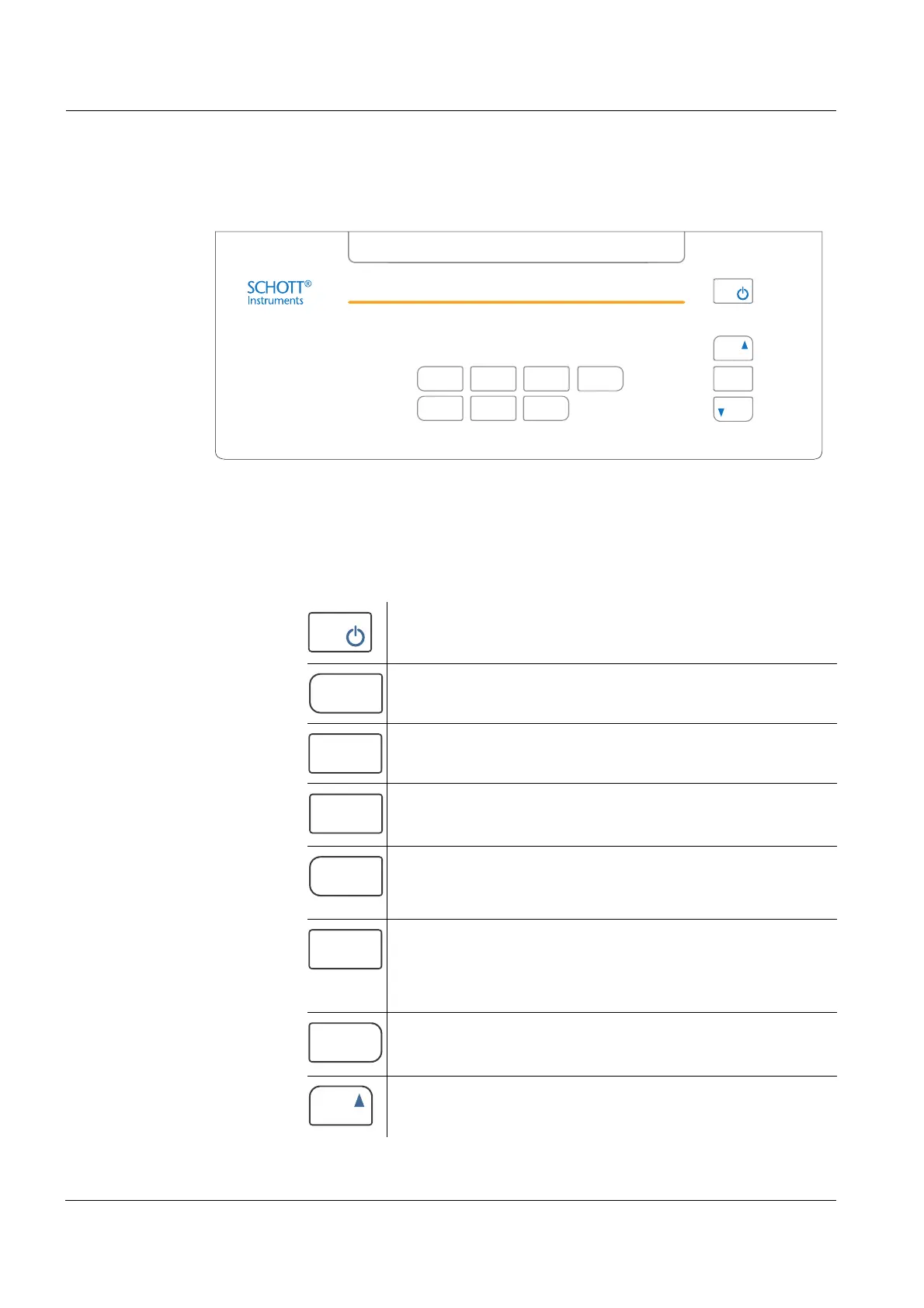
Overview ProLab 2000
10
ba75577e03 11/2009
1.2 Keypad
In this operating manual, keys are indicated by brackets <..> .
The key symbol (e.g. <MENU/OK>) generally indicates a short
keystroke (under 2 sec) in this operating manual. A long keystroke
(approx. 2 sec) is indicated by the underscore behind the key symbol
(e.g. <MENU/OK
_>).
Key functions
MENU
OK
SCMODE
STO
ESC
PRINT
CAL
RCL
<On/Off> Switch the meter on/off
<MODE>
<MODE
_>
Select measured parameter
Activate operation lock
<CAL>
<CAL
_>
Call up calibration procedure
Open menu for calibration data storage
<SC> Switch on or off the stability control
function manually.
<STO>
<STO
_>
Store measured value
Open menu for automatic storing
function
<RCL>
<RCL
_>
Open menu for manually stored
measured values
Open menu for automatically stored
measured values
<PRINT>
<PRT
_>
Print
Open menu for automatic printing
<▲> Increment values, scroll


 To Next Page