ProLab 2000 Operation
91
ba75577e03 11/2009
4.10.3 Options for data transmission
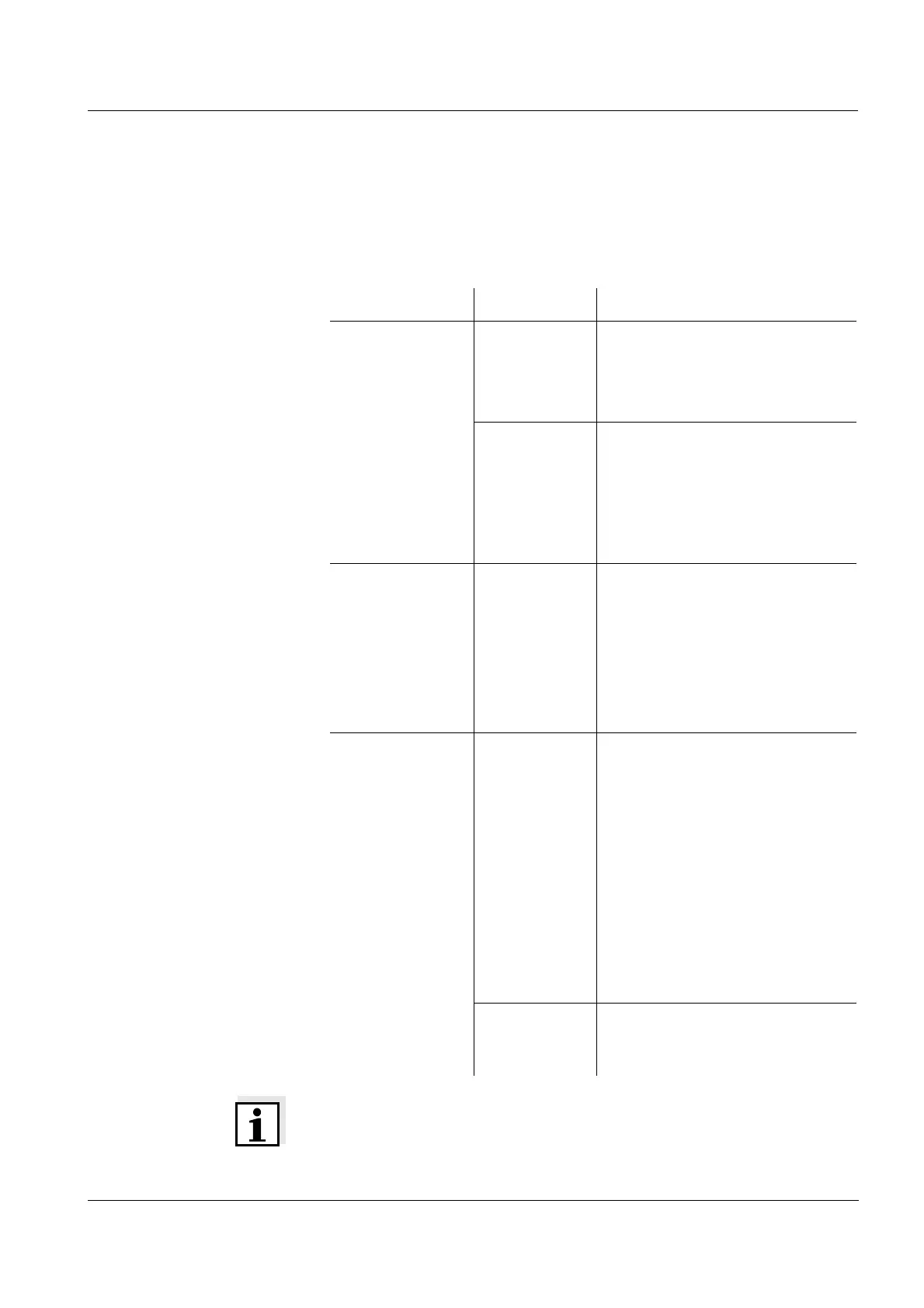
Via the RS 232 interface, you can transmit data to a PC or external
printer. The following table shows which data is transmitted to the
interface in which way:
Note
The following rule applies: Except for the menus, the display content is
generally downloaded to the interface with <PRINT> (displayed
measured values, measurement datasets, calibration records).
Data Control Operation / description
Current
measured values
of the connected
sensor
Manual z With <PRINT>.
z Simultaneously with every
manual storage process (see
page 81).
automatic, at
intervals
z With <PRT
_>. Then you
can set the transmission
interval.
z Simultaneously with every
automatic storage process
(see page 82).
Stored measured
values
Manual z Displayed dataset:
with <PRINT> after recall
from data storage.
z All datasets according to the
filter criteria via the Output to
RS232/USB function.
For details, see page 84.
Calibration
records
Manual z Calibration record of a
sensor:
Calibration record of a sensor
with <PRINT> (after calling
up from the data storage or at
the end of a calibration
procedure).
z All calibration records after
calling up from the data
storage via the Output to
RS232/USB function.
For details, see page 87.
automatic z For the respective sensor at
the end of a calibration
procedure.


 To Next Page