Stationary Air Compressor System Operating Instructions
3 - Starting and Operating
22
NOTE
The X4 Controller will shut down the compressor
if operational tolerances exceed factory-set limits.
See the “System Tolerances and Overrides” section
of this instruction.
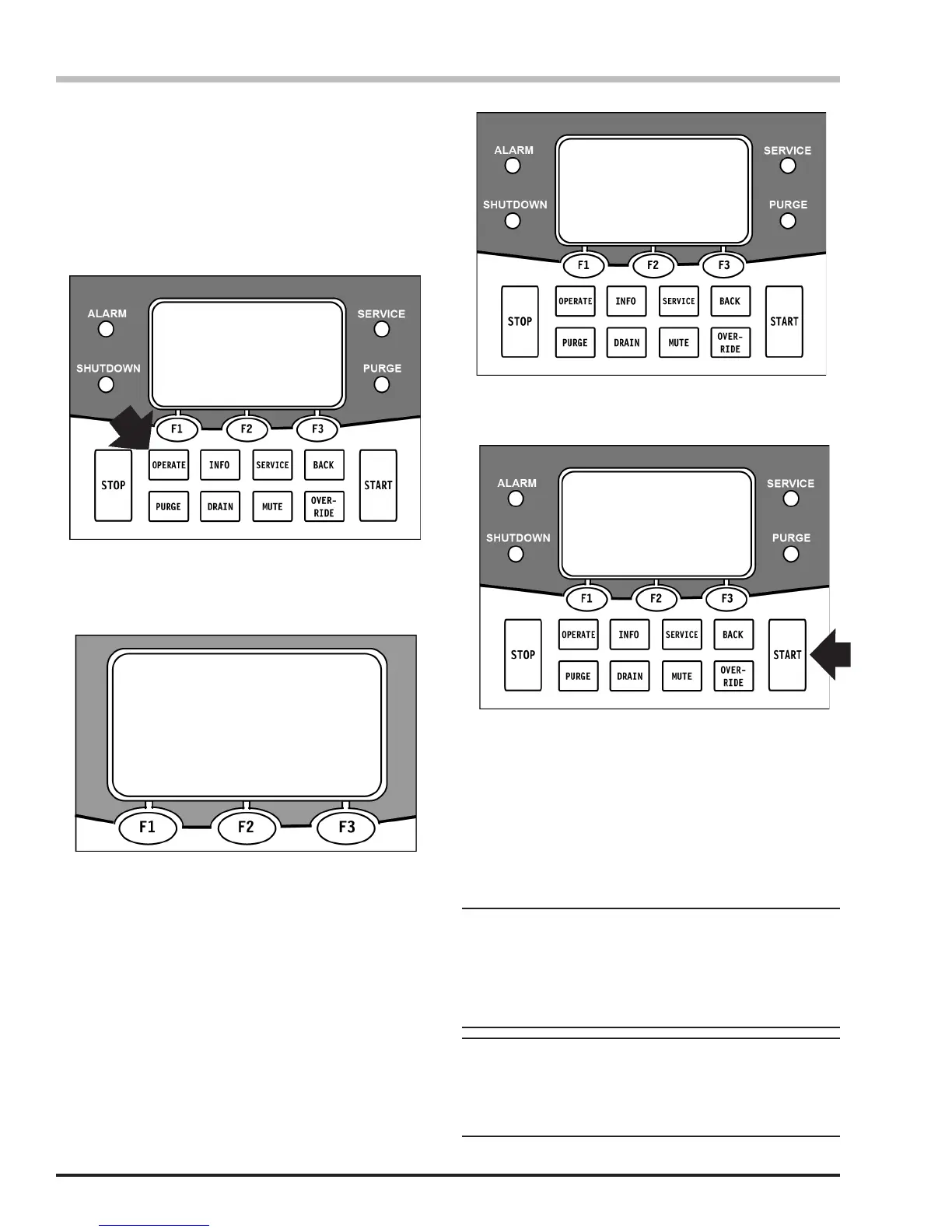
Press the START button to turn the compressor ON.
The X4 Controller display will show the compressor
discharge temperature (T = °F) and, if installed, the
carbon monoxide concentration (CO = ppm) and dew
point level (DP = °F) of the discharge air. Refer to the
System Tolerances and Overrides section on Page
28. If any of the Compressor Operating Parameters are
out-of-tolerance, run a Purge cycle as instructed in the
Use of the Purge section of this instruction.
NOTE
If the CO or Dew Point monitor is not installed on
your system, the X4 Controller will display “N/A”
after the parameter on the LCD screen.
1. Turn the external power source ON (wall-mounted
switch).
2. After the X4 Controller completes the system boot,
the display will say, “Press F2 Button Below to
Begin.” Press the F2 key directly below the X4
Controller digital display.
3. The display will show the current Service Due dates
and say, “Push Operate, Info, or Service.” Press
OPERATE on the keypad. (Remember, you can
press BACK at any time to return to the previous
display.)
4. The display will read AUTO or MANUAL. Select by
pressing the key below the desired mode:
AUTO - F1 Key - recommended for “on-site” operation
when a constant supply of compressed air is needed.
In this mode, the unit will automatically restart when
system pressure drops approximately 500 psi below the
maximum pressure.
MANUAL - F3 Key - used for a single compression
cycle. In this mode, the unit will bring the ASME storage
cylinders up to maximum system pressure, but will not
automatically restart as the pressure is depleted. The unit
must be restarted when storage pressure has dropped
below a usable level.
Air Sample Due 01/18/07
CO Cal Due 3/18/07
Purifier HRS REM 49 PUSH
OPERATE, INFO, OR SERVICE
5. For normal operation, select AUTO. The following
screen will appear:
Auto Mode
Press
Start Button to turn
Compressor ON
Operating the Compressor
Select Compressor
Control Mode
Condition = NORMAL
AUTO MANUAL
SCOTT Health &
Safety
800-247-7257
PRESS F2 BUTTON
BELOW TO BEGIN
Operating the Compressor Continued...


 To Next Page