6 - System Administrator Responsibilities
Stationary Air Compressor System Operating Instructions
39
To Calibrate the Optional
Carbon Monoxide (CO) Monitor
1. After the Air Sample section, the display will ask you
if a CO Calibration is to be performed at this time.
For this, you must have the SCOTT CO Calibration
Kit, P/N AB16-0533. THIS WILL ONLY APPEAR IF
THE OPTIONAL CARBON MONOXIDE MONITOR
IS INSTALLED ON YOUR SYSTEM.
2. If you select YES (F1 button), you will be prompted
to perform the steps of the CO Calibration using the
0 PPM CO (Zero Gas) and 20 PPM CO calibration
gas cylinders from the Calibration Kit.
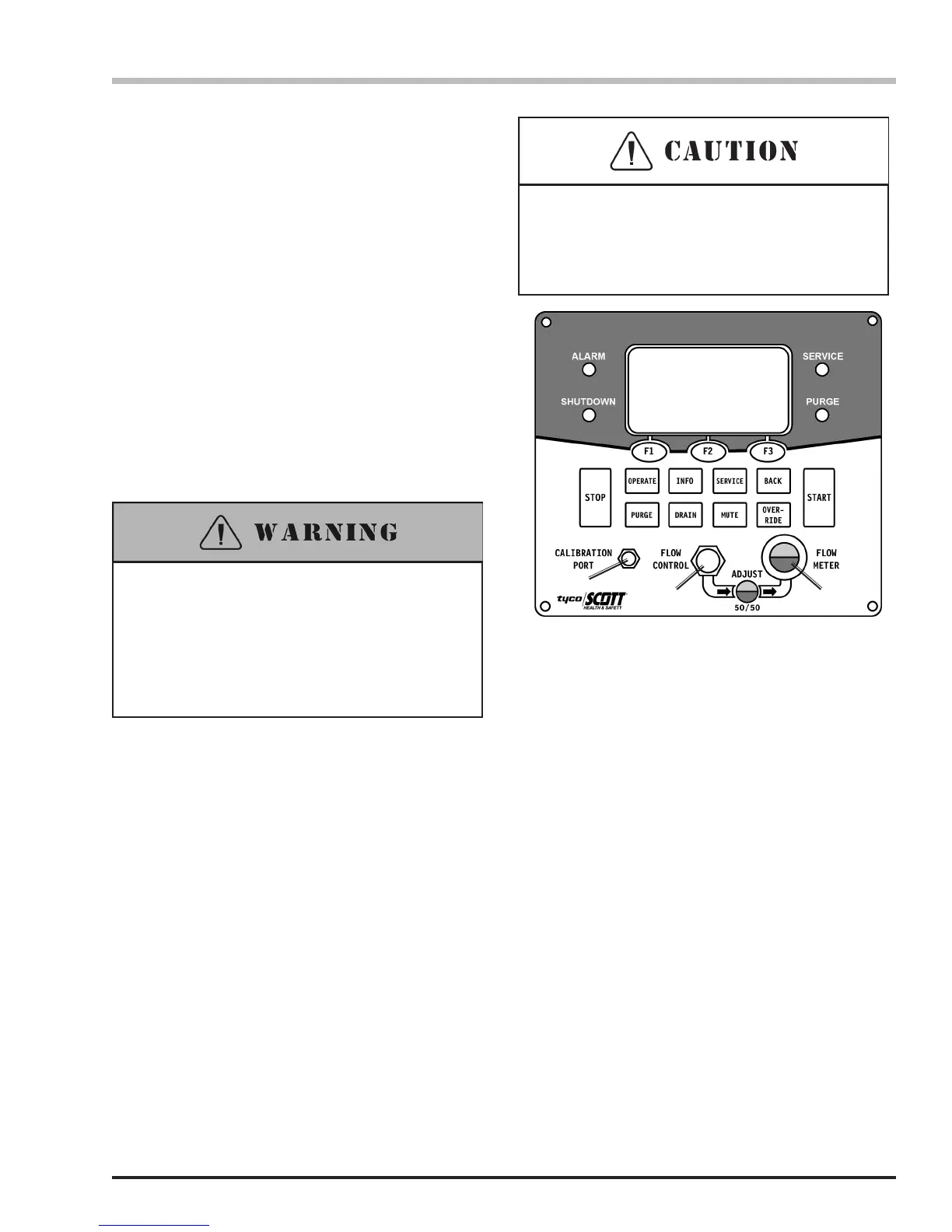
a. Connect the 0 PPM CO (Zero Gas) Cylinder to
the Calibration Port on the X4 Control Panel and
OPEN the cylinder valve.
5. You will be asked to enter the USER PASSWORD.
The display will show a “1” above F1, a “2” above F2,
and a “3” above F3. The factory installed password is
111111. To enter this, press the F1 button six times. If
you have changed the password already, enter your
new password. (If you enter the wrong password,
the display will say, “Invalid Password – Wait for ve
seconds and reenter password.”)
6. The display will say, “Was an Air Sample Taken
Since the Last Compressor Operation?” Select
YES (F1 button) if an air sample has been taken
and certied to meet the breathing air requirements
for your respiratory protection program. This will
automatically set the current date as the air sample
service date.
7. If the CO Sensor is installed and you select NO
(F3 button), you will proceed to the CO Calibration
procedure below.
b. Adjust the Flow Meter to 50/50 with the Flow
Control knob and select NEXT (F2 button).
c. The display will ask, “If Flow Indicator is at
50/50 Level, Press CAL Button.” Select CAL (F2
button).
d. Display will read, “0 PPM Calibration in Process,
Time Remaining XX Seconds.” This process
will take 60 seconds. When prompted for the
next step, CLOSE the Zero Gas cylinder valve
and disconnect the cylinder from the Calibration
Port.
Connect 0 PPM CO
Adjust Flow to 50/50
Level on Indicator
Next
2 3
1) Calibration Port
2) Flow Control Dial
3) Air Flow Adjustment Eye
1
Calibrating the CO Monitor
continued on the next page...
Follow the CARBON MONOXIDE Calibration
procedure carefully. Improper calibration of the
CARBON MONOXIDE MONITOR could result
in operating the system outside the applicable
standards or codes which may lead to serious injury
or death.
Thread the hose connection carefully onto the
calibration port. Do not cross thread or force which
may cause damage to the connector and result in
inaccurate calibration.


 To Next Page