Stationary Air Compressor System Operating Instructions
2 - Features
12
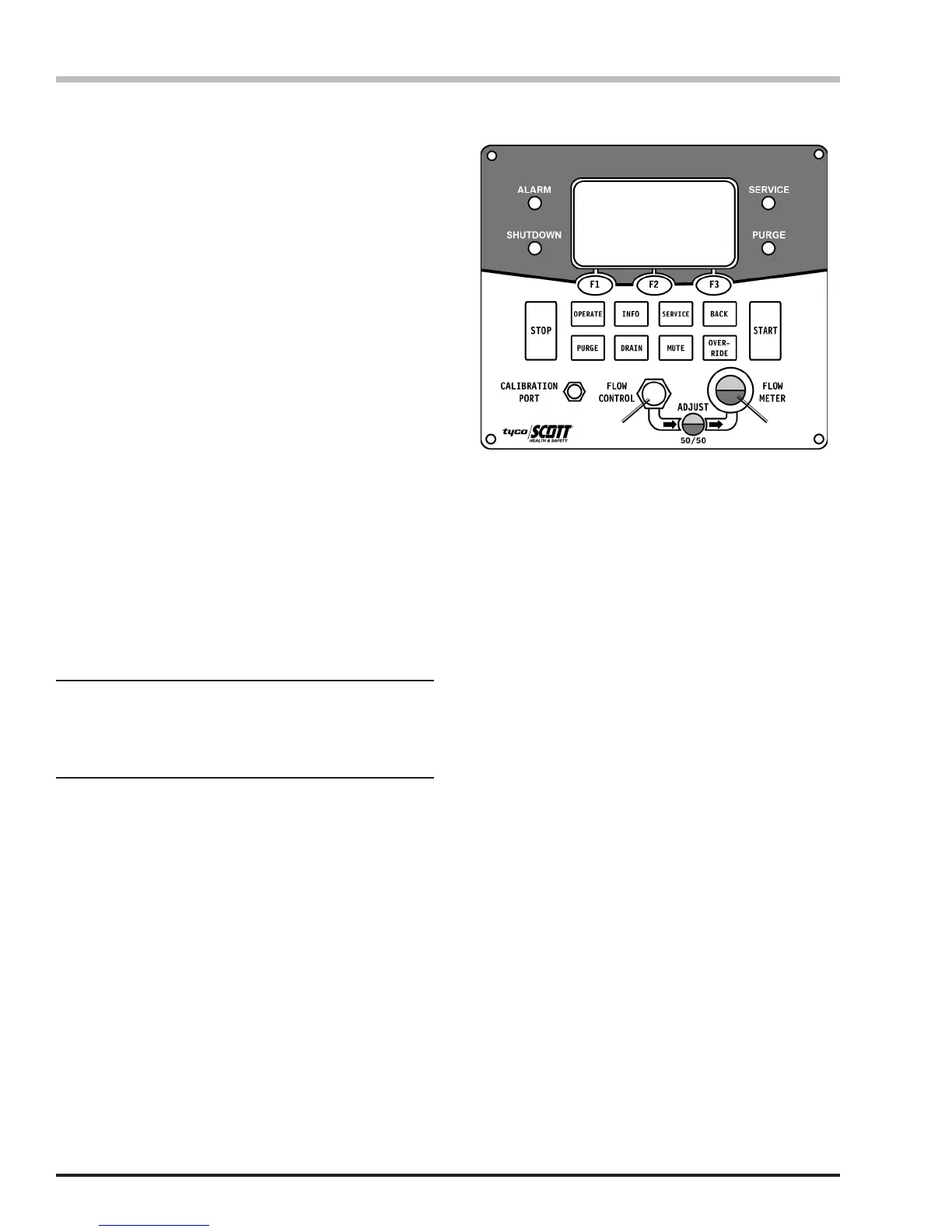
X4 Controller
The Stationary Air Compressor System is equipped with
an X4 Controller to start and stop the compressor and to
provide information about the compressor’s performance
and condition to the Operator. The X4 Control Panel
features an LCD display, a key pad, and warning lights
for ALARM, SHUTDOWN, SERVICE, and PURGE.
Four models of the X4 are available for a Stationary Air
compressor system:
The Basic controller has warning indicators for high
discharge air temperature and low oil conditions.
The CO Only controller has the same features as
the Basic controller but adds a monitor for high carbon
monoxide (CO) levels in the breathing air.
The Dew Point Only controller has the same features
as the Basic controller but adds a monitor for excessive
moisture levels (Dew Point or DP).
The Full Feature controller includes BOTH the Carbon
Monoxide (CO) monitor AND the moisture level monitor
(Dew Point or DP) along with warning indicators for high
discharge air temperature and low oil conditions.
It is the responsibility of the System Administrator to
inform the Operator what features are installed and
enabled and to train the Operator in there use. It is
the Operator’s responsibility to notify the System
Administrator of any alarms or shutdown warnings the
occur during the operation of the compressor system.
If monitored conditions are out of tolerance, the controller
emits a visual and audible alarm and will subsequently
shut down the compressor.
The controller allows the system to run in either AUTO
or MANUAL mode. In AUTO mode, the compressor
will automatically restart when storage pressure drops
approximately 500 psi below the maximum system
pressure. When in MANUAL mode, the compressor stops
after purging and must be restarted manually.
NOTE
If the CO or Dew Point monitor is not installed on
your system, the X4 Controller will display “N/A”
after the parameter on the LCD screen.
T = 104° CO = 0 DP = -80°F
Condition = Normal
Compressor will Stop when
Storage is Full
1 2
On X4 Controllers equipped with either CO or
Dew Point monitoring, the following features
will be present:
1) Flow Control Dial
2) Air Flow Adjustment Eye
Purication
After leaving the compressor, compressed air passes
through a series of purication chambers.
The Stationary Air compressor is available rated for either
5000 or 6000 psi working pressure to purify up to 84,000
SCF of air (based on 70°F/21°C inlet temperature). A
mechanical lter separator removes oil, moisture, and
airborne foreign particles from the pressurized air. The
remaining purier chambers remove additional chemical
particles from the air before being released for use.
After the air has been compressed and puried, it is
directed either to a charging station for lling breathing
air cylinders or to storage cylinders, depending upon
system options.
On compressor systems where the CO or Dew Point
monitors are not installed, it is also the responsibility
of the organization using this equipment to establish
procedures to assure the breathing air quality to the
end user in the time between the routine air samples.
Failure to establish procedures to monitor the breathing
air quality could result in undetected problems that could
lead to production of air that does not meet the breathing
air standards.


 To Next Page