6 - System Administrator Responsibilities
Stationary Air Compressor System Operating Instructions
40
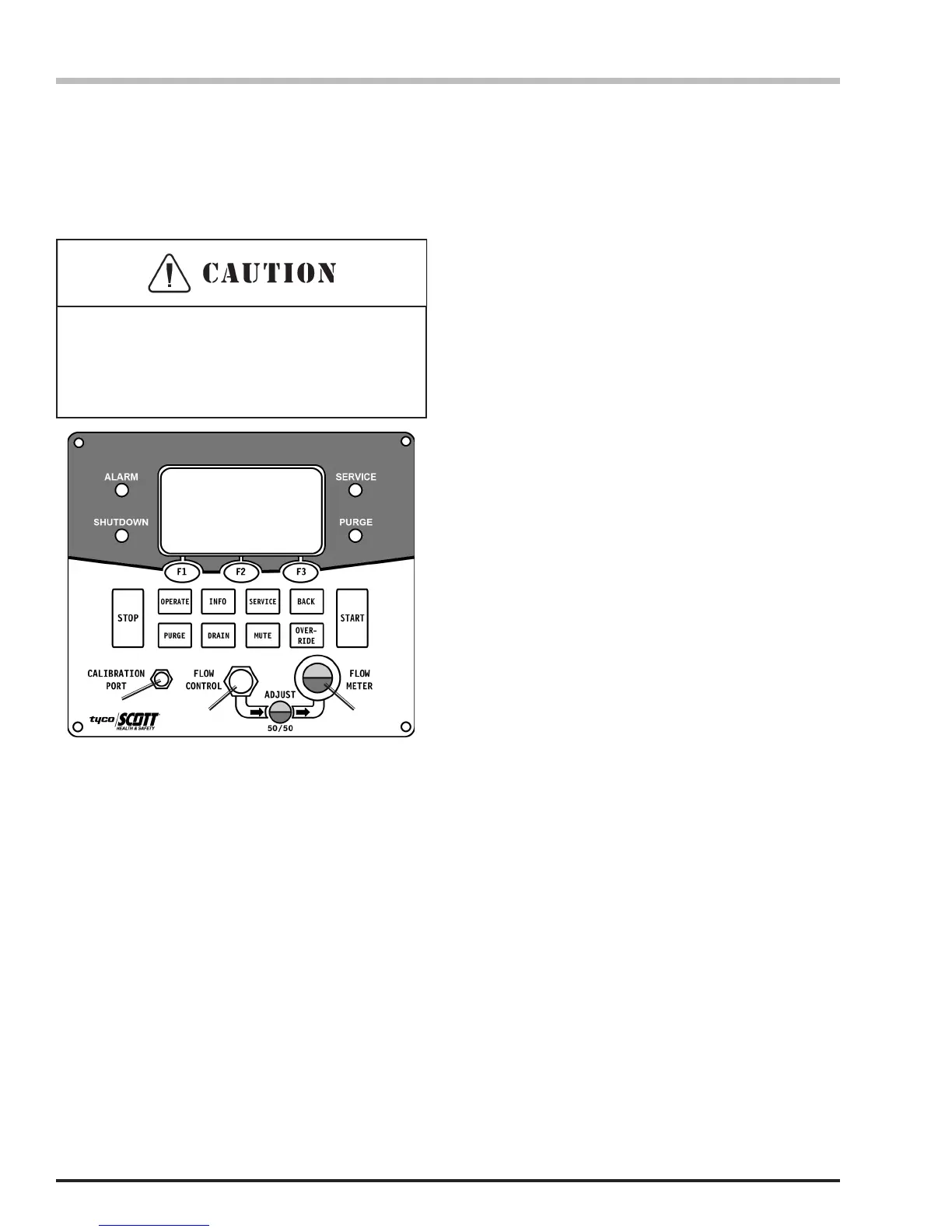
e. Connect the 20 PPM CO Cylinder to the
Calibration Port on the X4 Control Panel and
OPEN the cylinder valve.
f. Adjust the Flow Meter to 50/50 with the Flow
Control knob and select NEXT (F2 button).
g. The display will ask, “If Flow Indicator is at
50/50 Level, Press CAL Button.” Select CAL (F2
button).
h. Display will read, “20 PPM Calibration in Process,
Time Remaining XX Seconds.” This process will
take 60 seconds.
i. After the 60 seconds, the display will read,
“Calibration Complete – DONE.” Close the 20
PPM CO cylinder valve and disconnect the
cylinder from the Calibration Port.
Connect 20 PPM CO
Adjust Flow to 50/50
Level on Indicator
Next
2 3
1) Calibration Port
2) Flow Control Dial
3) Air Flow Adjustment Eye
1
Calibrating the CO Monitor Continued...
j. Select DONE (F2 button). The X4 Controller will
exit the Perform System Service and return the
display to the start-up screen that says “SCOTT
Safety, 800-247-7257, PRESS F2 BUTTON
BELOW TO BEGIN” as when rst starting the
compressor system.
3. If you select NO (F3 button) to the CO Calibration,
the X4 Controller will exit the Perform System
Service and return the display to the start-up screen
that says “SCOTT Safety, 800-247-7257,PRESS F2
BUTTON BELOW TO BEGIN” as when rst starting
the compressor system.
Thread the hose connection carefully onto the
calibration port. Do not cross thread or force which
may cause damage to the connector and result in
inaccurate calibration.


 To Next Page