SECTION 8:
LOADING CUSTOM TUNES
Download and install the SCT Device Updater software and Drivers
1. From your e-mail, save your custom
tunesJLMÄSLZ[V`V\YJVTW\[LY»Z
Desktop.
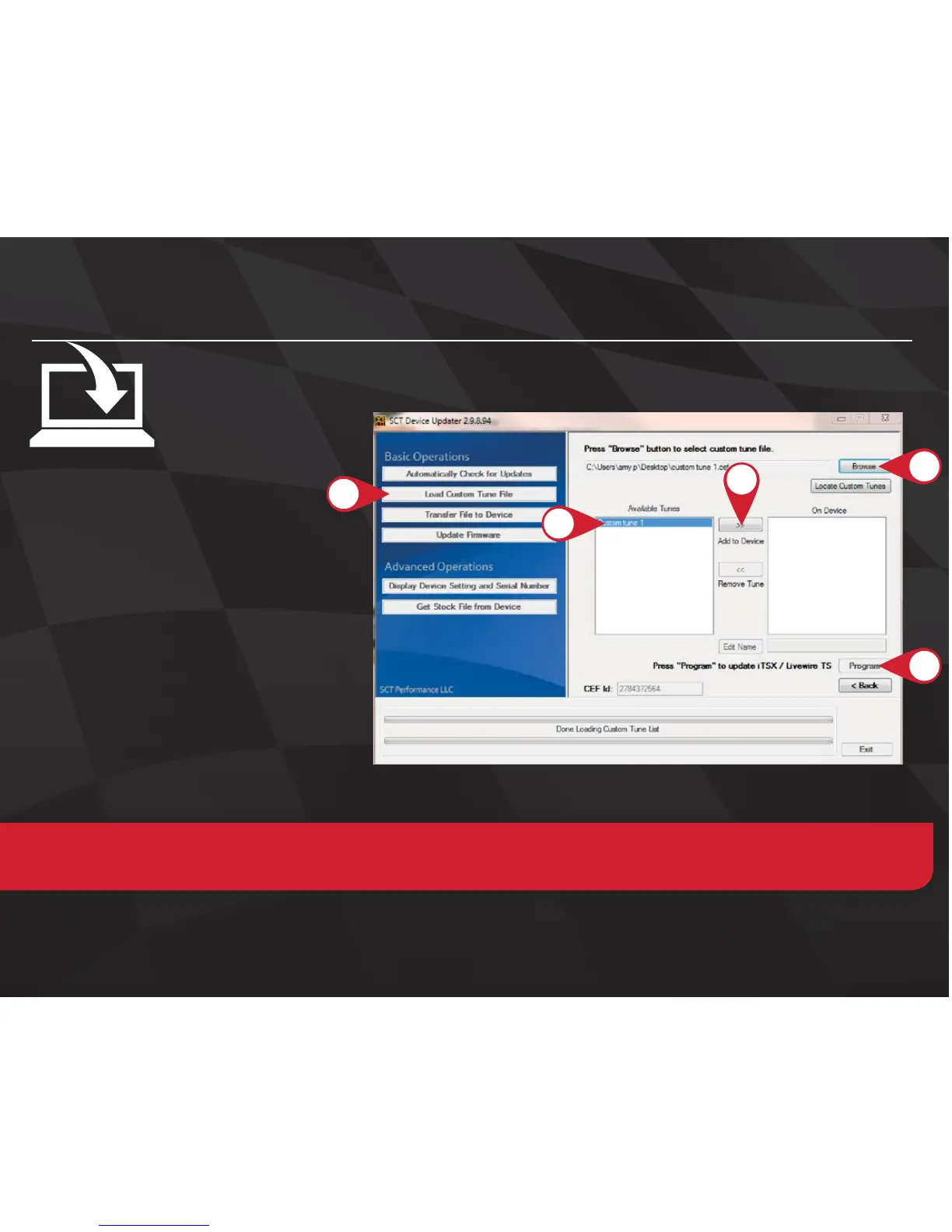
2. Open the SCT Device Updater
software and click the Load Custom
Tune File button.
3. Click Browse and locate your custom
tunes on your Desktop. Alternatively,
click Locate Custom Tunes.
4. Select the Tune you wish to load.
5. The tune you selected should move
to the Available Tunes section.
6. Select the listed tune in the Available
Tunes section, then click the >>
button to move the selected tune to
the On Device section.
7. Once you have gotten all the tunes you’d like to program under the On Device section and they’re named to
your liking, just click Program, and the Device Updater will load the tunes to your device.
2.
4.
7.
6.
NOTE!;VLKP[[OLUHTLVM[OLÄSLHZP[HWWLHYZVU`V\YKL]PJL`V\T\Z[ZLSLJ[[OLÄSL^OPSLP[»ZPU[OL6U+L]PJL
ZLJ[PVU[`WLPU[OLKLZPYLKUHTLPU[OLIV_ILSV^HUKJSPJR:H]L



 To Next Page