EasyManua.ls Logo

SDT SDT340 - Software Info; Database; Certifications and Markings Reminder

SDT SDT340
44 pages
Print Icon
To Next Page IconTo Next Page
To Previous Page IconTo Previous Page
Loading...
DC.R340TT.MAN.001—01—User Manual SDT340TANKTEST EN
35/44
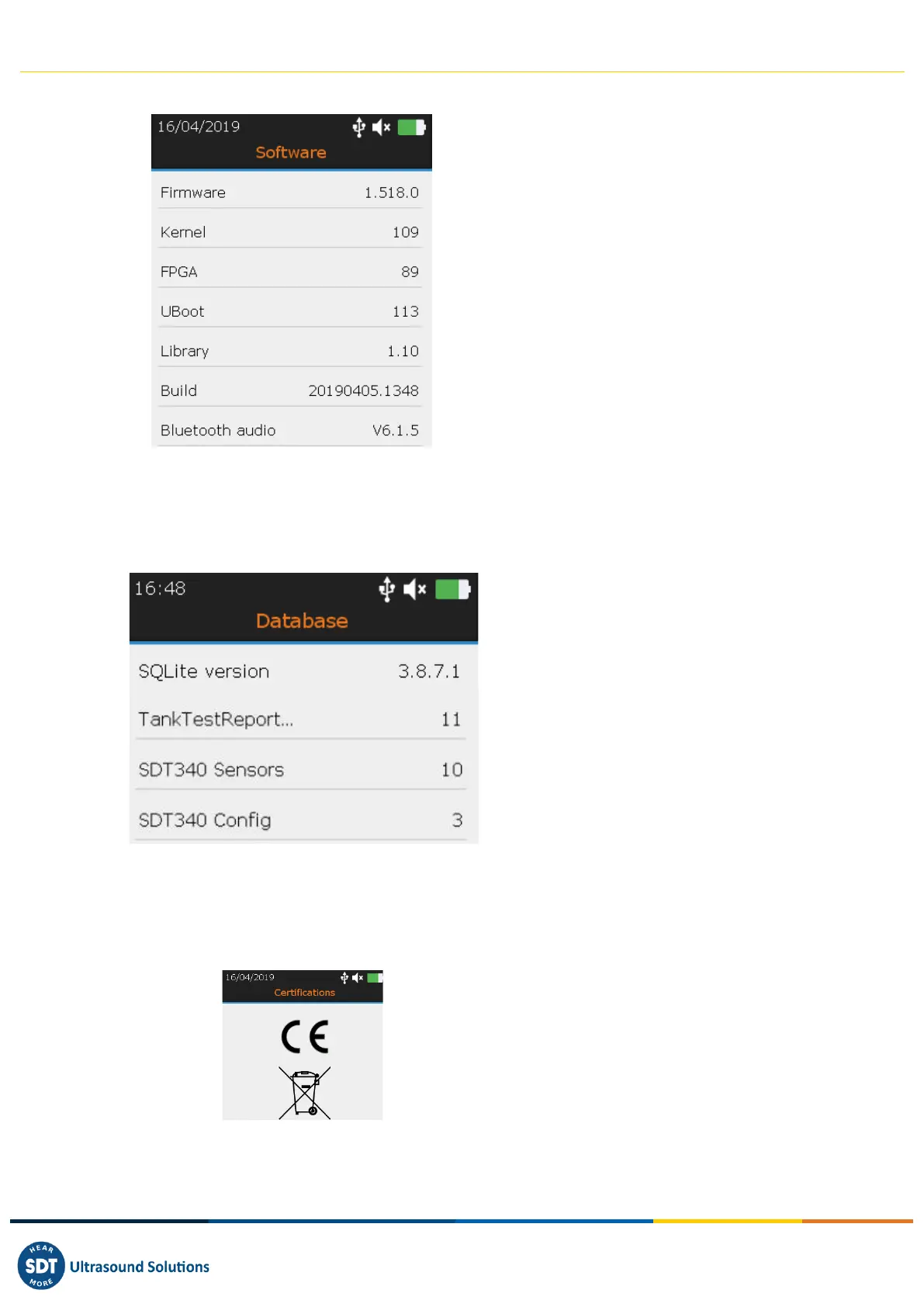
13.1.6. Software info
❶ Firmware version
❷ Kernel version.
❸ FPGA version
❹ UBoot version
❺ Library version
❻ Build version
❼ Bluetooth audio version
With the Up and Down navigation keys highlight the desired settings and confirm your choice with
Enter. Press the button ESC to display the previous screen.
13.1.7. Database
❶ SQLite version
❷ Databases
With the Up and Down navigation keys highlight the desired settings and confirm your choice with
Enter. Press the button ESC to display the previous screen.
13.1.8. Certifications and markings reminder
❶ CE compliant
❷ WEEE Directive compliant
With the Up and Down navigation keys highlight the desired settings and confirm your choice with
Enter. Press the button ESC to display the previous screen.
❶
❷
❸
❹
❺
❻
❶
❷
❶
❼
❷
❷
❷

Related product manuals