C.) Pull Tab forward and lift Bill Storage Box. (Fig. 11) Remove bills.
D.) Return empty Bill Storage Box.
REMOVING BILL
VALIDATOR
From time to time it may be necessary to remove the Bill Validator for cleaning and clearing jams.
1. To remove the Bill Validator.
A.) Unlock and open the Front Door, unplug vendor.
B.) Remove the Coin Tray, and pull the Vertical Shelf out.
C.) Pull Tab forward and lift Bill Storage Box.
D.) Disconnect Bill Validator from Wiring Harness.
E.) Remove the three (3) Mounting Nuts. (Fig. 11)
F.) Remove Bill Validator.
CLEARING JAMS
It is possible that a torn or damaged bill can jam within the Bill Validator,
putting it out of service.
1. To Clear a Jam.
A.) Remove Bill Validator as above.
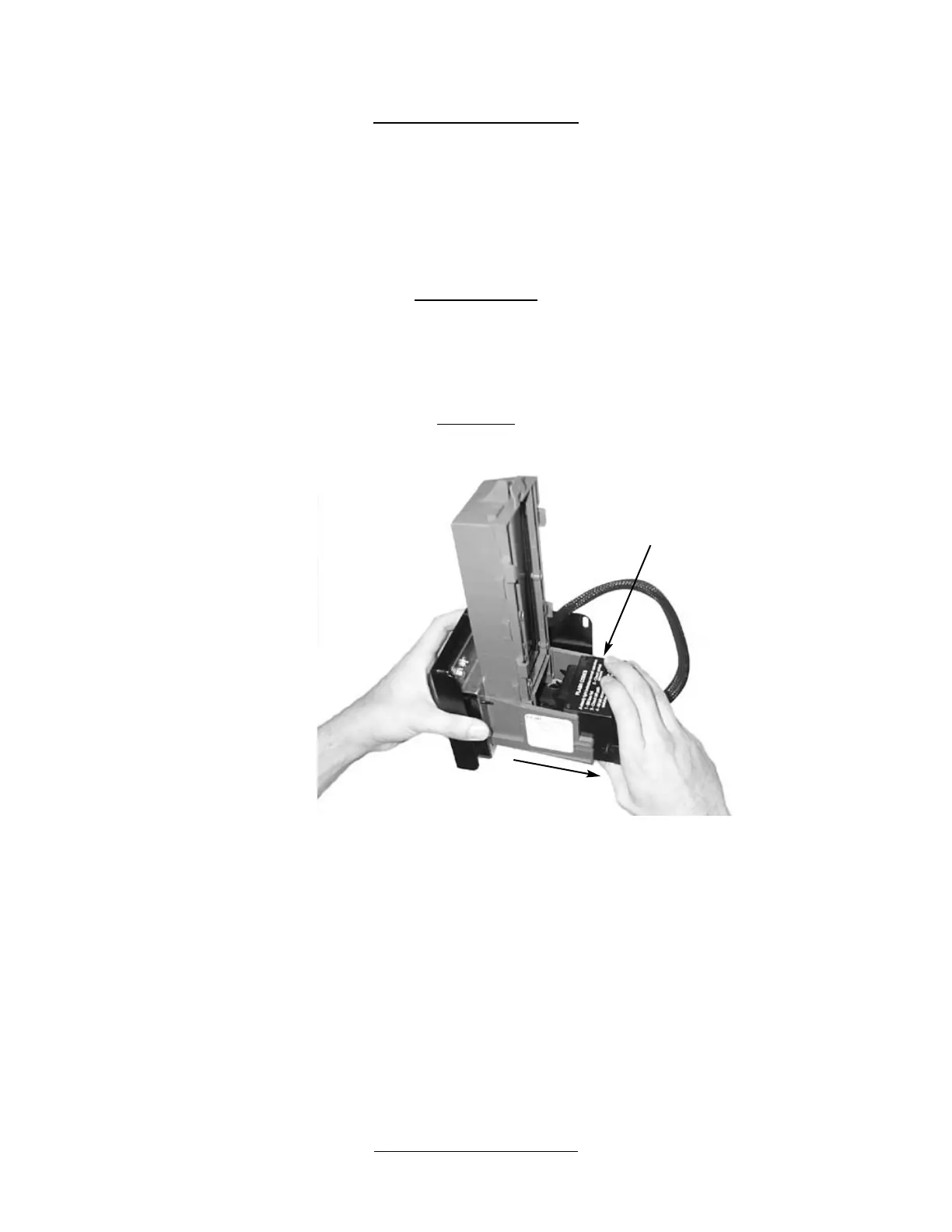
B.) Press Tab on bottom of Bill Validator, and pull Lower Housing free. (Fig. 12)
C.) Remove Jam, and reassemble.
CLEANING
It is recommended that you clean your Bill Validator frequently to keep it in order. How frequently and how thoroughly you clean
it will depend on the amount of traffic your vendor serves. Cleaning the Bill Validator can correct problems with service. There
are three levels to the cleaning process. Cleaning with a Cleaning Card, cleaning the Optics, and washing the Lower Housing.
1. Cleaning with a Cleaning Card, will perform a basic clean. The vendor does not need to be opened. One (1) Cleaning Card is
provided with your vendor, but more can, and should, be purchased. Seaga Manufacturing recommends CLEAN TEAM cards
that can be obtained online at www.cleanteam.com or by calling 1-800-888-8830.
A.) Insert the cleaning card in the same manner you would a regular
dollar bill, the card will be rejected.
B.) Repeat once. Do not reuse the card.
2. Cleaning the Optics is the second level of cleaning. You will need cotton swabs (Q-tips), and a mild soap and water solution.
A.) Remove the Bill Validator as described earlier in the manual.
B.) Remove the Lower Housing. There are three (3) Clear Lenses on the
Lower Housing and three (3) Red Lenses inside the Bill Validator. (Fig. 13)
C.) Swab the lenses with the solution, and reassemble.
3. Washing the Lower Housing is recommended at least once per year. You will need a mild soap and water solution.
A.) Remove the Bill Validator as described earlier in the manual.
B.) Remove the Lower Housing.
C.) Moisten the cloth. You will want the cloth moist, but not dripping.
D.) Wipe down the Lower Housing and the inside of the Bill Validator and reassemble.
VERTICAL
SHELF REMOVAL
1. To Remove the Vertical Shelf.
Press Tab
and Pull
Figure 12 Lower Housing Removal
Lower Housing


 To Next Page