“INC” -- Indicates that a particular monitor being checked has
not completed its diagnostic testing.
“N/A” -- The monitor is not supported on that vehicle.
There are two ways to retrieve I/M readiness status.
A. Retrieve I/M Readiness status with One-Click I/M
Readiness Key
By simply pressing the One-Click I/M Readiness Key, you can
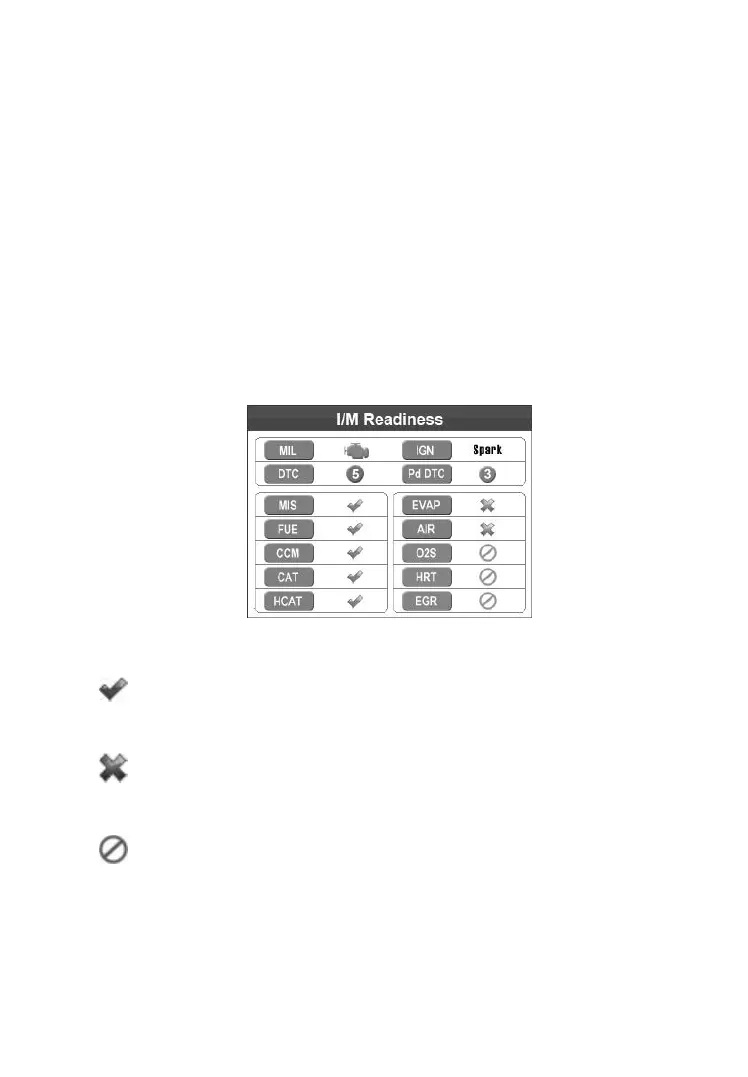
retrieve the I/M readiness status. The screen will show as below.
(Figure 5.33) According to different readiness status, the coloured LEDs
will illuminate and different audio tones will sound.
Figure 5.33
“OK” -- Indicates that a particular monitor being checked
has completed its diagnostic testing.
“INC” -- Indicates that a particular monitor being checked
has not completed its diagnostic testing.
“N/A” -- The monitor is not supported on the vehicle.
The green, yellow and red LEDs provide a quick way to help you
determine if a vehicle is ready for an Emission Test.
The LED and audio tone indications are interpreted as below:



 To Next Page