NOTE: This function reads off the real time data of
emission-related monitoring systems readiness status. Once the scan
tool has finished other operations, for example, clearing trouble
codes, the I/M Readiness Monitor Status program resets status of all
the monitors to “INC” condition. In order to set these monitors to a
Ready status, the vehicle must be driven through a complete drive
cycle. Times for reset vary depending on vehicle. Please refer to
vehicle service manual for drive cycle information.
NOTE: In this function, only ESC button is available. The other
buttons are disabled to prevent misoperation.
6.3 LED and Tone Interpretation
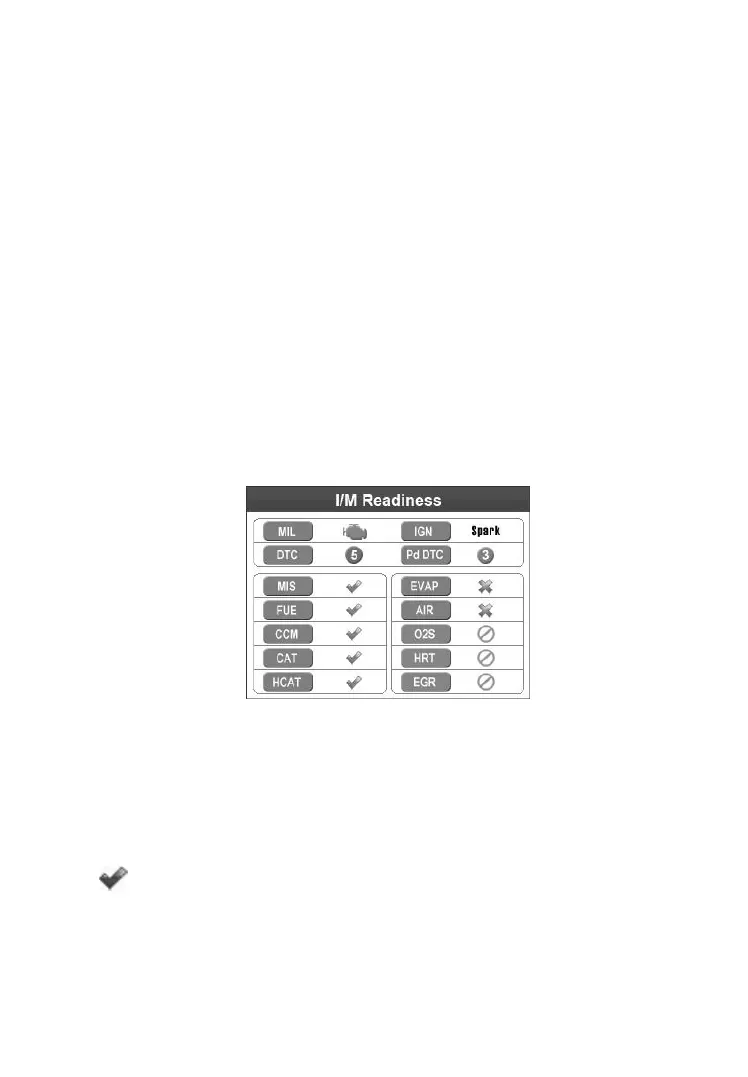
Select Ready Test from the Main Screen and the screen shows as
below, including applicable monitors status, MIL state, Ignition type,
DTCs (stored one and pending one).
Figure 6.2
If the scan tool is idle, it will show the result immediately. If it is busy,
it will wait till the current procedure finished. After viewing the status,
press ESC button to exit.
“OK” -- Indicates that a particular monitor being checked
has completed its diagnostic testing.



 To Next Page