ZIGVIEW
Digital Angle View FinderSECULINE Co., Ltd.
10
Power On and Off / Reset
■ Power On
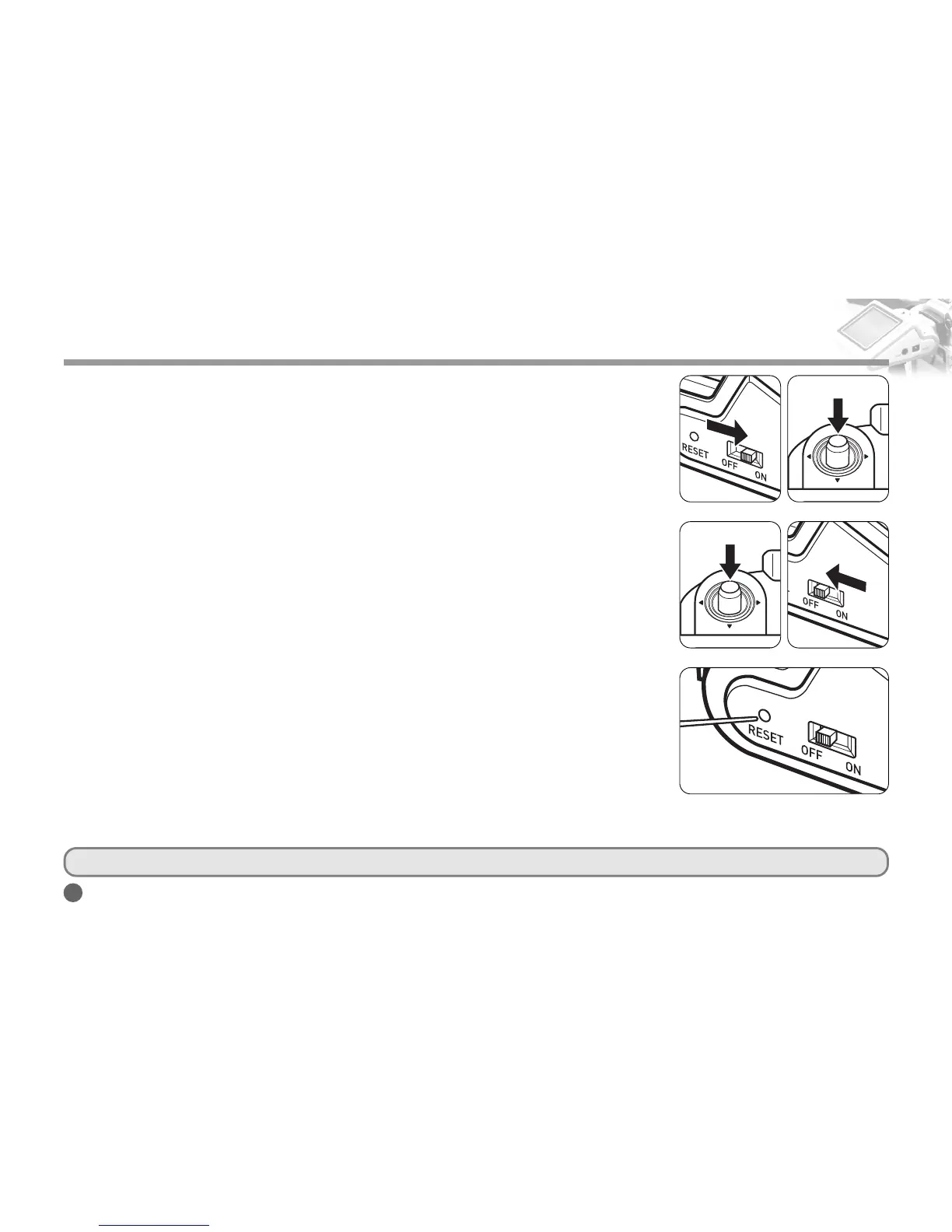
1. Push the power switch to ON.
2. Power and the LCD screen are turned on when you push the Navigation button.
When you turn on the switch first time after purchasing the product, displays are set at
factory values. You can change the values in the Set Mode. If you turn off the switch and
turn it on again while using the product, the previously set values are restored.
■ Standby Mode
1. It is convenient to put the device in standby mode when it is not used temporarily.
In standby mode, it consumes only a little standby current.
2. Pressing and holding the Navigation button in the middle of use will turn off the LCD and
enters standby mode.
3. Pressing the Navigation button in the standby mode will turn on the LCD and enters nor-
mal mode.
■ Power Off
1. Slide the POWER switch towards OFF. It completely turns standby power off.
2. When not using for a long period of time, turn the POWER switch OFF.
■ RESET
Initialize all the functions by pressing the RESET if the product is
malfunctioning or the screen does not change.
Press the RESET hole with a sharp instrument such as a ballpoint pen as
shown in the picture.
Basic Operations
■
The power switch and the RESET button are designed to resist physical force, but excessive force may cause damage on these parts.
<Power On>
<Entering the Standby Mode>
<Exiting the Standby Mode>
<Power Off>
<Reset>



 To Next Page