9
English
PREPARATIONS
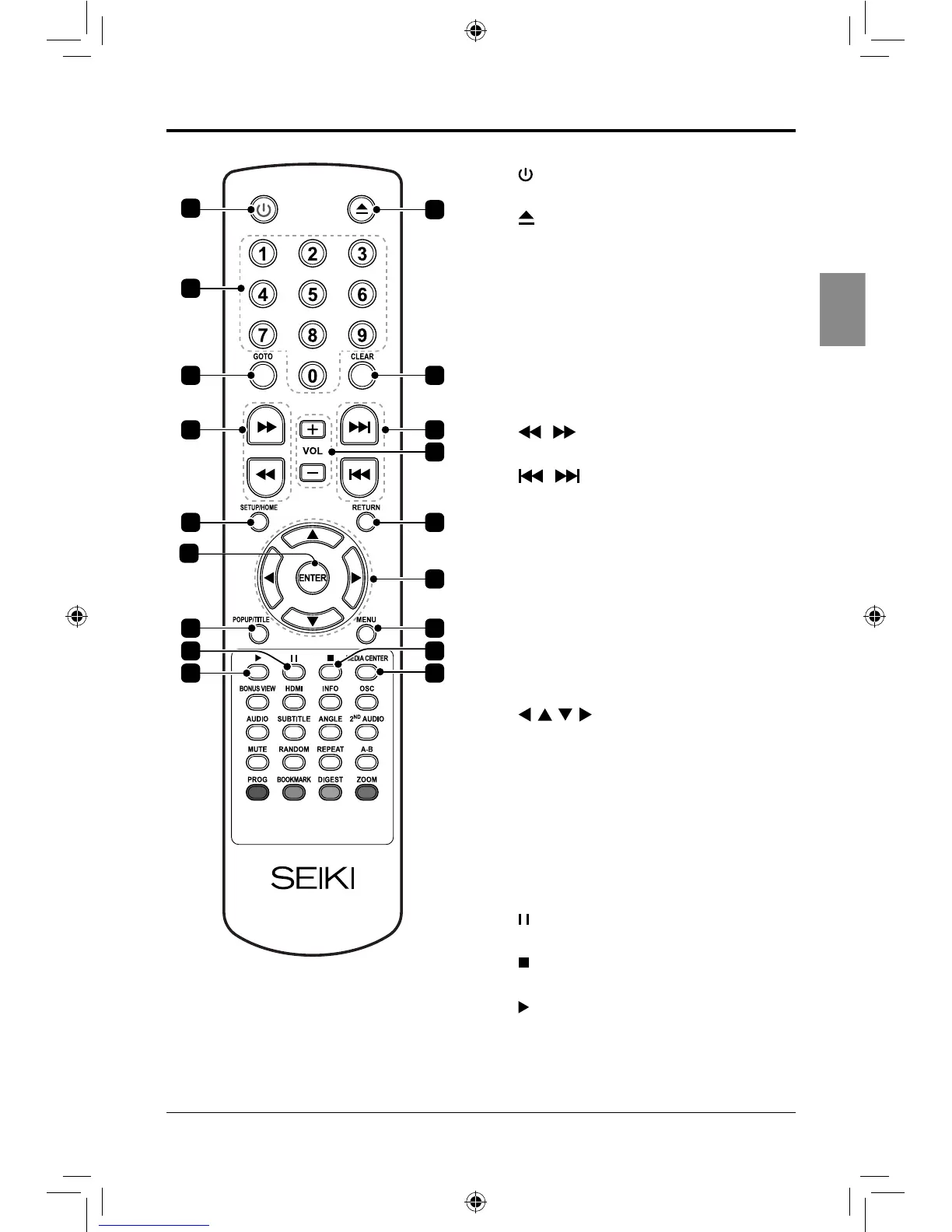
1.
Turn the player on or to standby.
2.
Open or close the DISC TRAY.
3. 0-9
Number keypad.
4. GOTO
Go to a specied track or time on the
loaded disc.
5. CLEAR
Clear number entered by the number
keypad.
6. /
Adjust the speed to play the loaded disc.
7. /
Skip between chapters or tracks on the
loaded disc.
8. VOL +/-
Adjust the volume.
9. SETUP/HOME
Access the setup menu.
10. RETURN
Return to the previous viewing menu.
11. ENTER
Conrm the selection in the OSD menus.
12.
Allow you to navigate the OSD menus
and adjust the system settings to your
preference.
13. POPUP/TITLE
View the popup/title menu on supported
discs.
14. MENU
Return to the main menu of the loaded
DVD.
15.
Pause the loaded disc during playback.
16.
Stop the loaded disc during playback.
17.
Play the loaded disc.
18. MEDIA CENTER
6
9
4
3
1
2
5
7
10
12
14
16
1817
13
15
8
11
SEIKI Blu-ray Manual V01.indd 9 2012-8-14 15:02:04



 To Next Page