10
English
PREPARATIONS
24
22
23
21
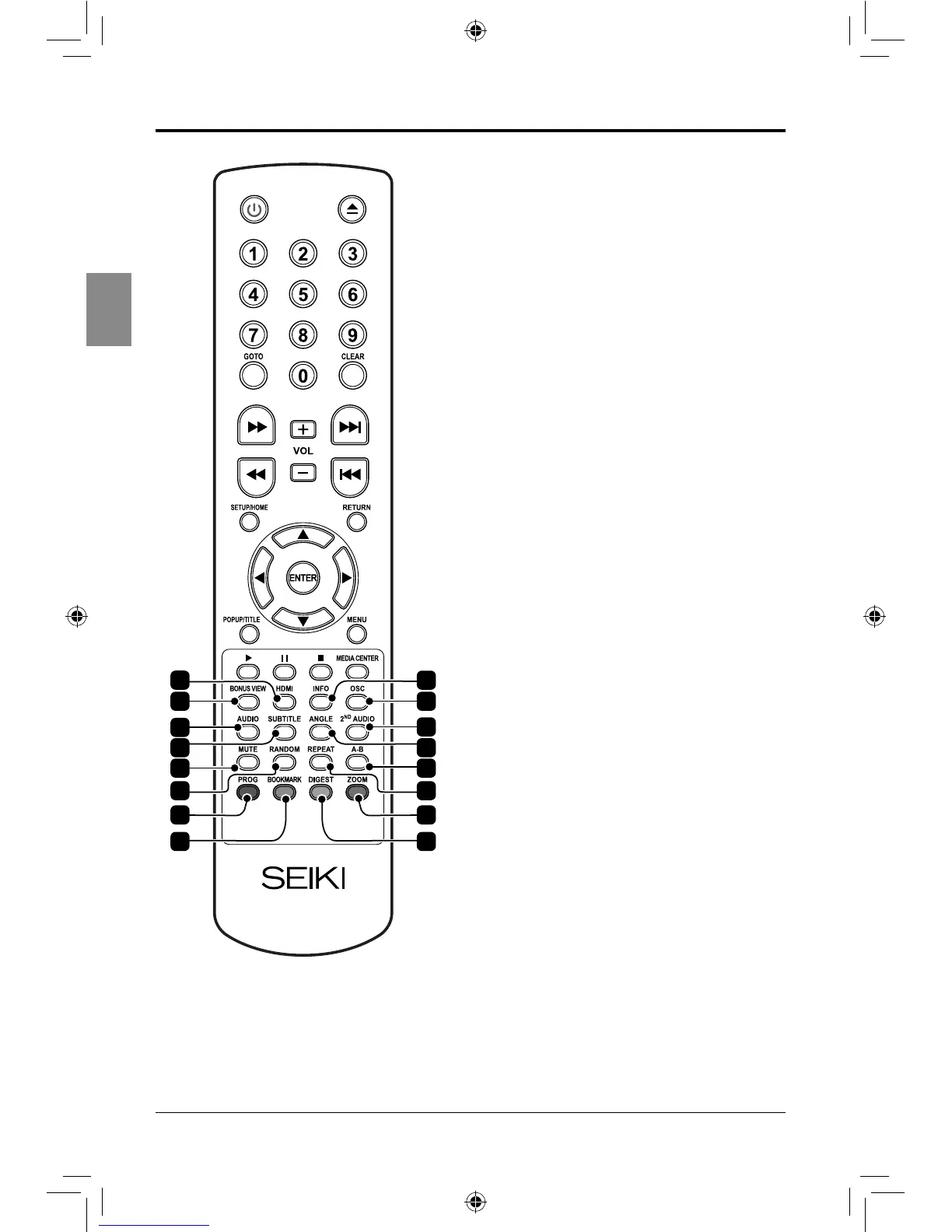
Open or close the Media Center.
19. HDMI
Press repeatedly to adjust the resolution.
20. INFO
Display the loaded disc information.
21. BONUSVIEW (BD only)
View multiple videos (picture in picture)
simultaneously on supported discs.
22. OSC
View the on-screen controls.
23. AUDIO
Select available audio settings on the
loaded disc.
24. 2
ND
AUDIO
Activate secondary audio language on
the loaded disc.
25. SUBTITLE
Select available subtitle settings on the
loaded disc.
26. ANGLE
View alternate angle on supported discs.
27. MUTE
Mute and restore the sound.
28. A-B
Repeat a selected section.
29. RANDOM (CD or DVD only)
Play chapters or tracks on the loaded
disc in random order.
30. REPEAT
Select to repeat the current track, chapter
or entire disc.
31. PROG
Program the loaded disc to play chapters
or tracks in a specied order.
32. ZOOM
Press repeatedly to adjust the level of
zoom on the loaded disc.
33. BOOKMARK
Bookmark a specic time on the loaded
disc.
34. DIGEST (BD, JPG Discs Only)
View additional information on supported
blu-ray disc or return to the picture list.
19
20
2625
27 28
29 30
3231
33 34
SEIKI Blu-ray Manual V01.indd 10 2012-8-14 15:02:04



 To Next Page