U.4.70
SEL-421/SEL-421-1 Relay User’s Guide Date Code 20020501
Basic Relay Operations
Configuring High-Accuracy Timekeeping
page 4.10 to change the default access level passwords. Also, you should be
familiar with the
ACSELERATOR software. See Section 3: PC Software in the
User’s Guide.
Step 1. Configure the communications port. Start the
ACSELERATOR
software. On the top toolbar, open the Communication menu,
and then click Port Parameters. You will see the Port
Parameters dialog box similar to Figure 4.8. Select the Data
Speed, Data Bits, Parity, and Stop Bits that match the relay
settings. Defaults are 9600, 8, N, 1, respectively. Click OK to
update the
ACSELERATOR software communications
parameters. Confirm that the Communications Status bar at the
bottom of the
ACSELERATOR window says “Connected.”
Step 2. Confirm the correct
ACSELERATOR software passwords.
Reopen the Communication menu and click Port Parameters.
Enter your Access Level 1 password in the Level One
Password text box, and your Access Level 2 password in the
Level Two Password text box. Click the OK button to accept
changes and close the dialog box.
Step 3. Read the present configuration in the SEL-421 Relay. On the
Settings menu, click Read. The relay sends all configuration
and settings data to the
ACSELERATOR software.
Step 4. Access the protection free-form SEL
OGIC settings. Click on the
+ mark next to Group 1 in the Settings tree view. Click the
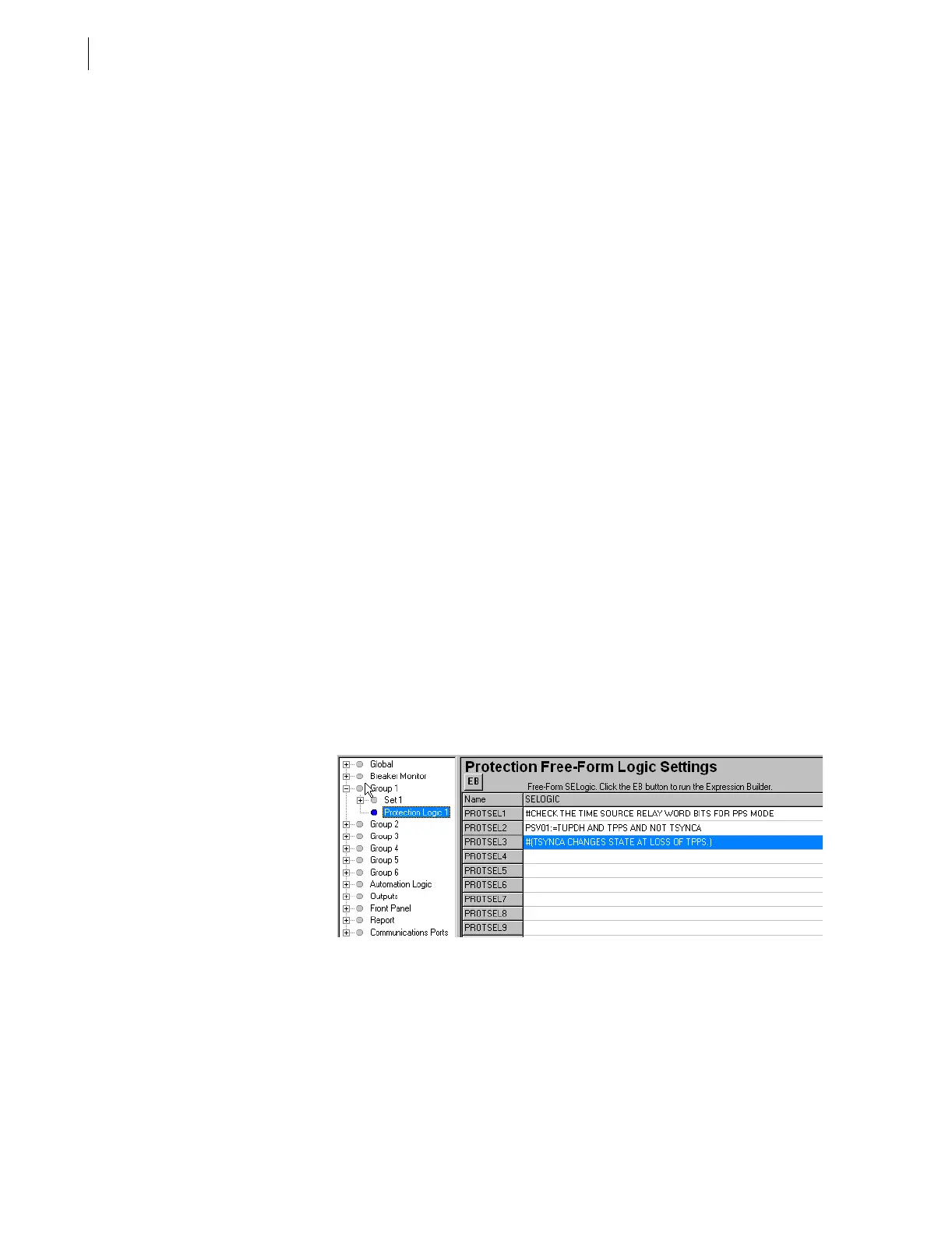
Protection Logic 1 settings (See Figure 4.64).
Step 5. Set a PSV. Enter the three lines of SEL
OGIC control equation
programming in the Protection Free-Form Logic Settings
shown in Figure 4.64. Comments begin with the # character;
see Fixed SEL
OGIC Control Equations on page R.3.5 in the
Reference Manual.
Figure 4.64 Programming a PSV in the ACSELERATOR Software.
Step 6. Configure a control output to alarm a loss of PPS mode. In the
Settings tree view, double-click Outputs and then click Main
Board (See Figure 4.65). In the Main Board Outputs OUT108
text box, enter the PSV01 condition to the preexisting OUT108
:= NOT (SALARM OR HALARM) equation, as shown in
Figure 4.65.


 To Next Page