U.4.71
Date Code 20020501 User’s Guide SEL-421/SEL-421-1 Relay
Basic Relay Operations
Configuring High-Accuracy Timekeeping
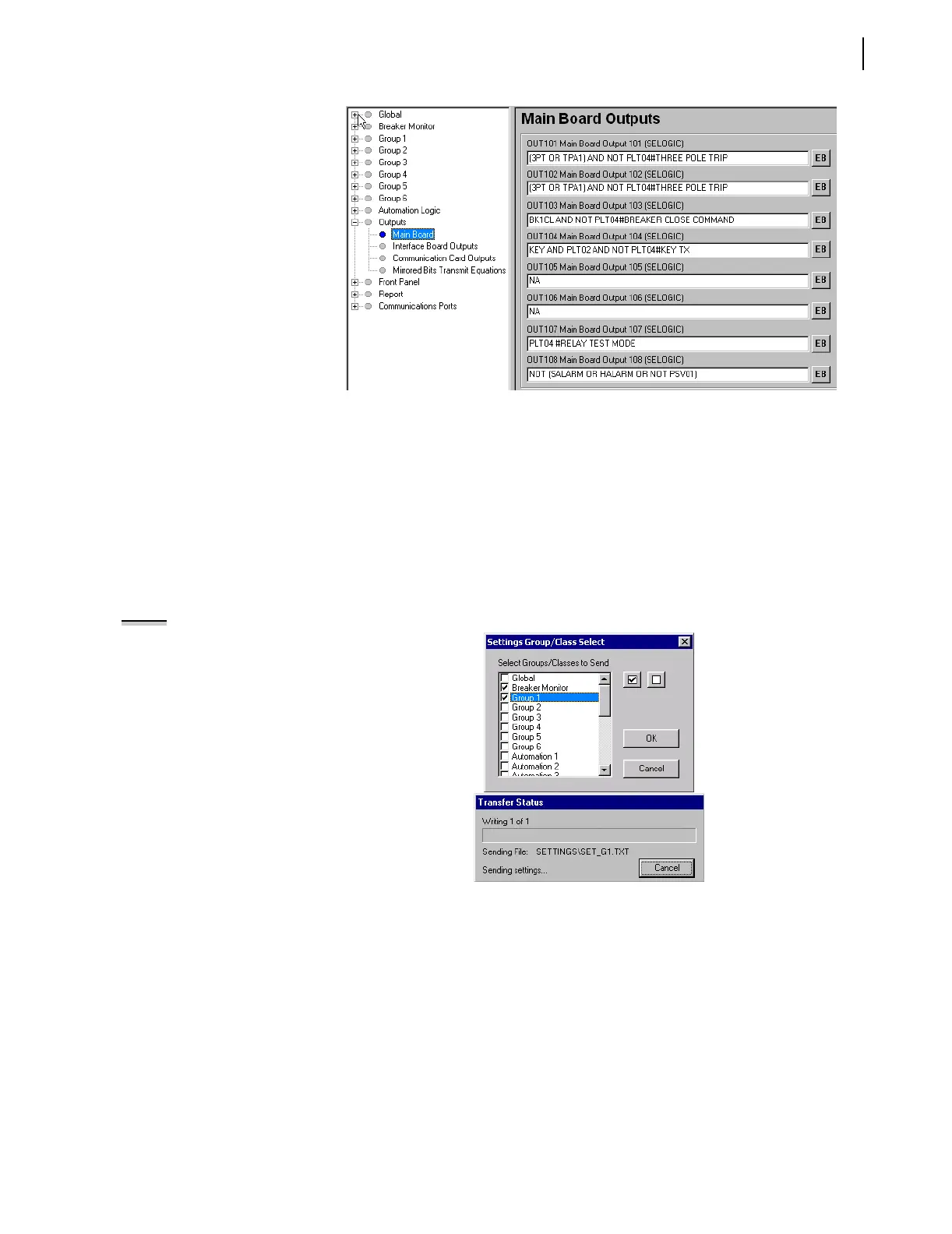
Figure 4.65 Setting OUT108 in the ACSELERATOR Software.
Step 7. Save the new settings in the ACSELERATOR software. On the
File menu, click Save.
Step 8. Upload the new settings to the SEL-421 Relay. On the File
menu, click Send. The
ACSELERATOR software prompts you
for the settings class or instance you want to send to the relay.
Click the check box for Group 1 and the check box for Breaker
Monitor, as shown in the first dialog box of Figure 4.66. Click
OK. The
ACSELERATOR software responds with a display
similar to the second dialog box of Figure 4.66. If you see no
error message, the new settings are loaded in the relay.
NOTE: The Relay Editor dialog boxes
shown in Figure 4.66 are for the
SEL-421 Relay. The SEL-421-1 Relay
dialog boxes are similar.
Figure 4.66 Uploading Group 1 and
Breaker Monitor Settings to the SEL-421 Relay.
To confirm that you have prepared an out-of synchronization/loss of PPS
mode alarm, disconnect the PPS input. The relay alarm will activate.



 To Next Page