EasyManua.ls Logo

SELTEX V350 - AC Cable Wiring; Connecting AC Power Cable

SELTEX V350
20 pages
Print Icon
To Next Page IconTo Next Page
To Previous Page IconTo Previous Page
Loading...
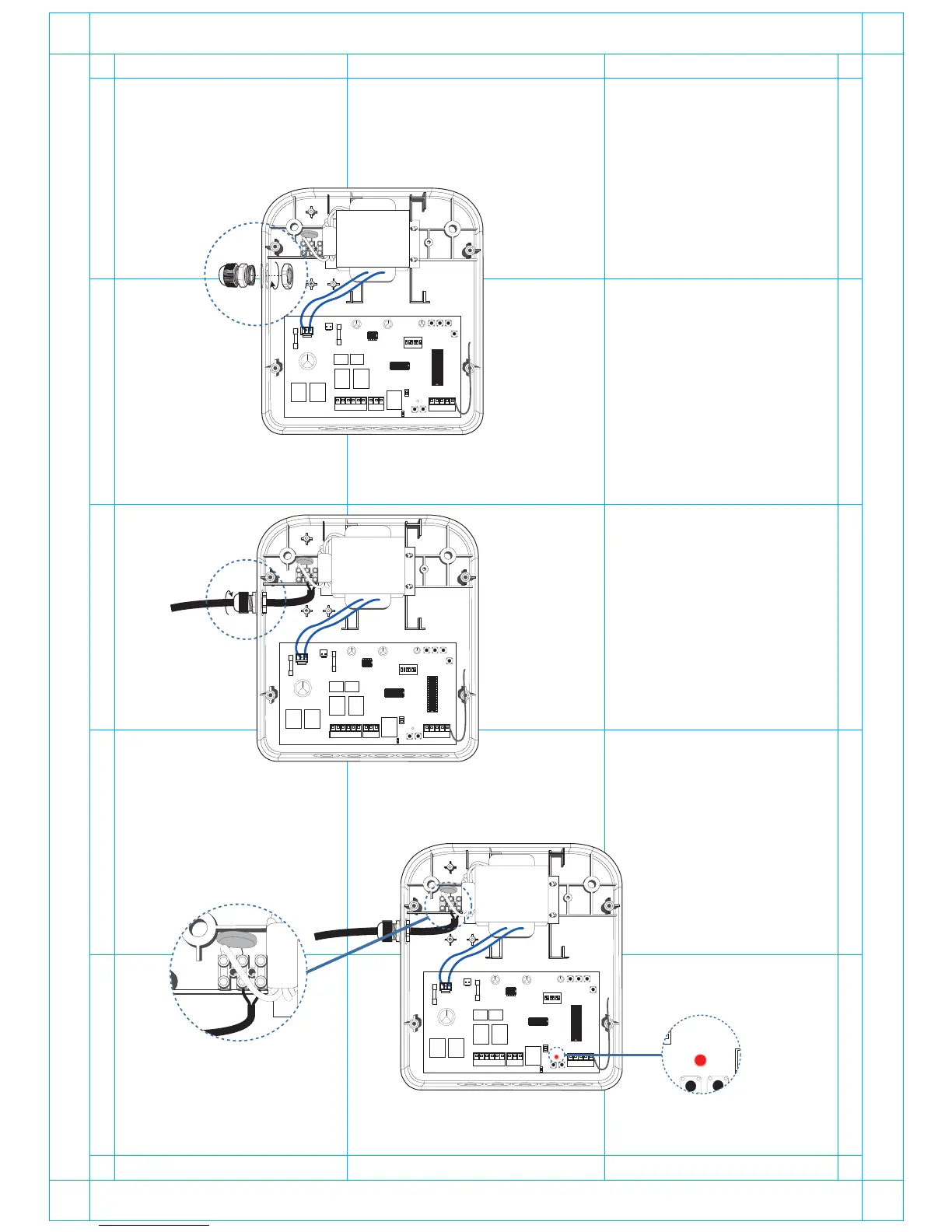
2. AC cable goes at the left side of the control box through the wire conduit.
AC12V
Auto ClearRF2
J1
O / C
LED1
BAT
- +
1 2 3 4 5 6
ON
Lamp
RF1
DIP
LED O/C1 O/C2 GND ANT
-
M2
+
-
M1
+ -
Warm
+
+12V
COM
GND
NC
Connect the AC cable as shown below.
1. Mount the wire conduit at the left side of the control box.
AC12V
Auto ClearRF2
J1
O / C
LED1
BAT
- +
1 2 3 4 5 6
ON
Lamp
RF1
DIP
LED O/C1 O/C2 GND ANT
-
M2
+
-
M1
+ -
Warm
+
+12V
COM
GND
NC
AC cable wiring:
AC12V
Auto ClearRF2
BAT
- +
1 2 3 4 5 6
ON
RF1
DIP
3. Connect the AC plug to the power and check th if the LED on the board is ON.
9
AC12V
Auto ClearRF2
J1
O / C
LED1
BAT
- +
1 2 3 4 5 6
ON
Lamp
RF1
DIP
LED O/C1 O/C2 GND ANT
-
M2
+
-
M1
+ -
Warm
+
+12V
COM
GND
NC
AC12V
Auto ClearRF2
J1
O / C
LED
BAT
- +
1 2 3 4 5 6
ON
Lamp
RF1
DIP
LED O/C1 O/C2 GND ANT
-
M2
+
-M1+ -
Warm
+
+12V
COM
GND
NC
*If the LED is ON, remove the AC plug, and put back the cover of the transformer.