31
GB
Installation
4.3. Initial operation
In order that the drive moves properly and can move to the interme-
diate position, the runtime of the connected drive has to bet set
during putting into operation!
Note: As long as the runtime has not been set, the extensions are
deactivated! Via the local operation on the device there is the possi-
bility of setting the runtime at that time!
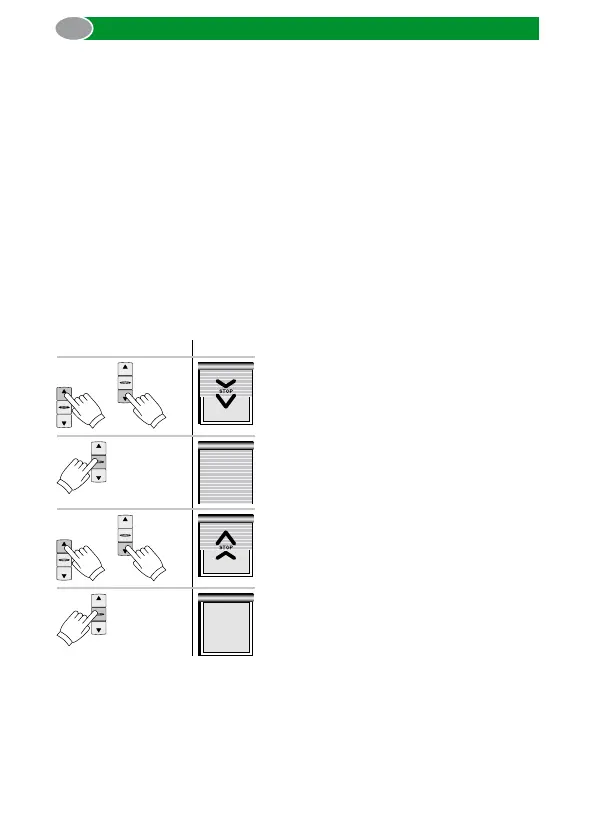
4.3.1. Runtime setting
A one-time moving interruption when moving up and down as well as
an orange flashing status LED signalize the setting of the runtime.
Note: The runtime calculation for the commeo Control must be exe-
cuted without voltage interruption. When the voltage will be inter-
rupted during the setting, you must start over with the first step!
Operation Drive
or
Move the blind to the lower end posi tion
with the UP or DOWN button.
3 s
Press the STOP button of the transmitter for
3 seconds to save the lower end limit positi-
on.
or
Move to the upper end position.
3 s
Press the STOP button of the transmitter
for 3 seconds to save the upper end limit
position. Perform a test run.
Note: Alternatively the runtime setting can also be done with a com-
meo transmitter in the SELECT mode.



 To Next Page