27
GB
Setting of the end positions
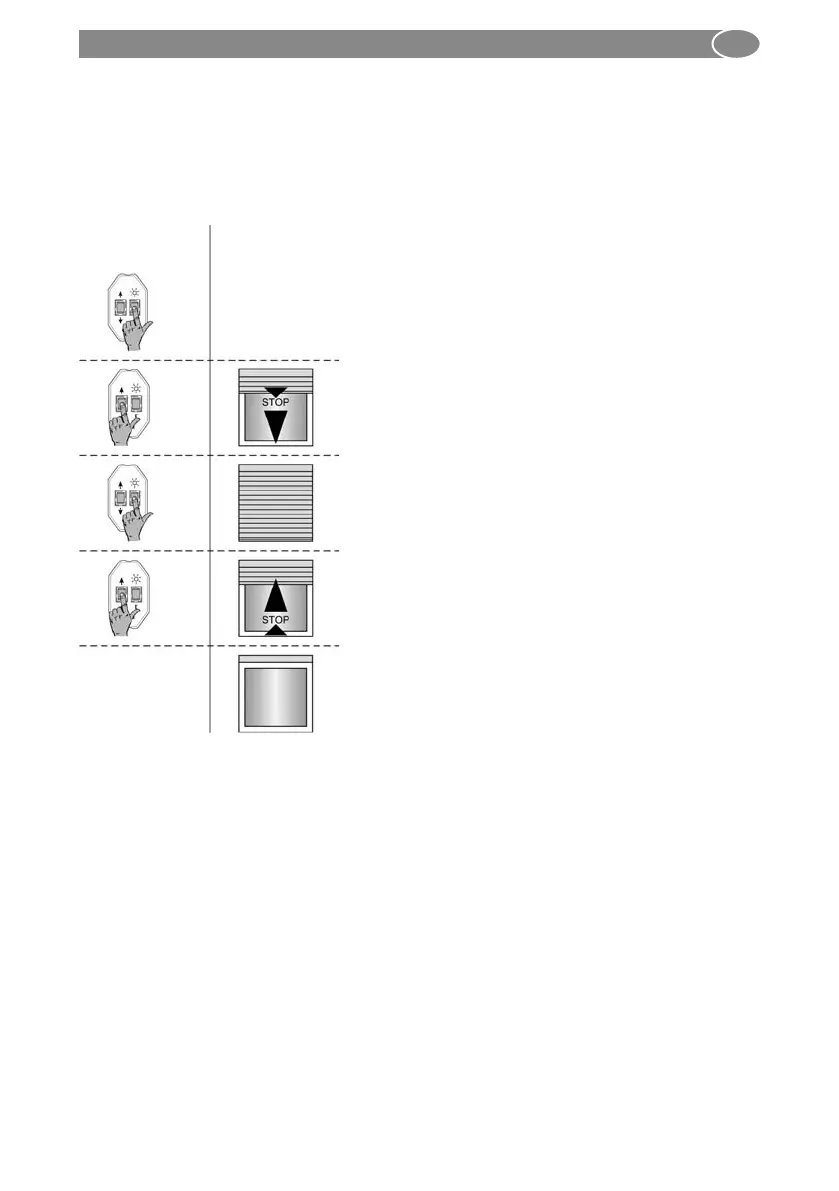
4.4.3. Manual setup-mode, bottom position – top stop
¨ in operation: bottom position, top stop/relief
When the movement is interrupted once, the system is in manual setup-mode.
In manual setup-mode, the lower end position must be set and stored first. Afterwards,
the upper end position can be set and stored. Drive against the top stop until the drive
is automatically switched off.
Auto-Stop
3 sec.
6 sec.
1. Press the E button of the setting cable
for 6 se conds.
2. Move the drive to the lower end posi-
tion with the UP or DOWN button. Press
the E button for 3 seconds The correct
rotation direction assignment will be
carried out at the end of the end po sition
setting.
3. Move against the top stop; the drive will
stop automatically.
4. The end positions are now set and the
rotation direction assignment is correct.
Perform a test run.
Drive
movement
Setting with
setting switch



 To Next Page