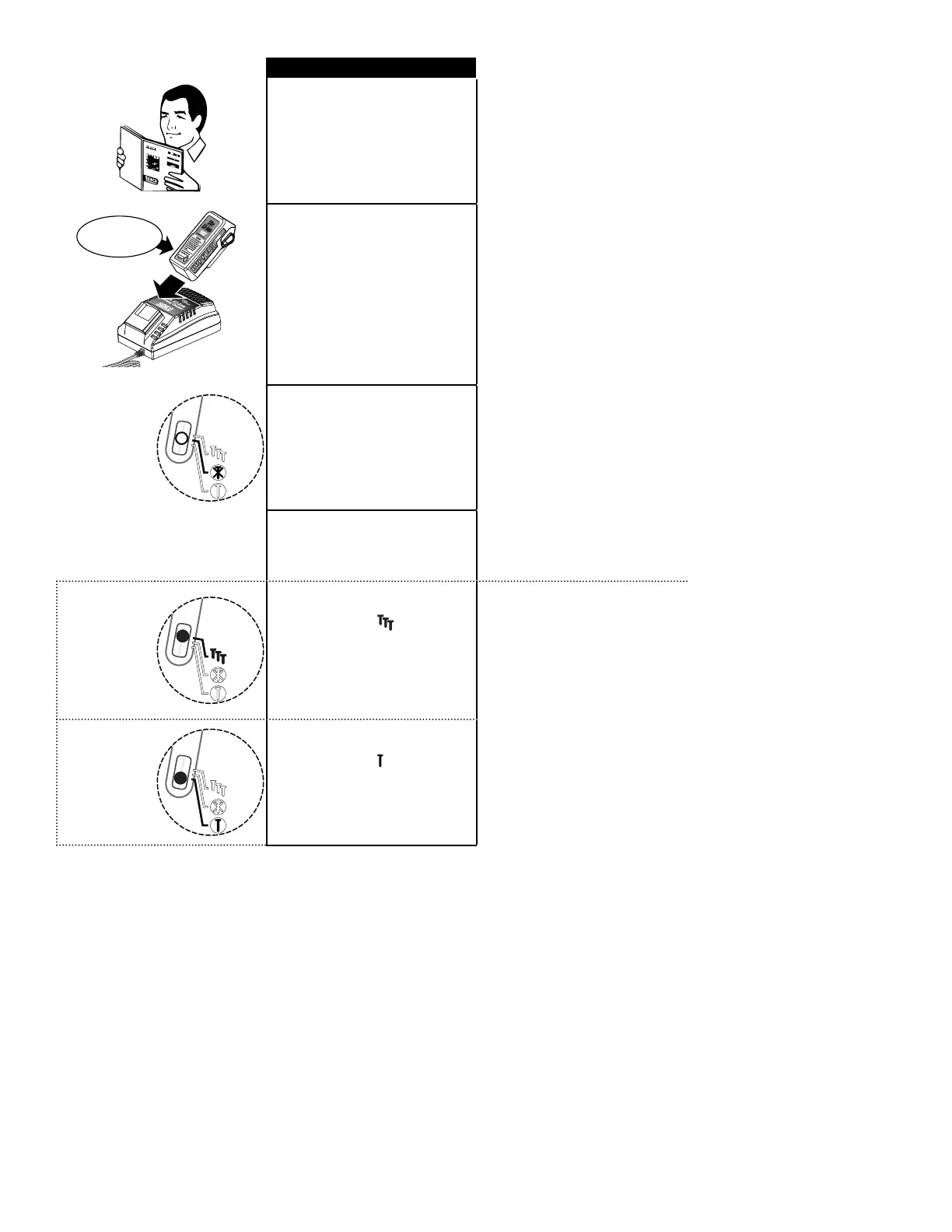
Read section titled “Safety Warn-
ings,” before using tool.
For best results, charge new bat-
tery before using. (see “To Charge
Battery” page 20).
» Indicator LED
OFF
» LED indicador–
Apagado
» Voyant DEL–
éteint
The tool should be switched off
when not in use. Hold down either
side of the selector switch for 1
second to turn the tool off. If left on,
the tool will automatically turn off
after 35 minutes.
All Fusion tools are equipped with
selective-actuation triggering. This
allows the user to choose between
the following modes of operation:
» Indicator LED
ON – Flash-
ing
» LED indicador–
Encendido y
titilando
» Voyant DEL–
clignotant
Pressing the side of the selector
switch toward the
symbol (as
shown) for 0.5 sec. will turn the tool
on in contact-actuation mode. This
is indicated by the ashing green
LED of the selector switch.
» Indicator LED
ON Solid
» LED indicador–
En modo
secuencial
sólido
» Voyant DEL–
non cligno-
tant
Pressing the side of the selector
switch toward the
symbol (as
shown) for 0.5 sec. will turn the
tool on in sequential mode. This is
indicated by the solid green LED of
the selector switch.
16


 To Next Page