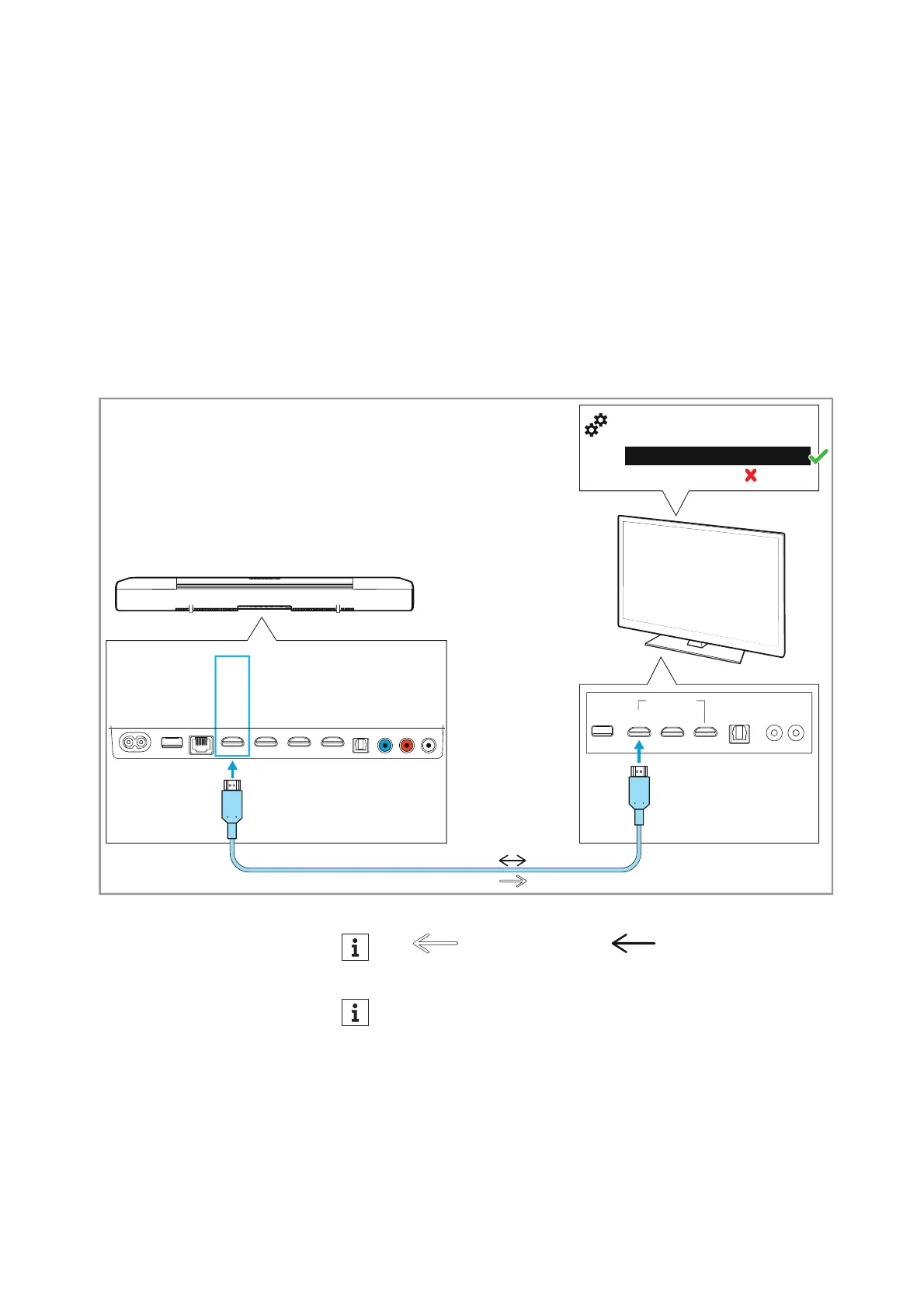
Connecting devices to the AMBEO Soundbar
20 | AMBEO Soundbar
Connecting a TV
Connection to the HDMI eARC socket (recommended)
• Required cable: High Speed HDMI
® Cable (supplied)
To connect the Soundbar to a TV with an HDMI IN socket labeled
“A
RC/eARC”:
▷ Connect one connector of the supplied high-speed HDMI cable to
the HDMI TV (eARC) OUT socket on the Soundbar.
▷ Connect the other connector of the cable to the HDMI (eARC) IN
socket of your TV.
▷ Please note the settings of your devices > 19.
AUX IN
SW PRE
OUT
OPT IN
HDMI 3 IN
HDMI 2 IN
HDMI 1 IN
HDMI TV
(eARC) OUT
ETHERNET
USB
POWER
HDMI IN
High Speed HDMI Cable *
*
eARC
Auto/Bypass/Pass-Through
Downmix/Stereo
TV/Player sound menu
*
:
HDMI Audio OUT/Optical OUT
*
Video signal Audio signal
TV sets with an “ARC” output (not “eARC”) can transmit sur-
round formats only to a limited extent.











 To Next Page