51
11 LC display panel
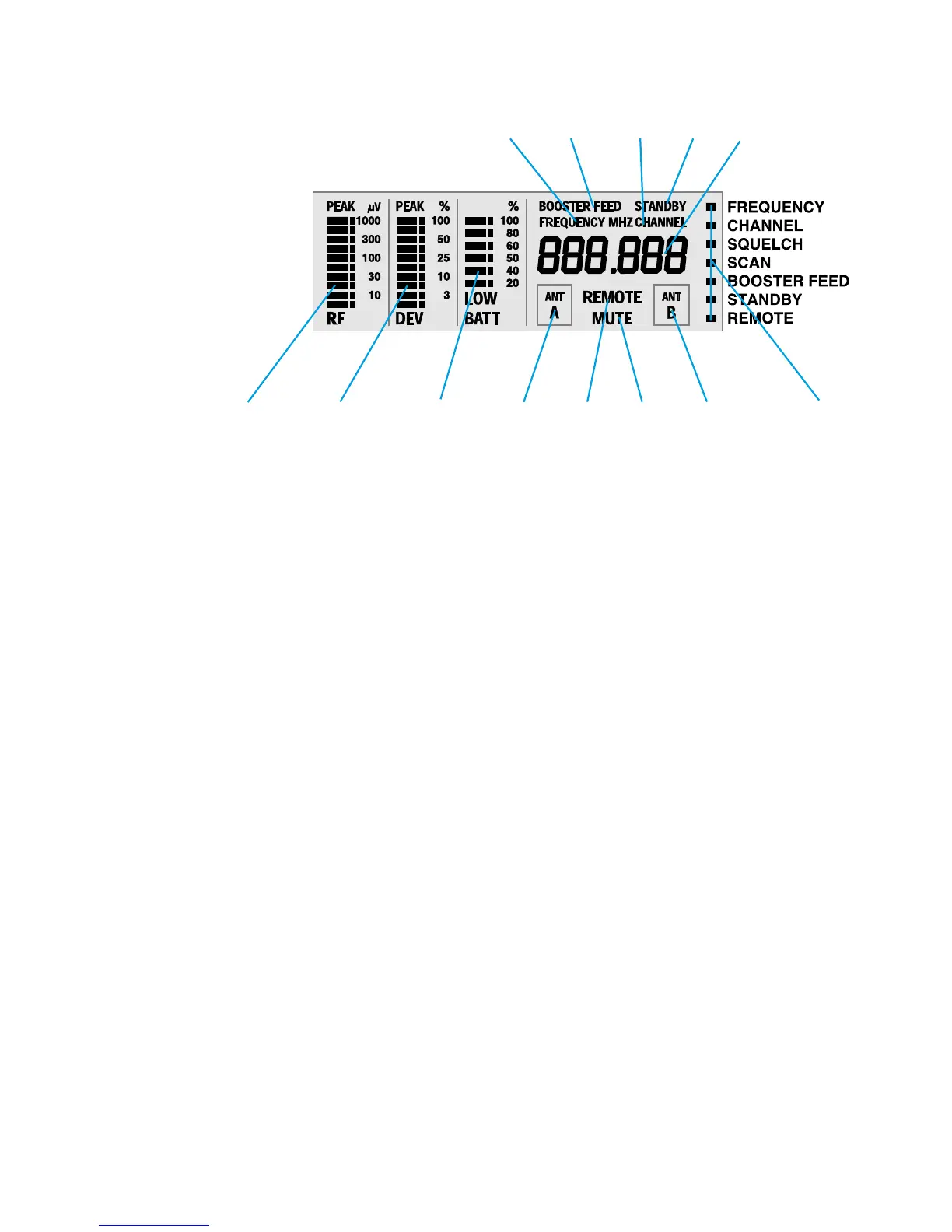
Display for the “FREQUENCY” menu. This display can be the receiver’s standard display
which always appears after switch-on.
Display for the “BOOSTER FEED” menu.
Display for the “CHANNEL” menu. This display can also be the receiver’s standard
display which always appears after switch-on.
Display for the “STANDBY” menu.
Alphanumeric main display, indicates the settings that can be adjusted in the menus.
Ten-step bargraph for the received RF signal, with overmodulation display (Peak).
Ten-step bargraph for the received AF signal,
with overmodulation display (Peak) and “peak hold”.
Six-step bargraph for the transmitter battery status (in %) and
“LOW BATT” display if transmitter battery is going flat.
Antenna A is currently receiving (diversity selection).
Display for the “REMOTE” menu.
Reception is muted, “MUTE”.
Antenna B is currently receiving (diversity selection).
Menu selection with display via LC dots.







 To Next Page