Using the EM 300-500 G4
74
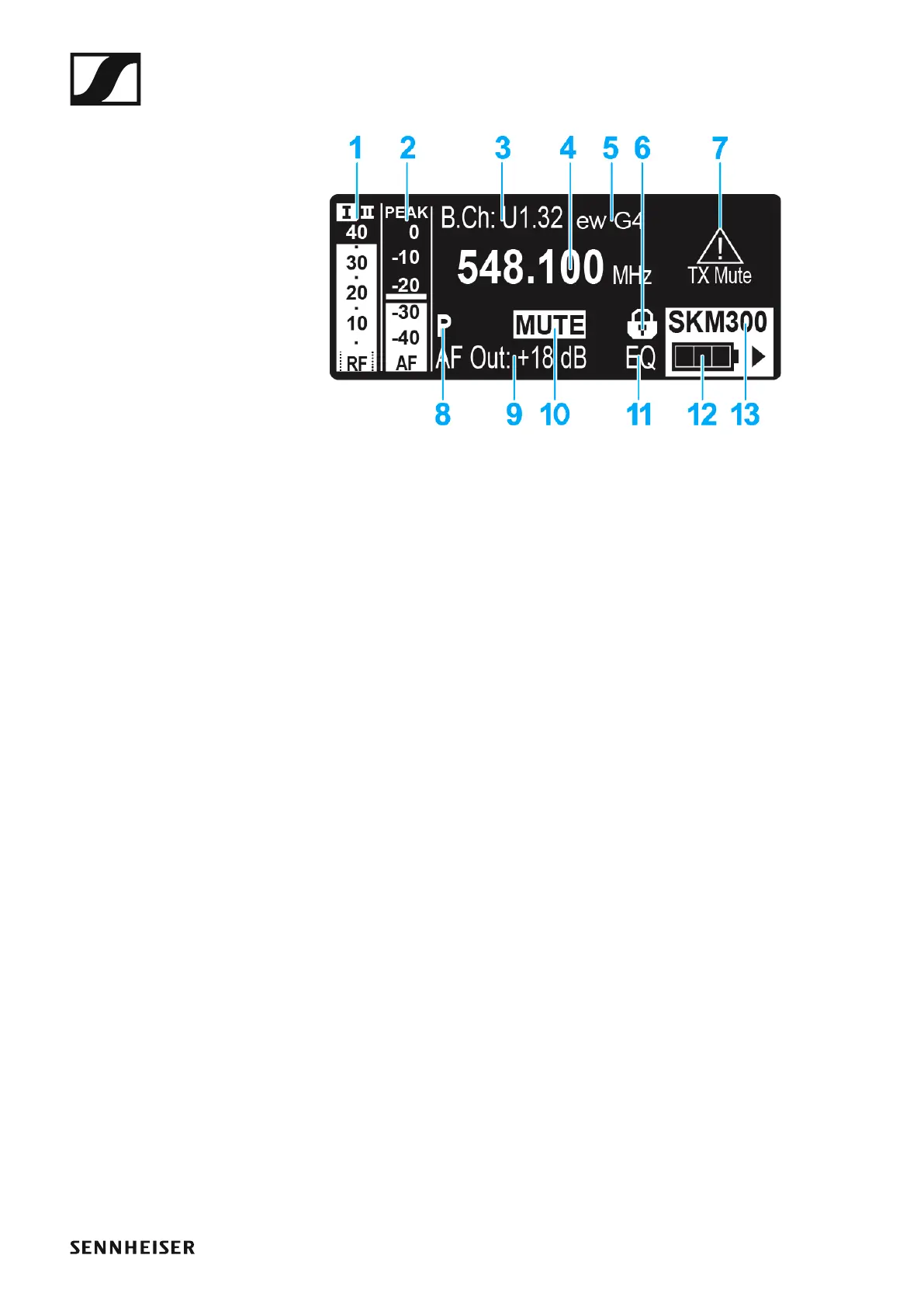
Receiver Parameters standard display
►
1 RF RF level (radio frequency)
• RF signal level display
• including the display of the squelch threshold (see “Squelch menu
item”)
2 AF audio level (audio frequency)
• Displays the audio level of the received transmitter
When the display shows full deflection, the audio input level is exces-
sively high. When the transmitter is overloaded frequently or for ex-
tended periods of time, the PEAK display is shown inverted.
• See “AF Out menu item”
3 Frequency bank and channel
• Current frequency bank and channel number
• See “Frequency Preset menu item”
4 Frequency
• Current receiving frequency
• See “Frequency Preset menu item”
5 Name
• Freely selectable name of the receiver
• See “Name menu item”
6 Lock-off function
• Lock-off function is activated on the receiver
• See “Lock-off function”
7 Warnings
• Activated warning messages are displayed
• See “Advanced -> Fullscreen Warnings menu item”
8 P pilot tone
• Activated pilot tone evaluation
• See “Advanced -> Pilot Tone menu item”
9 Output gain
• Current output gain of the audio frequency signal at the 6.3 mm sock-
et / XLR socket
• See “AF Out menu item”



 To Next Page