SP 30 | SP 30 + Bluetooth Speakerphone
SETTING UP THE SPEAKERPHONE9
C: Pairing the Speakerphone and a mobile device via Bluetooth®
1
2s
2
2s
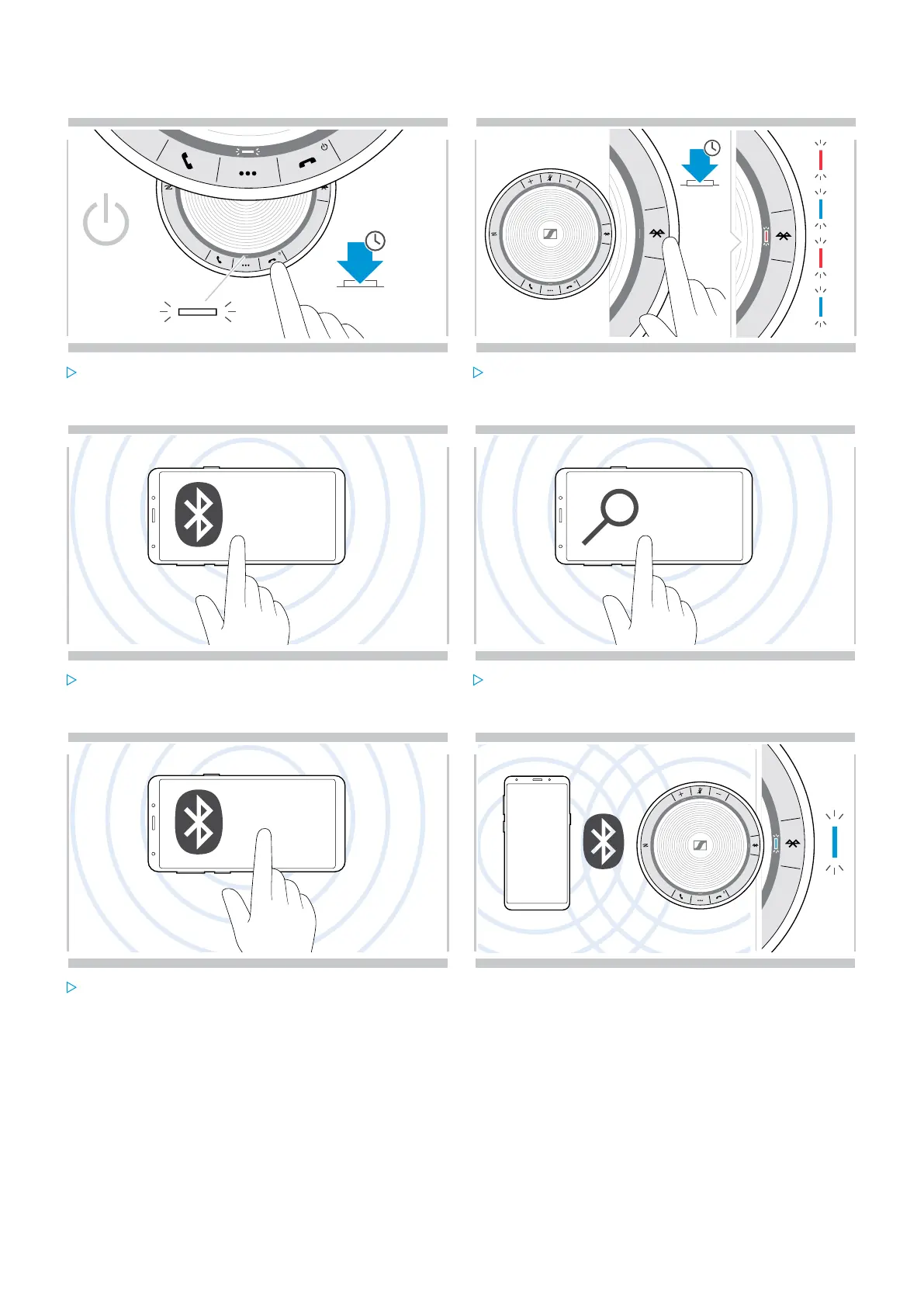
Press and hold the Power on/off button to turn on the
speakerphone.
The LED lights up white.
Press and hold the Bluetooth button until the LED
flashes blue and red.
The speakerphone is in pairing mode.
Bluetooth®
3
...
4
Enable the Bluetooth visibility on your mobile device
(see instruction manual of your mobile device).
Start a search for Bluetooth devices.
All available devices in the proximity of the mobile
device are displayed.
.....
.....
Sennheiser SP 30
.....
5 6
Select “Sennheiser SP 30*” to establish a Bluetooth
connection to the speakerphone.
* You can change the default name “Sennheiser SP 30”
via HeadSetup™ Pro.
Once the speakerphone is paired with the mobile phone,
the LED lights up blue.


 To Next Page