SP 30 | SP 30 + Bluetooth Speakerphone
USING THE SPEAKERPHONE 14
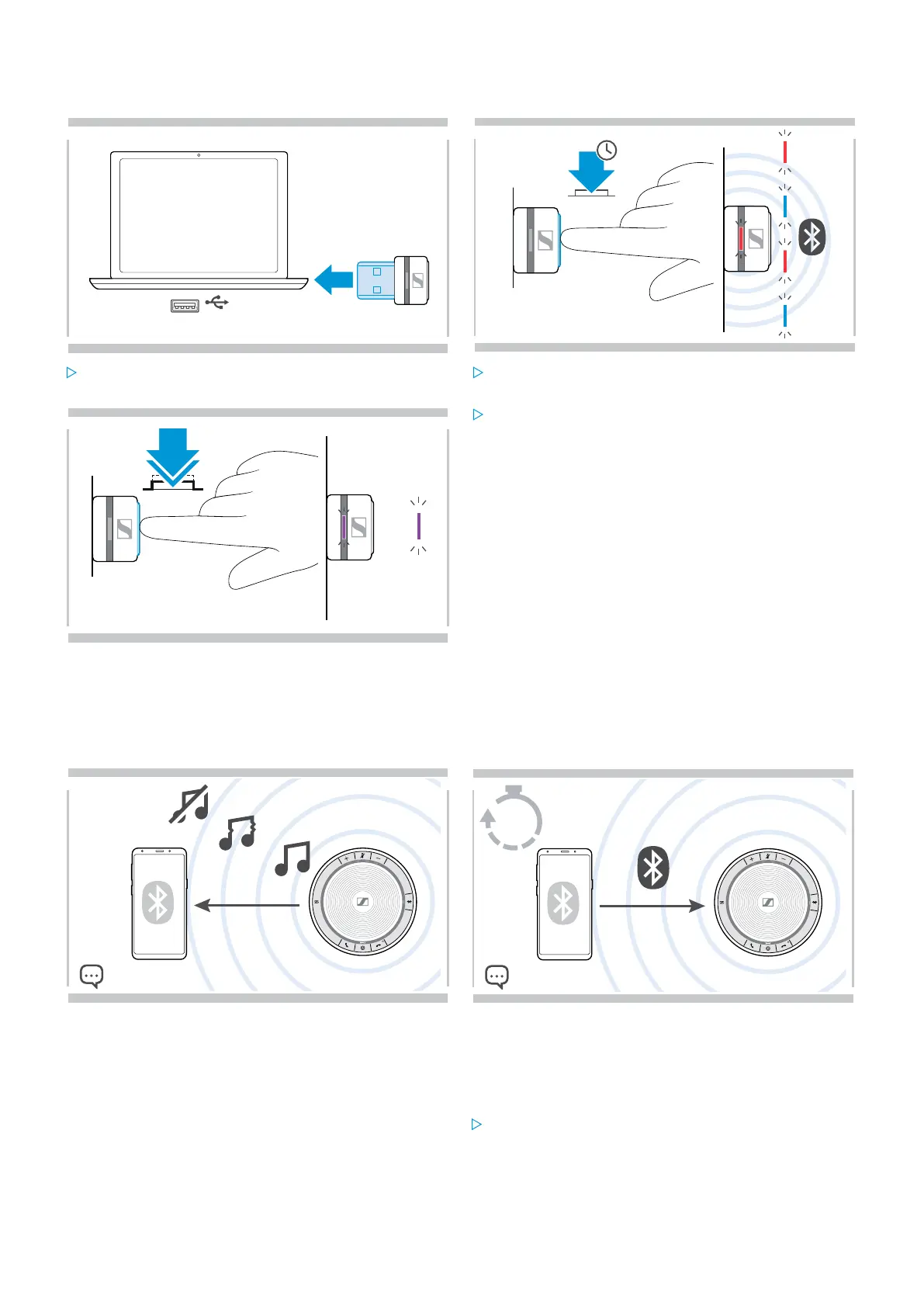
Clearing the dongle’s pairing list
1
USB-A
3s
2
Plug the dongle into the USB port of your computer. Press and hold the button until the LED flashes blue
and red.
3x
2x
3
Double tap the button.
The LED flashes purple three times to indicate that
pairing list is cleared.
The dongle automatically enters pairing mode.
Bluetooth® transmission range
Calling and audio playback is only possible in the Bluetooth transmission range of the devices. The transmission range
largely depends on environmental conditions such as wall thickness, wall composition etc. With a free line of sight, the
transmission range of most mobile phones and Bluetooth devices is up to 25 meters.
5min
If you leave the Bluetooth transmission range, the audio
quality deteriorates first and later connected devices will
be disconnected.
If you re-enter the Bluetooth transmission range within
short period of time, the speakerphone will attempt to
restore the connection(s) – in personal mode only.
If you spend a longer period of time outside the Bluetooth
transmission range:
Press the Bluetooth button to connect manually.


 To Next Page