SP 30 | SP 30 + Bluetooth Speakerphone
ADDITIONAL FUNCTIONS22
Additional functions
Switching between Bluetooth® personal and shared mode
If the speakerphone is used as a personal device it will automatically attempt to connect to the last eight paired
devices. In this setup the Personal Mode (default) should be used.
If the speakerphone is used as a shared device automatic connection to previously paired devices may not be desired.
In this setup the Shared Mode should be used. In this mode pairing must be performed every time when connecting a
device via Bluetooth.
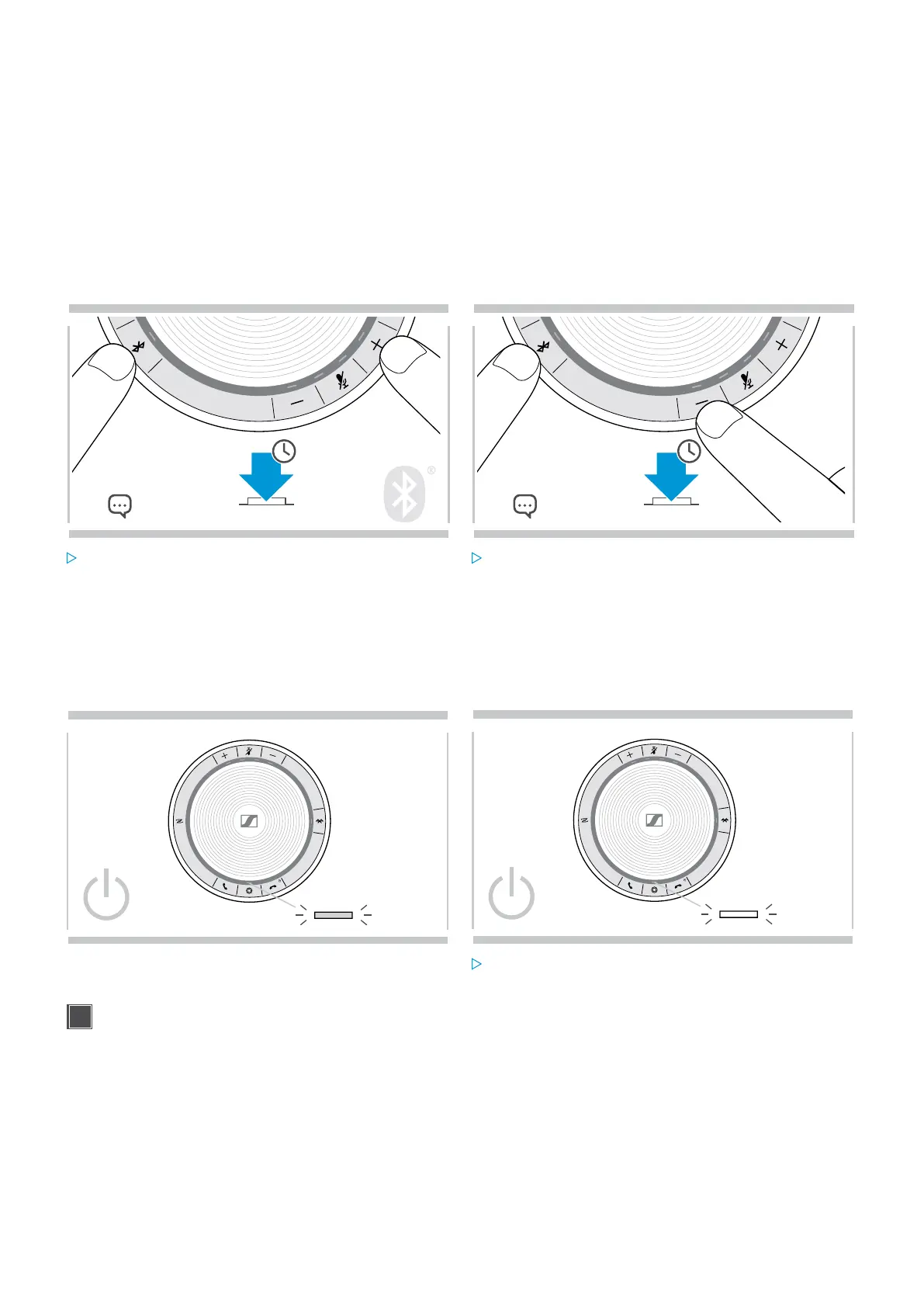
Activating Personal mode Activating Shared mode
2s
A
2s
B
Press the Bluetooth and + button.
A voice prompt is announced.
Press the Bluetooth and – button.
A voice prompt is announced.
After change of mode, the pairing list is cleared and you have to pair devices again (see page 7).
Waking up from standby
The speakerphone enters standby mode automatically after some time to save energy – depends on connection status,
activity etc.
zzz
While in standby the activity LED is dimmed and all other
LEDs are off.
Press any button or plug in USB to end the standby
mode.
After a while in standby mode, the speakerphone turns off, if there are no active connections and not connected
to a power source.


 To Next Page