Chapter 3: Installing the RTM II 13
RTM II FlexNet User Guide DUG-10009-01
3.3 Troubleshooting Radio Communications
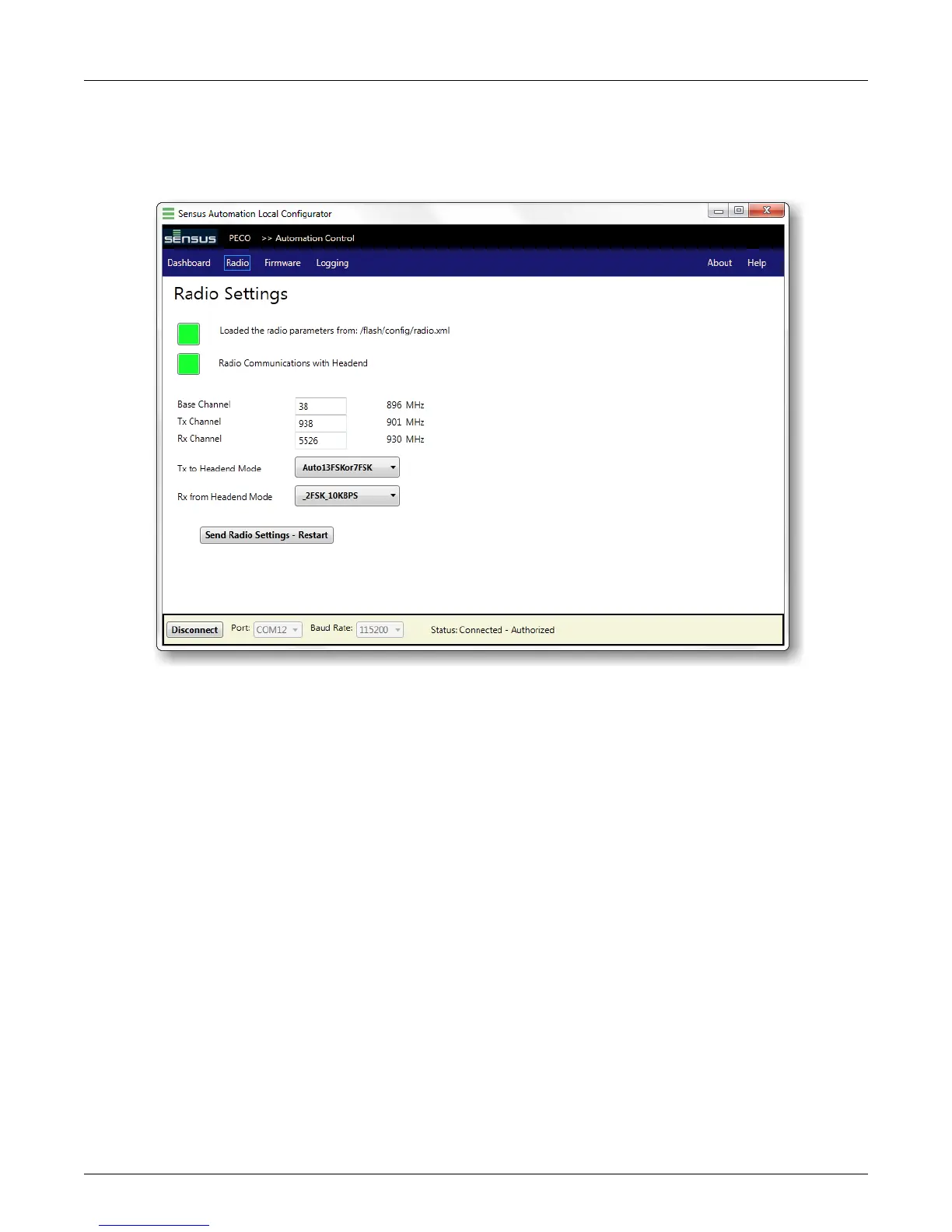
In the Automation Device Configurator software, click the Radio tab to verify that the correct radio
settings are entered for your Sensus Automation FlexNet channels.
If the following items are red, try the solution listed.
◦ Loaded the radio parameters from: Shows the location of the file containing the radio settings.
If the file cannot be found, contact your system administrator or Sensus Automation Technical
Support.
◦ Radio Communications with AutomationControl: The Sensus device is not communicating
with AutomationControl through the base station. Verify these communication settings are
correct.
◦ Send Radio Settings - Restart: If this button is red, it means no radio parameters are loaded.
Contact your system administrator for the correct settings.
You may need to check with Sensus Automation Technical Support that your Automation Network
Interface and FlexNet Base Station are linked and routed.
◦ Power cycle the device and wait 5 minutes for radio communication to stabilize. If you are still
unsuccessful, contact Sensus Automation Technical Support.
Note: For more detailed information about using the Automation
Device Configurator utility, refer to
its Help.



 To Next Page