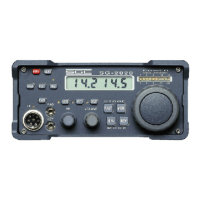
SG-2000 MANUAL 82
The SGC Building, 13737 S.E. 26th St. Bellevue, WA. 98005 USA
©1995, SGC, Inc. TEL: (206) 746-6310 FAX: (206) 746-6384
Set Clock
1) While clock is displayed, press the “PRGM” button.
2) Press “6” or “CLOCK/DATE.”
3) Type six digits for time desired (ie..131500 FOR 1:15 PM.)
4) Press the “PRGM” button to end.
Set Date
To program in the date:
1) While date is displayed, press the “PRGM” button.
2) Press “6” or “CLOCK/DATE.”
3) Type six digits for date desired in the format MM DD YY.
4) Press the “PRGM” button.
Attenuator
To turn 20 dB Attenuator on or off:
Press the “20 dB /ATTN” button.
Power HI-LO
To change output power level:
Press the “PWR/HI LO” button.
Volume
To change the volume level:
1) Except in Scan, volume can be changed by pressing the “Up” or
“Down” arrows.
2) Press the “VOL” button.
3) Depress either up or down keys respectively.
4) Control of volume will time out or press “CLAR” to close.
Intercom
To activate the intercom:
1) Press the "7" or "INTCM/XCV" keys
2) Depress a number key 1 to 8 for any specific control head or 0 for
all control heads.


 To Next Page