27
4
Special functions
USER PROGRAMS
3
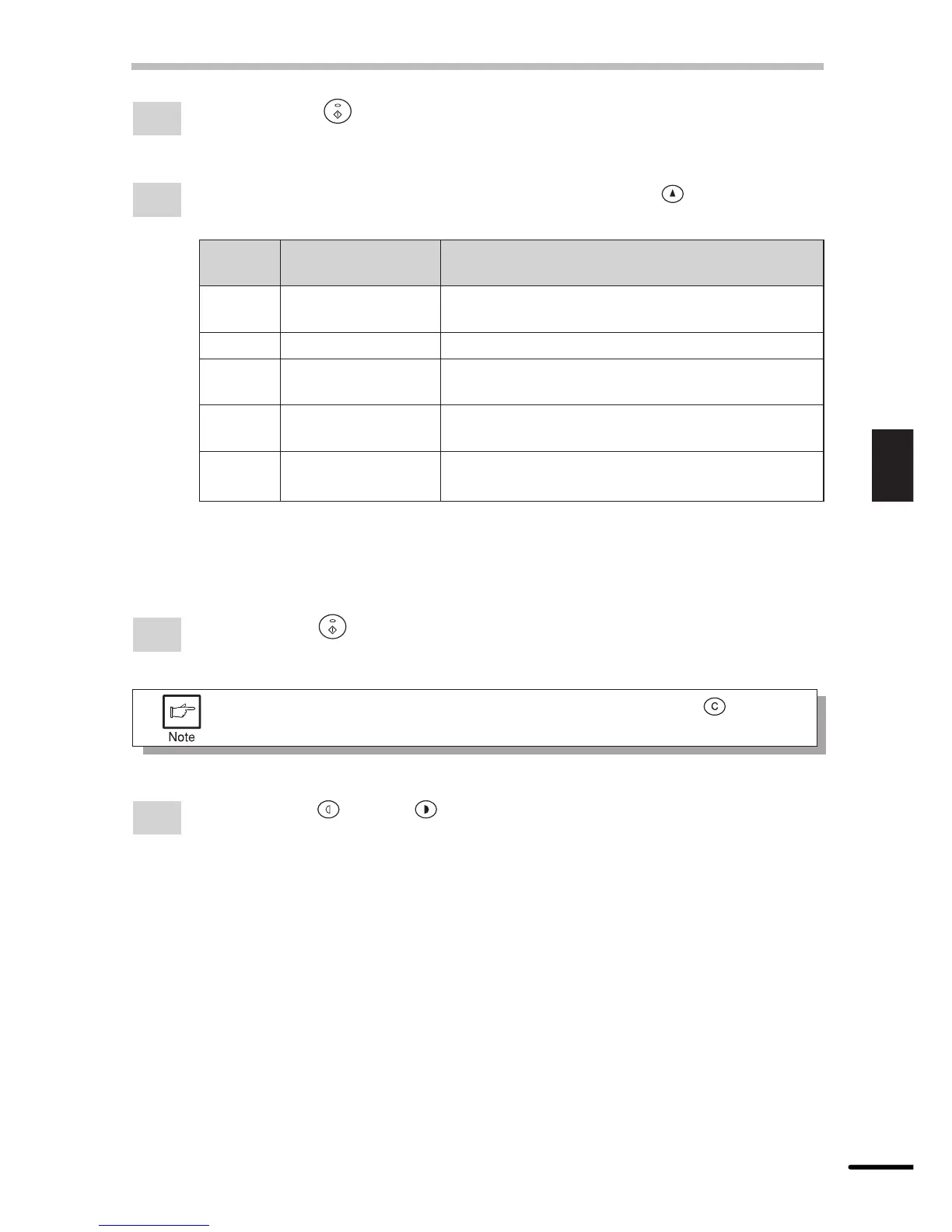
Press the print ( ) key. The entered program number will be lit steadily and the
currently selected parameter number for the program will blink on the right side of the
display.
4
Select the desired parameter using the right copy quantity ( ) key. The entered
parameter number will blink on the right of the display.
Program
Mode Parameters
No.
1 Auto clear time 0 e OFF 1 e 30 sec. * 2 e 60 sec.
3 e 90 sec. 4 e 120 sec.
2 Preheat mode 0 e 30 sec. 1 e 60 sec. * 2 e 90 sec.
3 Auto power shut- 0 e 2 min. * 1 e 5 min. 2 e 15 min.
off timer 3 e 30 min. 4 e 60 min. 5 e 120 min.
5 Auto power shut- 0 e OFF * 1 e ON
off mode
9 Paper detection 0 e OFF * 1 e ON
mode
Factory default settings are indicated with an asterisk (*).
Paper detection mode
If the width of the paper in the paper tray is less than 8-1/2”, the width of scanning
will be reduced to 5-1/2”.
5
Press the print ( ) key. The right-hand number in the display will be lit steadily and
the entered value will be stored.
To change the setting or to set another mode, press the clear ( ) key. The
copier will return to step 2.
6
Press the light ( ) or dark ( ) key to return to the normal copy mode.



 To Next Page