AR-5520 USER PROGRAMS 8-4
2. Setting the user programs
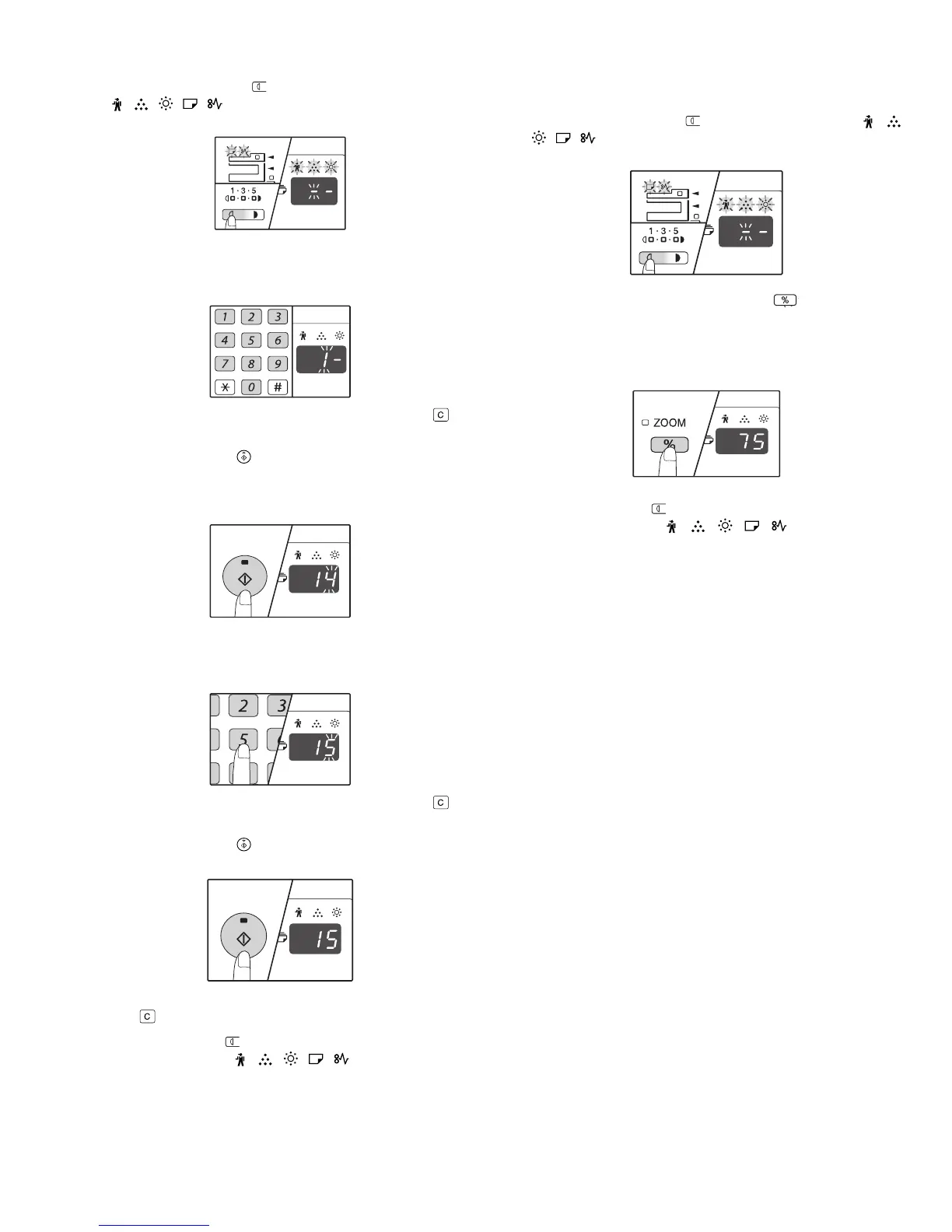
1) Hold down the [Light] key ( ) until the alarm indicators
( , , , , ) blink.
•The display shows "- -" with the left hyphen blinking.
2) Enter the program number with the numeric keys.
•The selected program number blinks.
•For example, to select "Auto clear timer", press the [1] key.
Note:If you enter the wrong number, press the [CLEAR] key ( ) and
then enter the correct number.
3) Press the [START] key ( ).
•The selected program number stops blinking and lights steadily.
•The currently selected setting code blinks on the right side of the
display.
4) Enter the desired setting code by pressing a numeric key.
•The selected setting code blinks.
•For example, to select 90 seconds, press the [5] key.
Note:If you enter the wrong number, press the [CLEAR] key ( ) and
return to step 2).
5) Press the [START] key ( ).
•The selected setting code stops blinking and lights steadily.
Note:To select a setting for another system setting, press the [CLEAR]
key ( ) and then return to step 2.
6) Press the [Light] key ( ) to complete the settings.
•The alarm indicators ( , , , , ) go off and the display
returns to the number of copies display.
3. Toner cartridge life
The toner level is indicated by a 6-level display. Use it as a guideline for
replacing the toner cartridge.
1) Hold down the [Light] key ( ) until the alarm indicators ( , ,
, , ) blink.
•The display will show "- -".
2) Hold down the [Copy ratio display] key ( ) for more than 5
seconds.
•The approximate quantity of toner remaining will be indicated in the
display as a percentage. ("100", "75", "50", "25", "10" is displayed.)
When the percentage is less than 10%, "LO" will be displayed.
3) Press the [Light] key ( ) to return to the normal display.
•The alarm indicators ( , , , , ) go off. The display
returns to the number of copies display.



 To Next Page