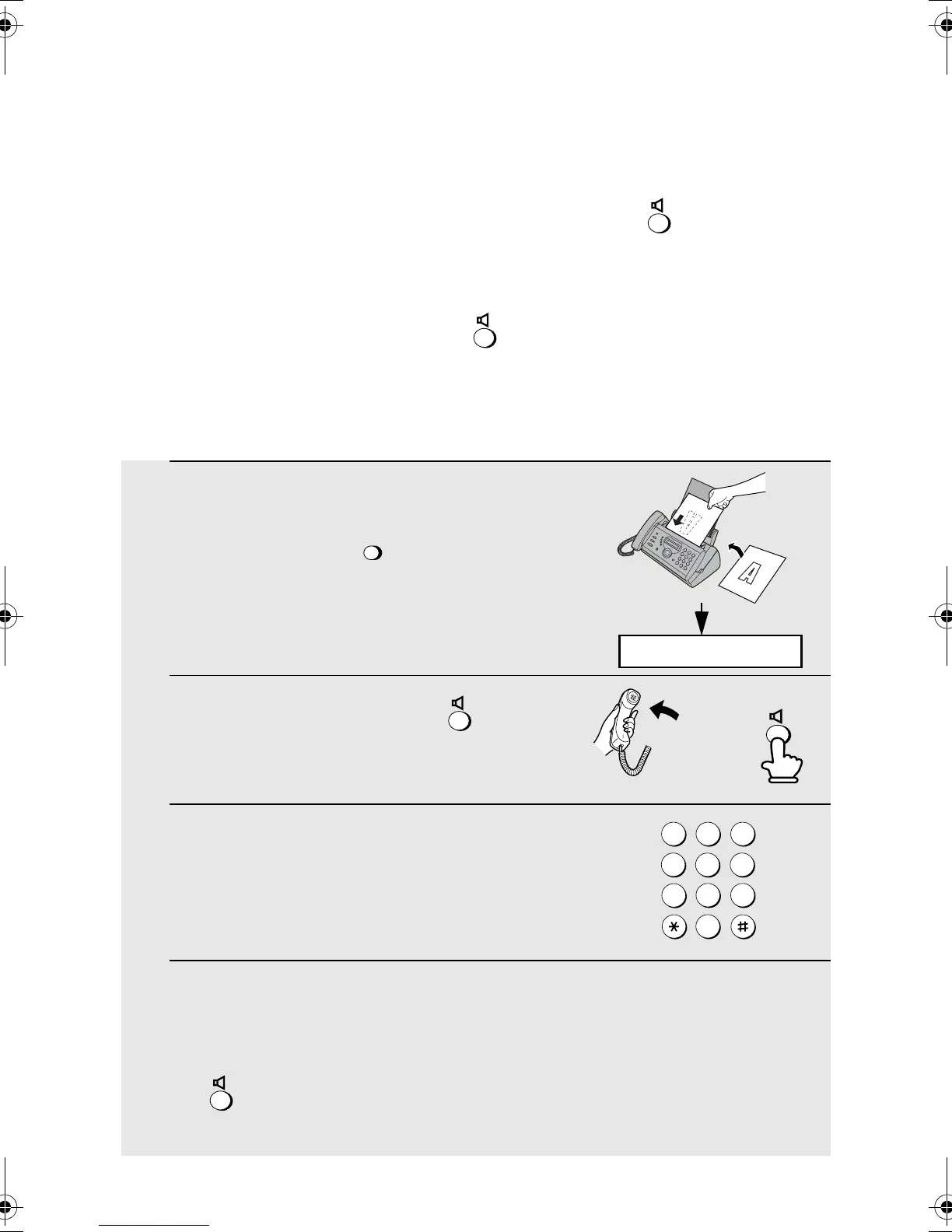
Sending a Fax by Normal Dialling
30
1 Load the document(s).
• If desired, press to set the
resolution and/or contrast.
2 Pick up the handset or press .
Listen for the dial tone.
3 Dial the number of the receiving
machine by pressing the number keys.
4 Wait for the connection. Depending on the setting of the receiving
machine, you will either hear a fax tone or the other person will answer.
• If the other party answers, ask them to press their Start key (if you pressed
, pick up the handset to speak with them). This causes the receiving
machine to issue a fax tone.
ESOLUTIO
or
Sending a Fax by Normal Dialling
With Normal Dialling, you pick up the handset (or press ) and dial by
pressing the number keys.
♦ If a person answers, you can talk with them through the handset before
sending the fax. (If you pressed , you must pick up the handset to
talk.)
♦ Normal Dialling allows you to listen to the line and make sure the other fax
machine is responding.
JKL
ABC
1
DEF
WXYZ
9
HI
4
5
MNO
6
QRS
7
TUV
8
0
2 3
READY TO SEND
all.book Page 30 Monday, September 29, 2003 4:57 PM



 To Next Page